







Question: Write a visual studio program in C++ using DirectX. The program has to show a full-screen green screen. * Start with an empty project and
Write a visual studio program in C++ using DirectX. The program has to show a full-screen green screen.
* Start with an empty project and have all the files in .cpp format. Use of .h files is not allowed.
* Include WinMain, WinProc, gameInitialize, gameRun and gameEnd in this way:
bool Game_Init(HWND hwnd);
void Game_Run(HWND hwnd);
void Game_End();
* An example of what I have for the main:
int WINAPI WinMain( HINSTANCE hInstance,
HINSTANCE hPrevInstance,
LPSTR lpCmdLine, int nCmdShow)
{
MSG msg;
MyRegisterClass(hInstance);
HWND hWnd;
hWnd = CreateWindow(
APPTITLE, APPTITLE, WS_OVERLAPPEDWINDOW,
CW_USEDEFAULT, CW_USEDEFAULT, 500, 400,
NULL, NULL, hInstance, NULL);
if (!hWnd)
return FALSE;
ShowWindow(hWnd, nCmdShow);
UpdateWindow(hWnd);
if (!Game_Init(hWnd))
return FALSE;
while (TRUE)
{
if (PeekMessage(&msg, NULL, 0, 0, PM_REMOVE))
{
if (msg.message == WM_DESTROY )
break;
TranslateMessage(&msg);
DispatchMessage(&msg);
}
Game_Run(hWnd);
}
Game_End();
return msg.wParam;
}
LRESULT CALLBACK WinProc (HWND hWnd, UINT message, WPARAM wParam, LPARAM lParam)
{
switch (message)
{
case WM_DESTROY:
PostQuitMessage(0);
break;
}
//let the default window handler process the message
return DefWindowProc(hWnd, message, wParam, lParam);
}
* The above and below are NOT the entire program.
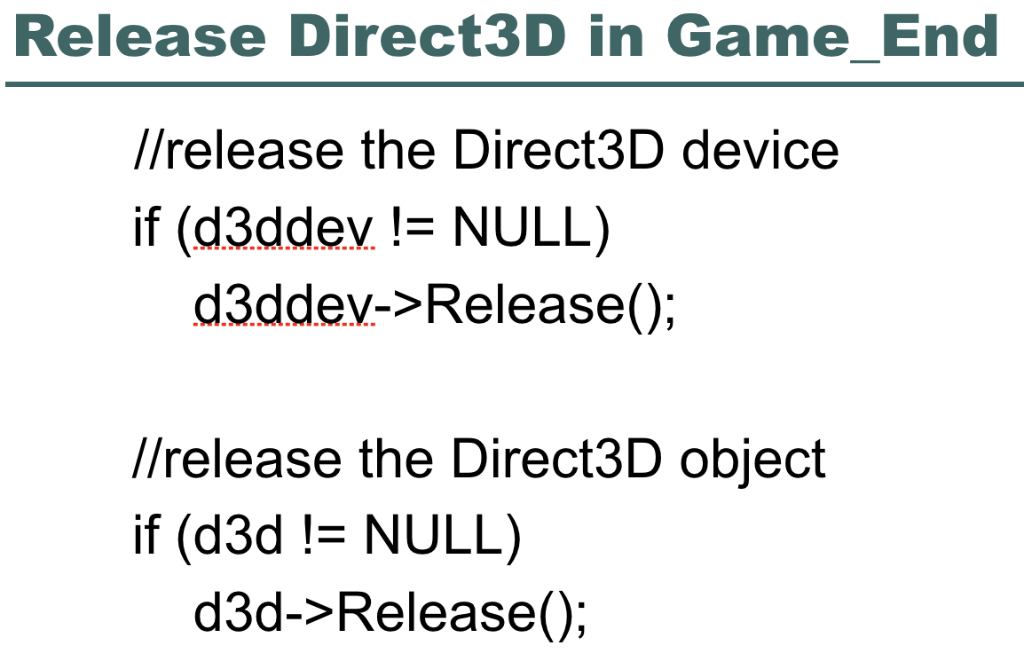
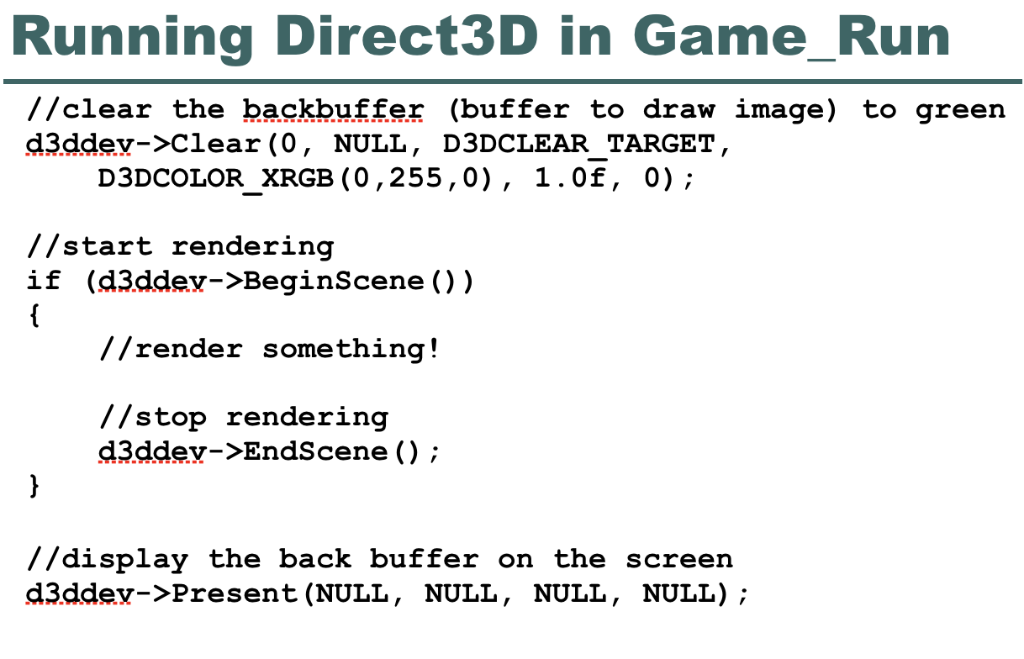
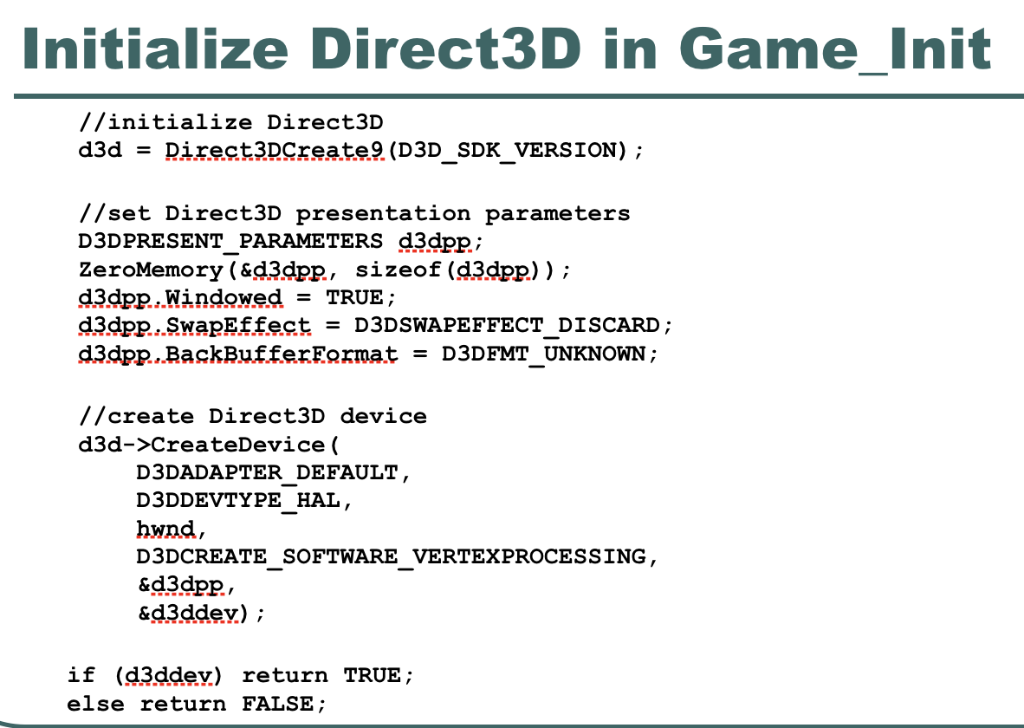
* Thank you in advance for your help.
Release Direct3D in Game_End //release the Direct3D device if (d3ddev != NULL) d3ddev->Release(); //release the Direct3D object if (d3d != NULL) d3d->Release); Running Direct3D in Game Run //clear the backbuffer (buffer to draw image) to green d3ddey-Clear(0, NULL , D3DCLEAR TARGET D3DCOLOR XRGB (O , 255 , 0) , 1 . Of , 0) ; //start rendering if (d3ddev->BeginScene )) //render something! //stop rendering d3ddey-EndScene() ; //display the back buffer on the screen d3ddev->Present (NULL, NULL, NULL, NULL); Initialize Direct3D in Game_Init //initialize Direct3D //set Direct3D presentation parameters D3DPRESENT PARAMETERS d3dpp.; ZeroMemory (&d3dpp., sizeof (d3dpp) ); d3dpp,Windowed = TRUE; d3dpp..SwapEffect - D3DSWAPEFFECT_DISCARD; d3dpp.RackBufferFarmat - D3DFMT_UNKNOWN; //create Direct3D device d3d->CreateDevice ( D3DADAPTER DEFAULT D3DDEVTYPE HAL hwnd, D3DCREATE SOFTWARE VERTEXPROCESSING, &d3dPR. &d3ddev); if (d3ddey) return TRUE; else return FALSE; Release Direct3D in Game_End //release the Direct3D device if (d3ddev != NULL) d3ddev->Release(); //release the Direct3D object if (d3d != NULL) d3d->Release); Running Direct3D in Game Run //clear the backbuffer (buffer to draw image) to green d3ddey-Clear(0, NULL , D3DCLEAR TARGET D3DCOLOR XRGB (O , 255 , 0) , 1 . Of , 0) ; //start rendering if (d3ddev->BeginScene )) //render something! //stop rendering d3ddey-EndScene() ; //display the back buffer on the screen d3ddev->Present (NULL, NULL, NULL, NULL); Initialize Direct3D in Game_Init //initialize Direct3D //set Direct3D presentation parameters D3DPRESENT PARAMETERS d3dpp.; ZeroMemory (&d3dpp., sizeof (d3dpp) ); d3dpp,Windowed = TRUE; d3dpp..SwapEffect - D3DSWAPEFFECT_DISCARD; d3dpp.RackBufferFarmat - D3DFMT_UNKNOWN; //create Direct3D device d3d->CreateDevice ( D3DADAPTER DEFAULT D3DDEVTYPE HAL hwnd, D3DCREATE SOFTWARE VERTEXPROCESSING, &d3dPR. &d3ddev); if (d3ddey) return TRUE; else return FALSE
Step by Step Solution
There are 3 Steps involved in it

Get step-by-step solutions from verified subject matter experts
 Study Help