







Question: Write queries with aggregate functions: SUM, AVG, COUNT, MAX, and MIN. Use the GROUP BY clause to answer complex managerial questions. Nest aggregate functions. Use
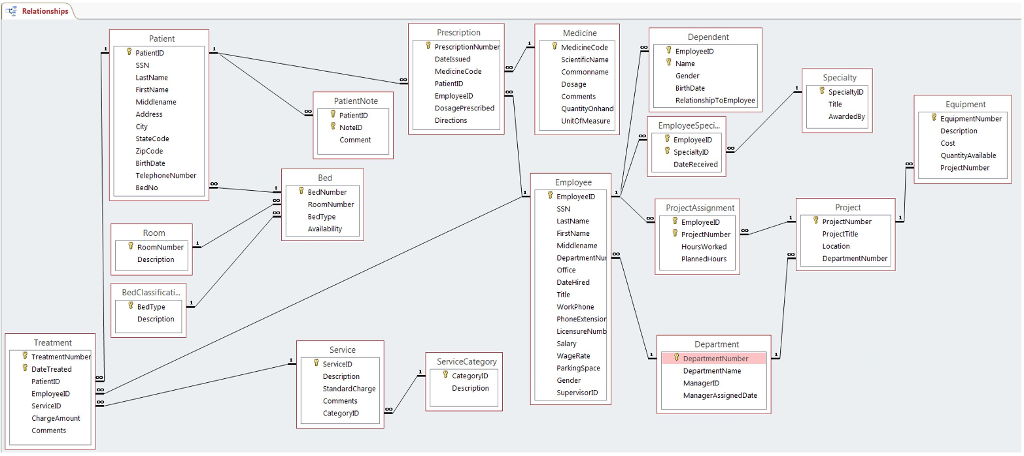
Write queries with aggregate functions: SUM, AVG, COUNT, MAX, and MIN.
Use the GROUP BY clause to answer complex managerial questions.
Nest aggregate functions.
Use the GROUP BY clause with NULL values.
Use the GROUP BY clause with the WHERE and ORDER BY clauses.
Use the HAVING clause to filter out rows from a result table.
Write queries with aggregate functions: SUM, AVG, COUNT, MAX, and MIN.
Use the GROUP BY clause to answer complex managerial questions.
Nest aggregate functions.
Use the GROUP BY clause with NULL values.
Use the GROUP BY clause with the WHERE and ORDER BY clauses.
Use the HAVING clause to filter out rows from a result table.
Write queries with aggregate functions: SUM, AVG, COUNT, MAX, and MIN.
Use the GROUP BY clause to answer complex managerial questions.
Nest aggregate functions.
Use the GROUP BY clause with NULL values.
Use the GROUP BY clause with the WHERE and ORDER BY clauses.
Use the HAVING clause to filter out rows from a result table.
1. A manager from the human resources department needs you to write a query to count the number of employees of the company that are registered nurses (Title = 'R.N.') from the employee table. Label the output column Number of RNs.
2. Accountants working on the company's annual budgeting process need to know the average salary (Salary) for employees and the sum of all employee salaries. The information is stored in the employee table. The result table should have two columns based on a single query. Label the columns Average Salary and Total Salary. Format the output as $999,999.
3. A new government reporting regulation requires you to develop a query that will count the number of male dependents of employees of the company. The information is stored in the Gender column of the dependent table. The result table should have a single output column labeled Number Male Dependents.
4. A revision to the government reporting regulation cited in question 3 requires the report to count separately the number of male and female dependents of the company. Display the information as two columns, one for gender and one for the associated count. The result table should have two rows, one for each gender. Use a single query. Additionally, the gender output column should be formatted as A6 and have a heading of Gender. The count column should have a heading of Number Counted.
5. The government reporting regulation also requires a report of the count of each type of dependent (spouse, daughter, and son). Write a query that will produce a result table with two columns labeled Dependent Type (use the RelationshipToEmployee column from the dependent table) and Dependent Count.
6. Modify the query written for question 5 to restrict output to the result table such that spouses are not listed. Only a count of daughters and sons should be listed in the output. Sort the output by the count of the number of dependents in each category with the largest counts listed first. Label the columns as specified in question 5.
7. The company's executive director or project manager needs to know the number of projects each department is working on based on the information stored in the project table. The result table should have two columns labeled Department and Project Count. You will need to refer to the DepartmentNumber column that stores the department number and the ProjectNumber column that stores the project number information.
8. Rewrite the query from question 7 to exclude projects located in Edwardsville. You will need to use the Location column that stores the project location in writing your query. Label the columns as specified in question 7.
9. Rewrite the query from question 8 to exclude any group (department) that does not have at least two projects. Label the columns as specified in question 7.
10. Display the DepartmentNumber, average salary, and the number of employees for those departments that have at least 3 employees. Label the output columns as Dept#, Avg. Salary, and Emp Count.
Relationships MedicineCode EmployeelD SpecieltyiD EmployeeSpeci StateCode Employee Emplayeeln Project ProjectNumbe ProjectTitle BedClassificati. ServiceCategory DateTreated CategorylD EmployeeD CategorylD ChargeAmount Relationships MedicineCode EmployeelD SpecieltyiD EmployeeSpeci StateCode Employee Emplayeeln Project ProjectNumbe ProjectTitle BedClassificati. ServiceCategory DateTreated CategorylD EmployeeD CategorylD ChargeAmount
Step by Step Solution
There are 3 Steps involved in it

Get step-by-step solutions from verified subject matter experts
 Study Help