







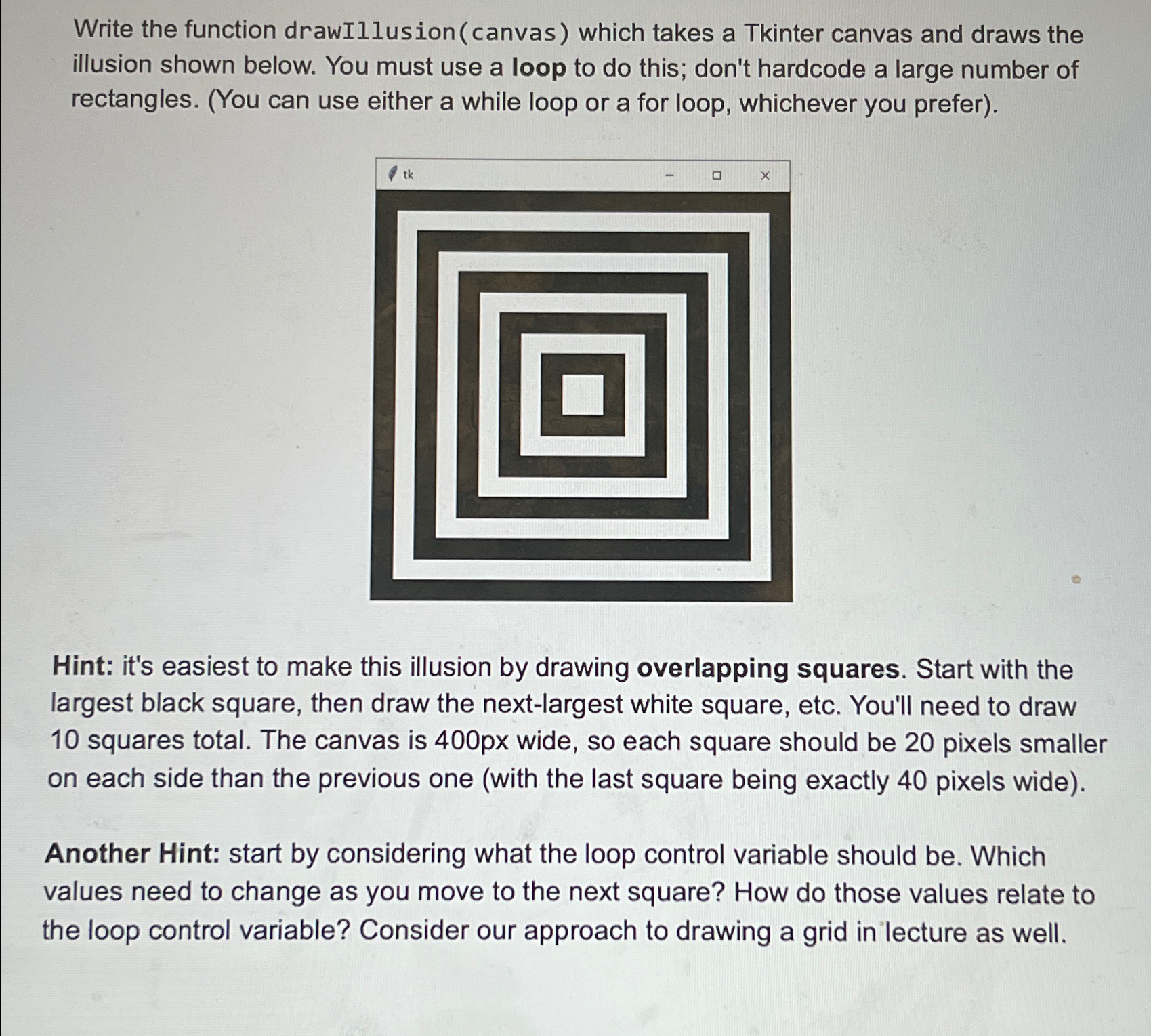
Question: Write the function drawIllusion ( canvas ) which takes a Tkinter canvas and draws the illusion shown below. You must use a loop to do
Write the function drawIllusioncanvas which takes a Tkinter canvas and draws the illusion shown below. You must use a loop to do this; don't hardcode a large number of rectangles. You can use either a while loop or a for loop, whichever you prefer
Hint: it's easiest to make this illusion by drawing overlapping squares. Start with the largest black square, then draw the nextlargest white square, etc. You'll need to draw squares total. The canvas is px wide, so each square should be pixels smaller on each side than the previous one with the last square being exactly pixels wide
Another Hint: start by considering what the loop control variable should be Which values need to change as you move to the next square? How do those values relate to the loop control variable? Consider our approach to drawing a grid in lecture as well.
Step by Step Solution
There are 3 Steps involved in it
1 Expert Approved Answer
Step: 1 Unlock

Question Has Been Solved by an Expert!
Get step-by-step solutions from verified subject matter experts
Step: 2 Unlock
Step: 3 Unlock
 Study Help