







Question: YM - Help View sve ont B9 ira project2 Y on Markovitch Home Insert Design Layout References Mailings Review X Georgia 16 - A IG
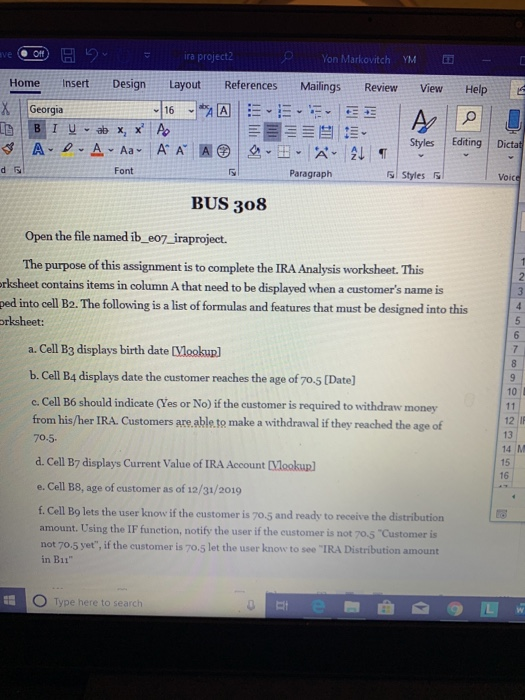
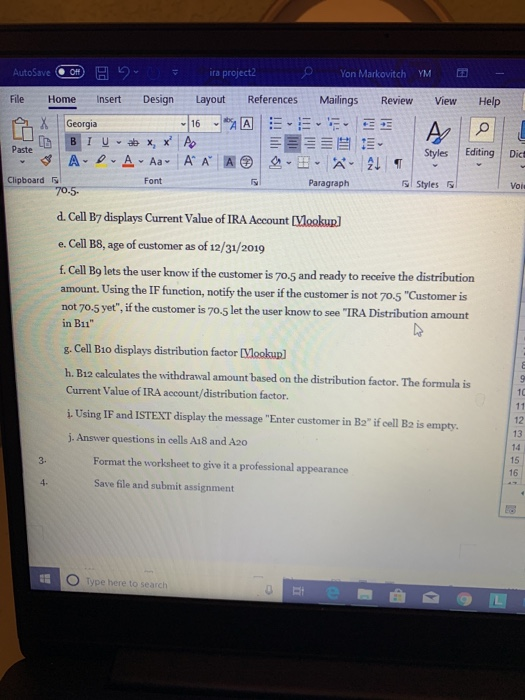
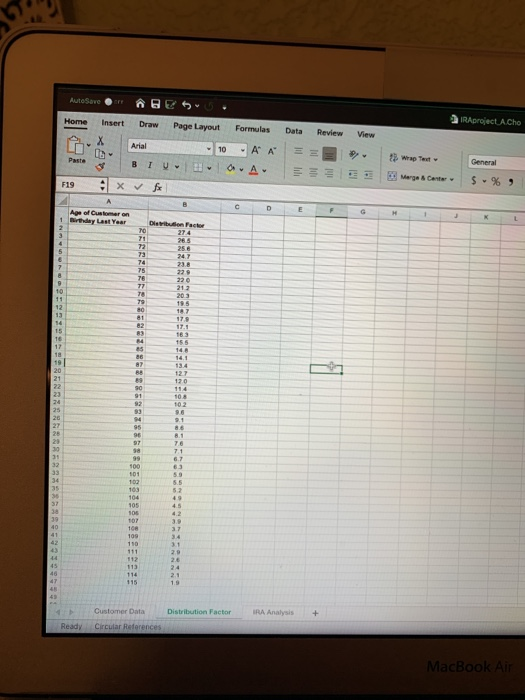
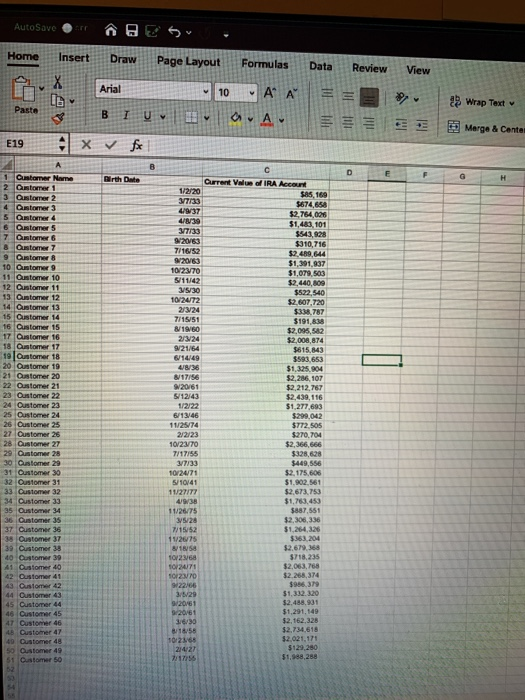
YM - Help View sve ont B9 ira project2 Y on Markovitch Home Insert Design Layout References Mailings Review X Georgia 16 - A IG BIU- ab X, X A ES 8 A-O. A Aa A A A A ALI Paragraph Styles Editing Dictat Font Styles Voice BUS 308 Open the file named ib_e07_iraproject. The purpose of this assignment is to complete the IRA Analysis worksheet. This orksheet contains items in column A that need to be displayed when a customer's name is ped into cell B2. The following is a list of formulas and features that must be designed into this orksheet: a. Cell B3 displays birth date (Vlookup] b. Cell B4 displays date the customer reaches the age of 70.5 (Date] c. Cell B6 should indicate (Yes or No) if the customer is required to withdraw money from his/her IRA. Customers are able to make a withdrawal if they reached the age of 70.5. 14 M d. Cell B7 displays Current Value of IRA Account (Vlookup] e. Cell B8, age of customer as of 12/31/2019 f. Cell B9 lets the user know if the customer is 70.5 and ready to receive the distribution amount. Using the IF function, notify the user if the customer is not 70.5 "Customer is not 70.5 yet", if the customer is 70.5 let the user know to see "IRA Distribution amount in B11" O Type here to search AutoSave H H = ira project Yon Markovitch YM - File Home Insert Design Layout References Mailings Review View Help A X Georgia 16A SEA IL BIUX, X A EEEEEE Paste Styles Editing - A-D A Aa A A A A A Clipboard Font Paragraph Styles Gal 70.5. Dict d. Cell By displays Current Value of IRA Account (Vookup e. Cell B8, age of customer as of 12/31/2019 f. Cell Bg lets the user know if the customer is 70.5 and ready to receive the distribution amount. Using the IF function, notify the user if the customer is not 70.5 "Customer is not 70.5 yet", if the customer is 70.5 let the user know to see "IRA Distribution amount in B11" g. Cell B10 displays distribution factor Vlookup] h. B12 calculates the withdrawal amount based on the distribution factor. The formula is Current Value of IRA account/distribution factor. i. Using IF and ISTEXT display the message "Enter customer in B2" if cell B2 is empty. j. Answer questions in cells A18 and Azo Format the worksheet to give it a professional appearance Save file and submit assignment E O Type here to search 2/ AgreactJACho Review View AutoSave E U . Home Insert Draw Page Layout nox Arial 10 Puste BIV - F19 x for Formulas Data AA A ! Merge Carte General $ -% Age of Customer an NNN ASUN Distribution Factor ERA Analysis + Customer Data Circular References Ready MacBook Air Data View AutoSaver @ s . Home Insert Draw Page Layout 10 Pasta BI U Q E199 x fx Formulas AA A Review = 2 Arial JL Wrap Text Margo & Conte 1220 17:33 4937 UN30 33 2063 7/10952 2013 10/2370 5/1142 15:30 107UT 2/3/24 7/15151 1950 23/24 W21/64 614/49 Customer Name 2 Customers 3 Oster 2 4 Ostomer 3 S tuner 4 6 Ostomers 7 Customer 6 & Customer 7 9 Olomer 10 Customer 9 11 Customer 10 12 Customer 11 13 Outomer 12 14 Ontemer 13 15 Customer 14 16 Customer 15 17 Customer 16 18 Customer 17 19 lostomer 18 20 Outomer 19 21 Customer 20 22 Oustomer 21 23 O tomer 22 24 Customer 22 25 Customer 24 26 Oustomer 25 27 Oustomer 25 28 Customer 27 29 Qustomer 28 30 Ostomer 20 91 Otomer 30 32 Customer 31 33 Customer 32 34 Customer 33 35 Oustomer 34 36 Customer 35 37 Customer 35 Qustomer 37 39 Customer 30 40 Customer 39 41 Customer 40 817/56 W20/61 1243 112574 2/2/23 10/23/70 SAS 169 $574.64 $2.764 005 $1 101 S4398 $310,716 $2. 4 644 $1,391,837 $1,079,503 $2,440,00 $622,440 $2.607.720 $338 787 $191 AM $2.00 52 $2.000 814 $815.843 $583653 $1.305 304 12,206 107 $2,212,767 $2.430, 116 $1.277.63 $299042 $77205 0704 $2.366,666 $325,628 5449.556 $2.175.606 31.0261 $2.673, 753 $1,13453 ST 12.306,336 $1.264 26 $51204 12.6 S718.235 52.083,768 12 26 314 SP $1,332.320 52.48831 $1.291.549 $2.162.328 $2.734.616 $2.021,171 51220 S 23 102471 10141 1127/TT 0938 275 315/20 7/15/52 1126/15 1858 10/26 OMITI Customer 44 Oustomer 43 45 Customer 44 as customer 45 AT Customer 46 4 Customer 3/5/29 W20761 20/61 8:18:56 50 Ostomer 4 Dato 50 YM - Help View sve ont B9 ira project2 Y on Markovitch Home Insert Design Layout References Mailings Review X Georgia 16 - A IG BIU- ab X, X A ES 8 A-O. A Aa A A A A ALI Paragraph Styles Editing Dictat Font Styles Voice BUS 308 Open the file named ib_e07_iraproject. The purpose of this assignment is to complete the IRA Analysis worksheet. This orksheet contains items in column A that need to be displayed when a customer's name is ped into cell B2. The following is a list of formulas and features that must be designed into this orksheet: a. Cell B3 displays birth date (Vlookup] b. Cell B4 displays date the customer reaches the age of 70.5 (Date] c. Cell B6 should indicate (Yes or No) if the customer is required to withdraw money from his/her IRA. Customers are able to make a withdrawal if they reached the age of 70.5. 14 M d. Cell B7 displays Current Value of IRA Account (Vlookup] e. Cell B8, age of customer as of 12/31/2019 f. Cell B9 lets the user know if the customer is 70.5 and ready to receive the distribution amount. Using the IF function, notify the user if the customer is not 70.5 "Customer is not 70.5 yet", if the customer is 70.5 let the user know to see "IRA Distribution amount in B11" O Type here to search AutoSave H H = ira project Yon Markovitch YM - File Home Insert Design Layout References Mailings Review View Help A X Georgia 16A SEA IL BIUX, X A EEEEEE Paste Styles Editing - A-D A Aa A A A A A Clipboard Font Paragraph Styles Gal 70.5. Dict d. Cell By displays Current Value of IRA Account (Vookup e. Cell B8, age of customer as of 12/31/2019 f. Cell Bg lets the user know if the customer is 70.5 and ready to receive the distribution amount. Using the IF function, notify the user if the customer is not 70.5 "Customer is not 70.5 yet", if the customer is 70.5 let the user know to see "IRA Distribution amount in B11" g. Cell B10 displays distribution factor Vlookup] h. B12 calculates the withdrawal amount based on the distribution factor. The formula is Current Value of IRA account/distribution factor. i. Using IF and ISTEXT display the message "Enter customer in B2" if cell B2 is empty. j. Answer questions in cells A18 and Azo Format the worksheet to give it a professional appearance Save file and submit assignment E O Type here to search 2/ AgreactJACho Review View AutoSave E U . Home Insert Draw Page Layout nox Arial 10 Puste BIV - F19 x for Formulas Data AA A ! Merge Carte General $ -% Age of Customer an NNN ASUN Distribution Factor ERA Analysis + Customer Data Circular References Ready MacBook Air Data View AutoSaver @ s . Home Insert Draw Page Layout 10 Pasta BI U Q E199 x fx Formulas AA A Review = 2 Arial JL Wrap Text Margo & Conte 1220 17:33 4937 UN30 33 2063 7/10952 2013 10/2370 5/1142 15:30 107UT 2/3/24 7/15151 1950 23/24 W21/64 614/49 Customer Name 2 Customers 3 Oster 2 4 Ostomer 3 S tuner 4 6 Ostomers 7 Customer 6 & Customer 7 9 Olomer 10 Customer 9 11 Customer 10 12 Customer 11 13 Outomer 12 14 Ontemer 13 15 Customer 14 16 Customer 15 17 Customer 16 18 Customer 17 19 lostomer 18 20 Outomer 19 21 Customer 20 22 Oustomer 21 23 O tomer 22 24 Customer 22 25 Customer 24 26 Oustomer 25 27 Oustomer 25 28 Customer 27 29 Qustomer 28 30 Ostomer 20 91 Otomer 30 32 Customer 31 33 Customer 32 34 Customer 33 35 Oustomer 34 36 Customer 35 37 Customer 35 Qustomer 37 39 Customer 30 40 Customer 39 41 Customer 40 817/56 W20/61 1243 112574 2/2/23 10/23/70 SAS 169 $574.64 $2.764 005 $1 101 S4398 $310,716 $2. 4 644 $1,391,837 $1,079,503 $2,440,00 $622,440 $2.607.720 $338 787 $191 AM $2.00 52 $2.000 814 $815.843 $583653 $1.305 304 12,206 107 $2,212,767 $2.430, 116 $1.277.63 $299042 $77205 0704 $2.366,666 $325,628 5449.556 $2.175.606 31.0261 $2.673, 753 $1,13453 ST 12.306,336 $1.264 26 $51204 12.6 S718.235 52.083,768 12 26 314 SP $1,332.320 52.48831 $1.291.549 $2.162.328 $2.734.616 $2.021,171 51220 S 23 102471 10141 1127/TT 0938 275 315/20 7/15/52 1126/15 1858 10/26 OMITI Customer 44 Oustomer 43 45 Customer 44 as customer 45 AT Customer 46 4 Customer 3/5/29 W20761 20/61 8:18:56 50 Ostomer 4 Dato 50
Step by Step Solution
There are 3 Steps involved in it

Get step-by-step solutions from verified subject matter experts
 Study Help