







Question: You are asked to add a sorting function to the table in this task. When a column header is first clicked, the table will be
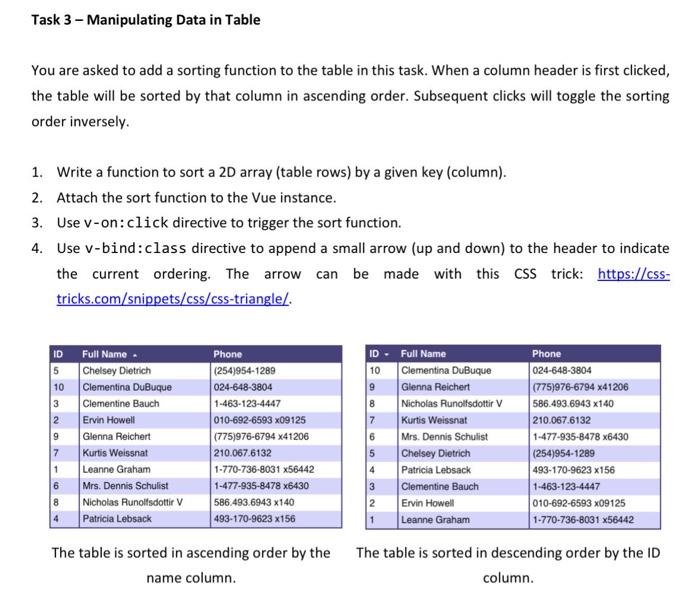
Task 3 - Manipulating Data in Table You are asked to add a sorting function to the table in this task. When a column header is first clicked, the table will be sorted by that column in ascending order. Subsequent clicks will toggle the sorting order inversely. 1. Write a function to sort a 2D array (table rows) by a given key (column). 2. Attach the sort function to the Vue instance. 3. Use v-on: cl ick directive to trigger the sort function. 4. Use v-bind:class directive to append a small arrow (up and down) to the header to indicate the current ordering. The arrow can be made with this CSS trick: https://csstricks.com/snippets/css/css-triangle/. The table is sorted in ascending order by the The table is sorted in descending order by the ID name column. column. Task 3 - Manipulating Data in Table You are asked to add a sorting function to the table in this task. When a column header is first clicked, the table will be sorted by that column in ascending order. Subsequent clicks will toggle the sorting order inversely. 1. Write a function to sort a 2D array (table rows) by a given key (column). 2. Attach the sort function to the Vue instance. 3. Use v-on: cl ick directive to trigger the sort function. 4. Use v-bind:class directive to append a small arrow (up and down) to the header to indicate the current ordering. The arrow can be made with this CSS trick: https://csstricks.com/snippets/css/css-triangle/. The table is sorted in ascending order by the The table is sorted in descending order by the ID name column. column
Step by Step Solution
There are 3 Steps involved in it

Get step-by-step solutions from verified subject matter experts
 Study Help