







Question: You must demo your work in class [0 will be given if not demoed in class) - This lab is to be done on
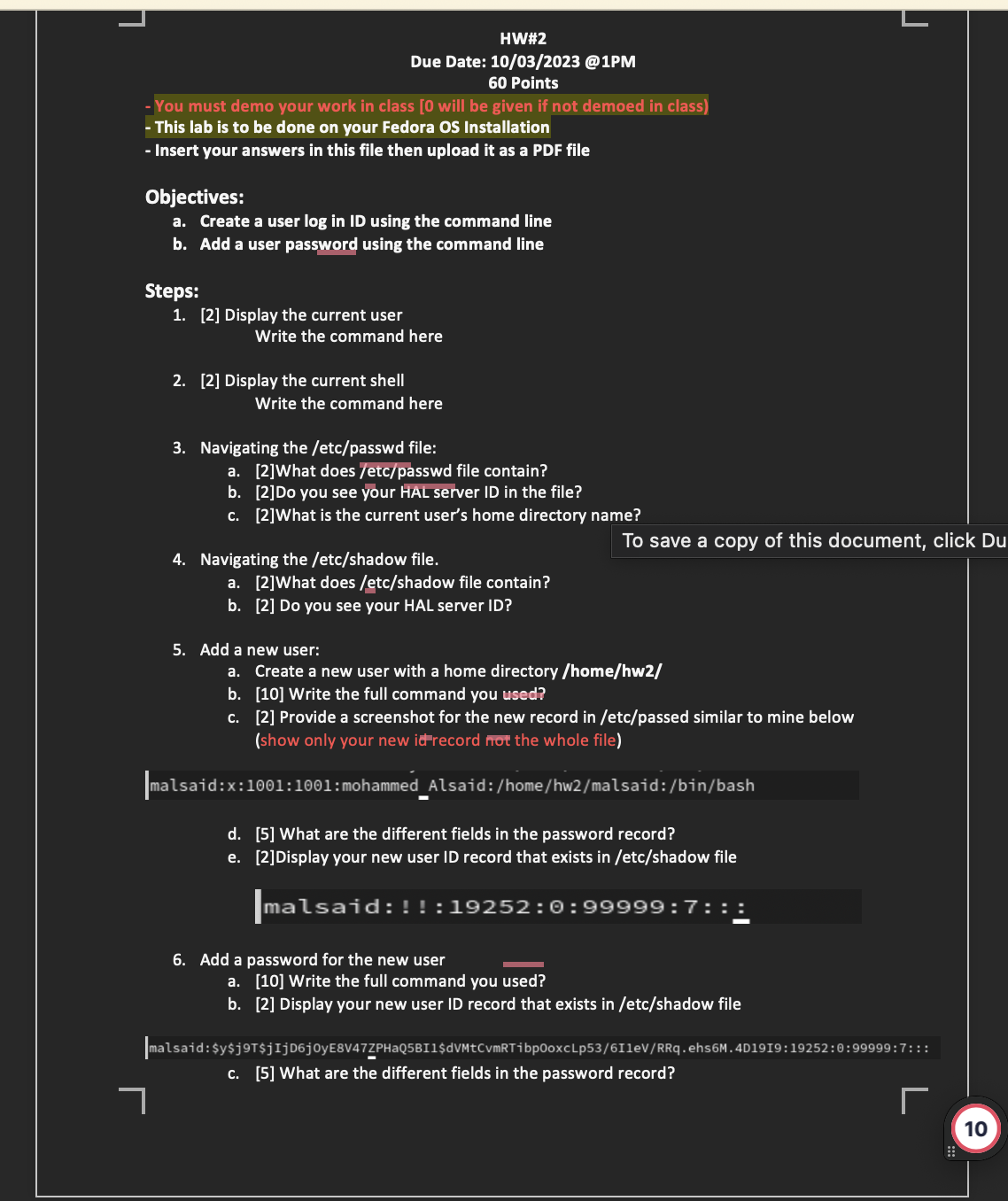
![d. [5] What are the different fields in the password record? e. [2] Display your new user ID record that](https://dsd5zvtm8ll6.cloudfront.net/si.experts.images/answers/2023/10/651e0bec24abc_948651e0bec2054d.jpg)
You must demo your work in class [0 will be given if not demoed in class) - This lab is to be done on your Fedora Os Installation - Insert your answers in this file then upload it as a PDF file Objectives: a. Create a user log in ID using the command line b. Add a user password using the command line Steps: 1. [2] Display the current user HW#2 Due Date: 10/03/2023 @1PM 60 Points 2. [2] Display the current shell Write the command here Write the command here 3. Navigating the /etc/passwd file: a. [2]What does /etc/passwd file contain? b. [2] Do you see your HAL server ID in the file? c. [2] What is the current user's home directory name? 4. Navigating the /etc/shadow file. a. b. c. a. [2] What does /etc/shadow file contain? b. [2] Do you see your HAL server ID? 5. Add a new user: Create a new user with a home directory /home/hw2/ [10] Write the full command you used? [2] Provide a screenshot for the new record in /etc/passed similar to mine below (show only your new id record not the whole file) To save a copy of this document, click Du malsaid:x: 1001:1001: mohammed_Alsaid: /home/hw2/malsaid:/bin/bash d. [5] What are the different fields in the password record? e. [2] Display your new user ID record that exists in /etc/shadow file malsaid:!! :19252:0:99999:7:: 6. Add a password for the new user || a. [10] Write the full command you used? b. [2] Display your new user ID record that exists in /etc/shadow file malsaid: $y$j9TjIjD6j0yE8V47ZPHaQ5BI1$dVMtcvmRTibp0oxcLp53/611eV/RRq.ehs6M.4D1919:19252:0:99999:7::: c. [5] What are the different fields in the password record? 7 L 10 d. [5] What are the different fields in the password record? e. [2]Display your new user ID record that exists in /etc/shadow file malsaid:!! :19252:0:99999:7::: 6. Add a password for the new user a. [10] Write the full command you used? b. [2] Display your new user ID record that exists in /etc/shadow file malsaid: $y$j9TjIjD6j0yE8V47ZPHaQ5BI1$dVMtcvmRTibp0oxcLp53/611eV/RRq.ehs6M.4D1919:19252:0:99999:7::: c. [5] What are the different fields in the password record? 7. Test your new ID a. Login to Fedora using your new ID [10] Provide similar screenshots to the two screens below Password [malsaid@localhost-live ~]$ Sep 17 18:19 mohammed Alsaid fedora O malsaid@localhost-live:~ Q L X L
Step by Step Solution
3.44 Rating (160 Votes )
There are 3 Steps involved in it
It appears youve shared two images concerning a homework assignment related to Linux commandline operations specifically regarding user account management on a Fedora operating system The assignment r... View full answer

Get step-by-step solutions from verified subject matter experts
 Study Help