







Question: you MUST replace UCID with your UDIC. For example, the view name in question 1 should look something like Player_Summary_ST235. Make sure you submit
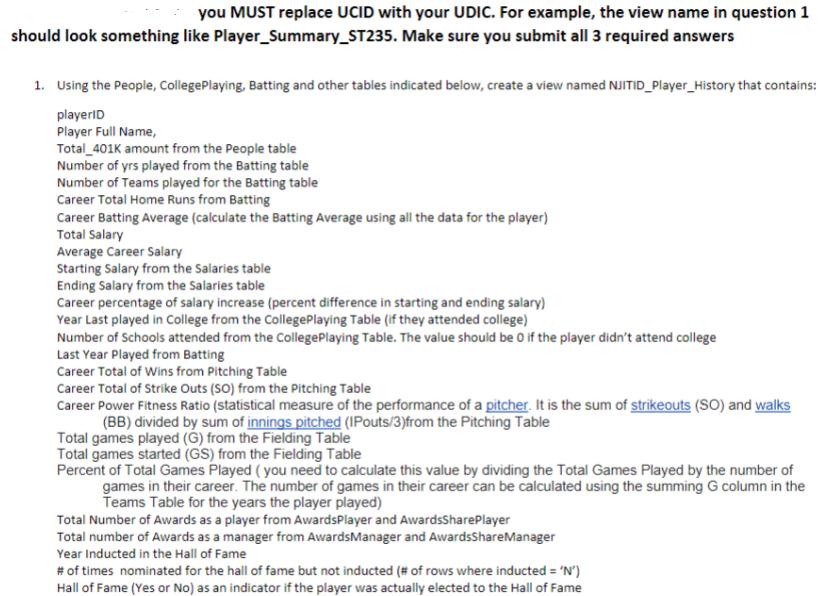
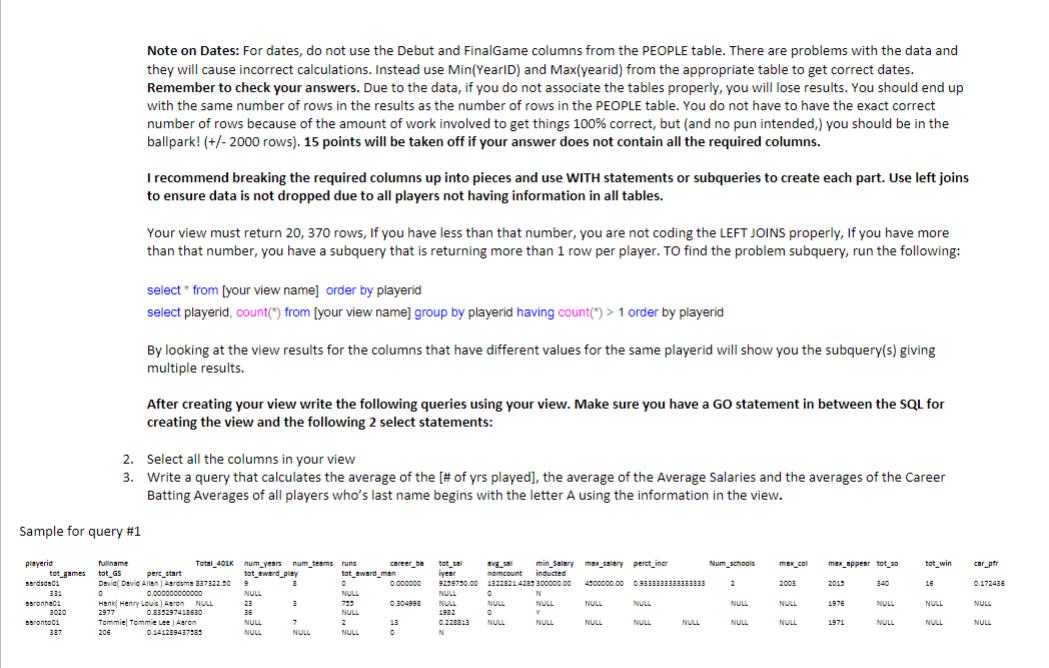
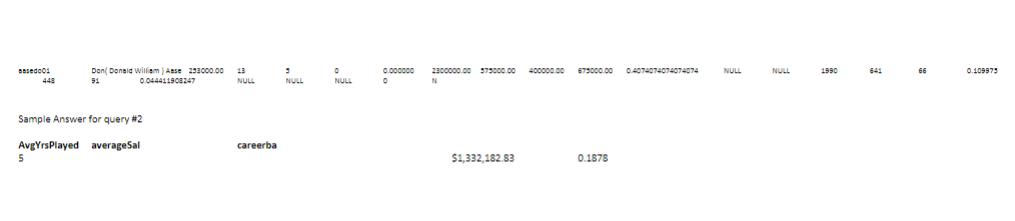
you MUST replace UCID with your UDIC. For example, the view name in question 1 should look something like Player_Summary_ST235. Make sure you submit all 3 required answers 1. Using the People, CollegePlaying, Batting and other tables indicated below, create a view named NJITID_Player_History that contains: playerID Player Full Name, Total 401K amount from the People table Number of yrs played from the Batting table Number of Teams played for the Batting table Career Total Home Runs from Batting Career Batting Average (calculate the Batting Average using all the data for the player) Total Salary Average Career Salary Starting Salary from the Salaries table Ending Salary from the Salaries table Career percentage of salary increase (percent difference in starting and ending salary) Year Last played in College from the CollegePlaying Table (if they attended college) Number of Schools attended from the CollegePlaying Table. The value should be 0 if the player didn't attend college Last Year Played from Batting Career Total of Wins from Pitching Table Career Total of Strike Outs (SO) from the Pitching Table Career Power Fitness Ratio (statistical measure of the performance of a pitcher. It is the sum of strikeouts (SO) and walks (BB) divided by sum of innings pitched (IPouts/3) from the Pitching Table Total games played (G) from the Fielding Table Total games started (GS) from the Fielding Table Percent of Total Games Played (you need to calculate this value by dividing the Total Games Played by the number of games in their career. The number of games in their career can be calculated using the summing G column in the Teams Table for the years the player played) Total Number of Awards as a player from AwardsPlayer and AwardsSharePlayer Total number of Awards as a manager from AwardsManager and AwardsShareManager Year Inducted in the Hall of Fame # of times nominated for the hall of fame but not inducted (# of rows where inducted = 'N') Hall of Fame (Yes or No) as an indicator if the player was actually elected to the Hall of Fame playerid tot games Berdede01 331 Baronhe01 3020 seronto 2. 3. 387 Note on Dates: For dates, do not use the Debut and FinalGame columns from the PEOPLE table. There are problems with the data and they will cause incorrect calculations. Instead use Min(YearID) and Max(yearid) from the appropriate table to get correct dates. Remember to check your answers. Due to the data, if you do not associate the tables properly, you will lose results. You should end up with the same number of rows in the results as the number of rows in the PEOPLE table. You do not have to have the exact correct number of rows because of the amount of work involved to get things 100% correct, but (and no pun intended,) you should be in the ballpark! (+/- 2000 rows). 15 points will be taken off if your answer does not contain all the required columns. I recommend breaking the required columns up into pieces and use WITH statements or subqueries to create each part. Use left joins to ensure data is not dropped due to all players not having information in all tables. Sample for query #1 Total 401K fullname tot GS perc_start David David Allen) Aardsma 337122.50 0 0.000000000000 Hank Henry Louis) Aaron NULL 2977 0.835297418630 Tommiel Tommie Lee Aaron 206 0.141289437585 Your view must return 20, 370 rows, If you have less than that number, you are not coding the LEFT JOINS properly, If you have more than that number, you have a subquery that is returning more than 1 row per player. To find the problem subquery, run the following: select from [your view name] order by playerid select playerid, count(") from [your view name] group by playerid having count(") > 1 order by playerid By looking at the view results for the columns that have different values for the same playerid will show you the subquery(s) giving multiple results. After creating your view write the following queries using your view. Make sure you have a GO statement in between the SQL for creating the view and the following 2 select statements: Select all the columns in your view Write a query that calculates the average of the [# of yrs played], the average of the Average Salaries and the averages of the Career Batting Averages of all players who's last name begins with the letter A using the information in the view. num_years num_teams runs tot award play tot_award man 9 E NULL 23 36 NULL NULL 7 NULL career_ba 0 NULL 753 NULL 2 NULL 0.000000 0.304998 13 0 tot sel year 9258750.00 NULL NULL 1982 0.228813 N min_Salarymax salary perct incr count inducted 13228214285 30000000 4000000.00 0.9333333333333333 avg_sa 0 NULL 0 NULL N NULL Y NULL NULL NULL NULL NULL NULL Num schools 2 NULL NULL max_col 2003 NULL NULL max_appear tot so 2015 1976 1971 340 NULL NULL tot win 16 NULL NULL car_pfr 0.172436 NULL NULL Based 448 Don Donald William) Asse 233000.00 13 91 0.044411908247 NULL Sample Answer for query #2 averageSal Avg YrsPlayed 5 careerba 3 NULL 0 ON NULL 0.000000 0 2300000.00 375000.00 400000.00 N $1,332,182.83 673000.00 0.4074074074074074 0.1878 NULL NULL 1990 0.109975
Step by Step Solution
3.44 Rating (157 Votes )
There are 3 Steps involved in it
It appears you have shared details for a database assignment that requires creating a view named after a students university ID NjITIDPlayerHistory co... View full answer

Get step-by-step solutions from verified subject matter experts
 Study Help