







Question: You need to deploy Windows to multiple new computers using a system image. You mount the image and use DISM to make several changes to
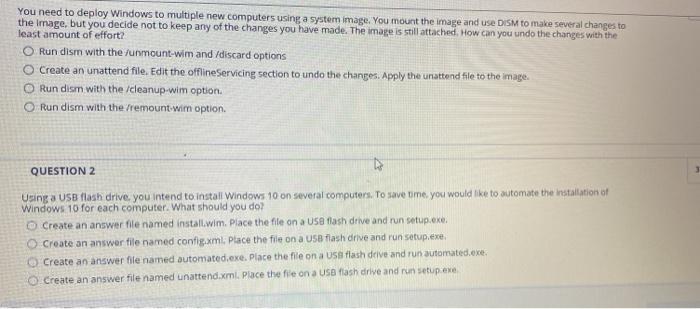
You need to deploy Windows to multiple new computers using a system image. You mount the image and use DISM to make several changes to the image, but you decide not to keep any of the changes you have made. The image is still attached. How can you undo the changes with the least amount of effort? Run dism with the unmount-wim and discard options Create an unattend file. Edit the offline Servicing section to undo the changes. Apply the unattend file to the image Run dism with the /cleanup-wim option O Run dism with the remount win option. QUESTION 2 Using a USB flash drive you intend to install Windows 10 on several computers. To save time, you would like to automate the installation of Windows 10 for each computer. What should you do? Create an answer file named install.wim Place the file on a USB flash drive and run setup.exe Create an answer file named config.xml. Place the file on a USB flash drive and run setup.exe, Create an answer fle named automated.exe. Place the file on a USB flash drive and run automated.exe Create an answer file named unattend.xml. Place the file on a USB flash drive and run setup.exe
Step by Step Solution
There are 3 Steps involved in it

Get step-by-step solutions from verified subject matter experts
 Study Help