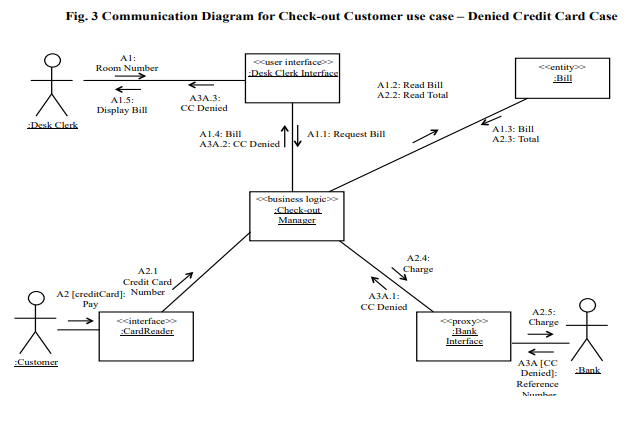
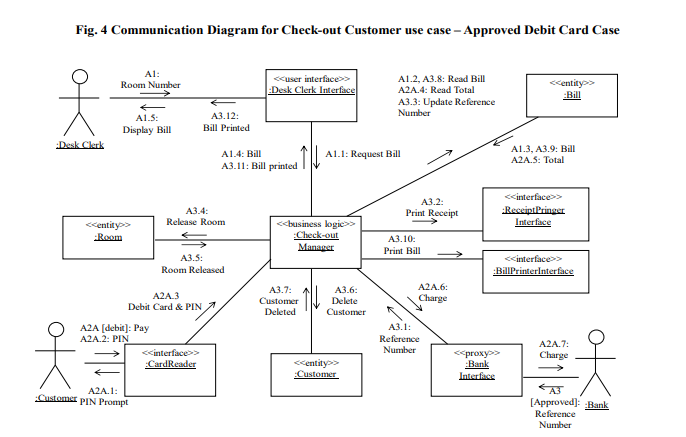
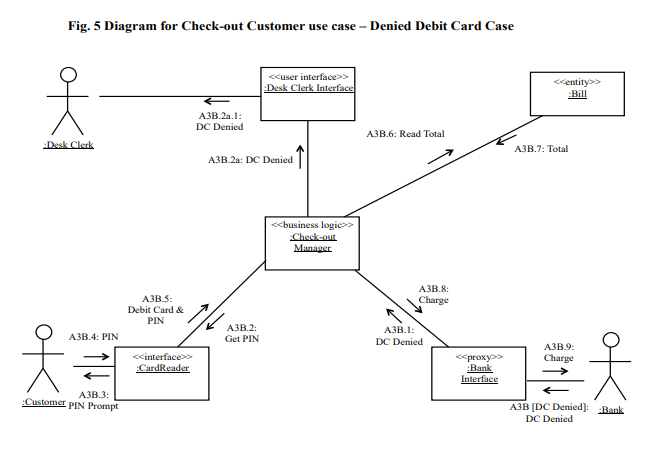
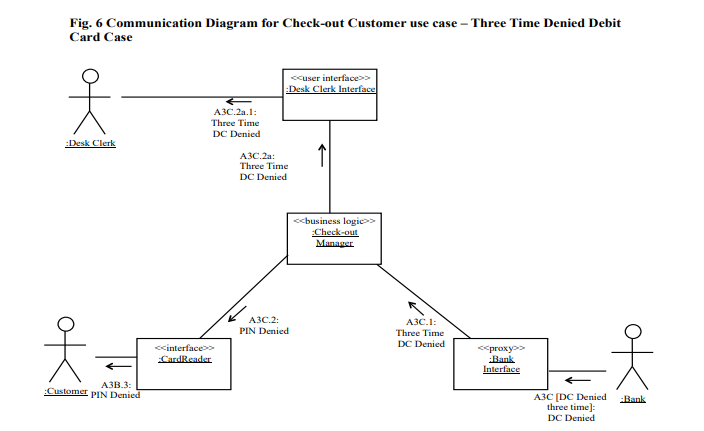
Question: Your are required to develop the software architecture for a he althcare system, which provides check-in, payment, and automatic no-show charge use cases depic ted

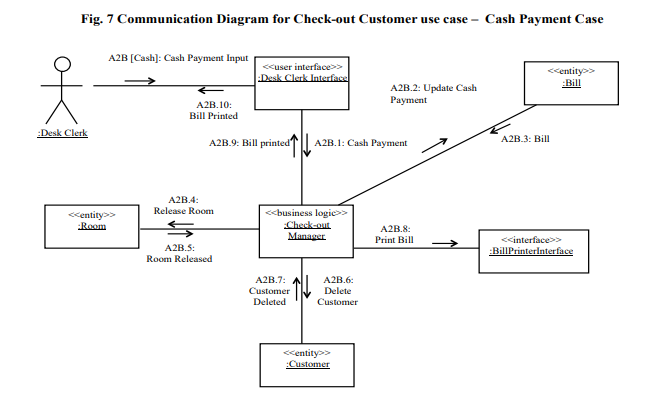
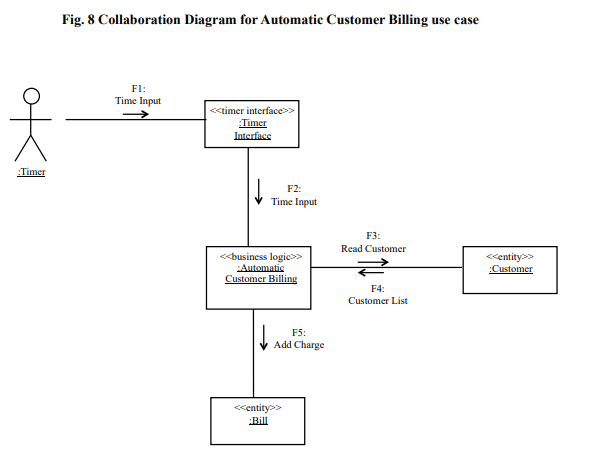
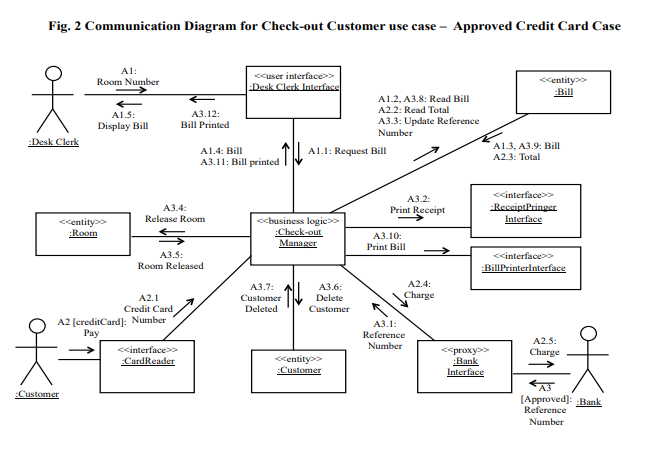
Your are required to develop the software architecture for a he althcare system, which provides check-in, payment, and automatic no-show charge use cases depic ted in Figs. 1-6 using the communication diagram. Develop the software architecture for a healthcare system in the following order:

1. Develop the consolidated communication diagram that merges all communication diagrams to show all objects and their interaction. (3 pts)

2. Determine the subsystems (or components) of healthcare system a nd depict them on the consolidated communication diagram. (3 pts)

3. Depict function call or message communication for interactions between objects or between subsystems on the consolidated communication diagram. ( 3 pts)

4. Develop the software architecture diagram that shows subsystems and their interaction. (6 pts)
Your are required to develop the software architecture for a he althcare

system, which provides check-in, payment, and automatic no-show charge use cases depic

ted in Figs. 1-6 using the communication diagram. Develop the software architecture

for a healthcare system in the following order: 1. Develop the consolidated

communication diagram that merges all communication diagrams to show all objects and

their interaction. (3 pts) 2. Determine the subsystems (or components) of healthcare

system a nd depict them on the consolidated communication diagram. (3 pts)

3. Depict function call or message communication for interactions between objects or

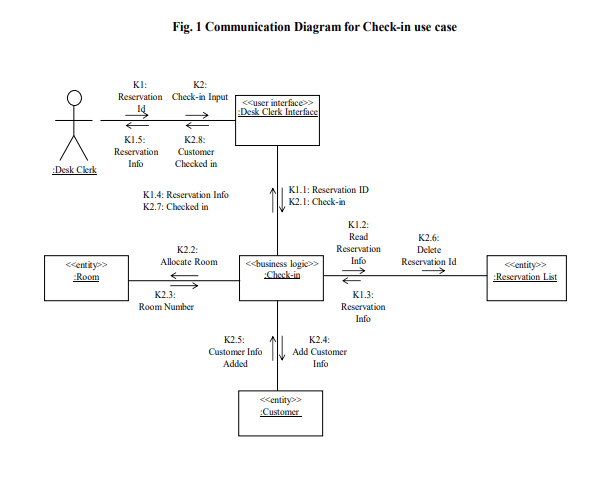
Fig. 1 Communication Diagram for Check-in use case Kl: Reservation Check-in Input > K1.5 K2.8 Reservation Custome Info Checked in K1.4: Reservation Info K2.7: Checked in K1.1: Reservation ID K2.1: Check-in K1.2 Read K2.2: Allocate Room K2.6 Delete Reservation Id Info KI.3: Room Number Info K2.5: Customer Info K2.4: Add Customer Info Fig. 1 Communication Diagram for Check-in use case Kl: Reservation Check-in Input > K1.5 K2.8 Reservation Custome Info Checked in K1.4: Reservation Info K2.7: Checked in K1.1: Reservation ID K2.1: Check-in K1.2 Read K2.2: Allocate Room K2.6 Delete Reservation Id Info KI.3: Room Number Info K2.5: Customer Info K2.4: Add Customer Info

Step by Step Solution

There are 3 Steps involved in it

1 Expert Approved Answer
Step: 1 Unlock blur-text-image
Question Has Been Solved by an Expert!

Get step-by-step solutions from verified subject matter experts

Step: 2 Unlock
Step: 3 Unlock

Students Have Also Explored These Related Databases Questions!