







Question: Zylab 4.11 Python Branching Indents ex: 1 and 2 HELP!!! 4.11 Branching Indents This will give you practice to learn the importance of indentation in
Zylab 4.11 Python Branching Indents ex: 1 and 2 HELP!!!
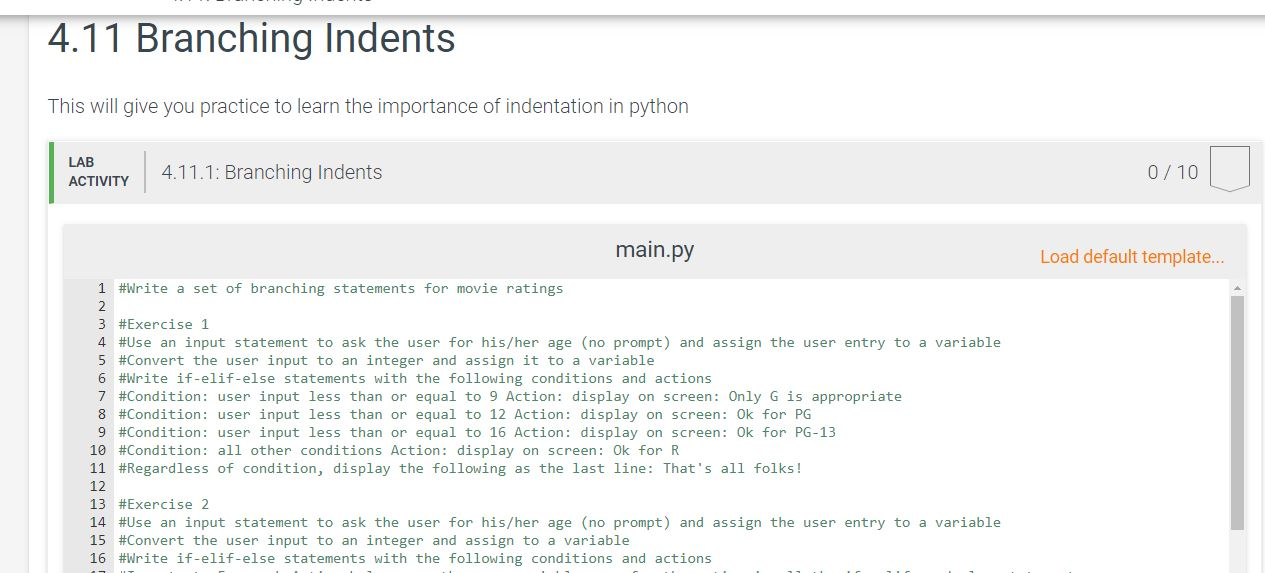
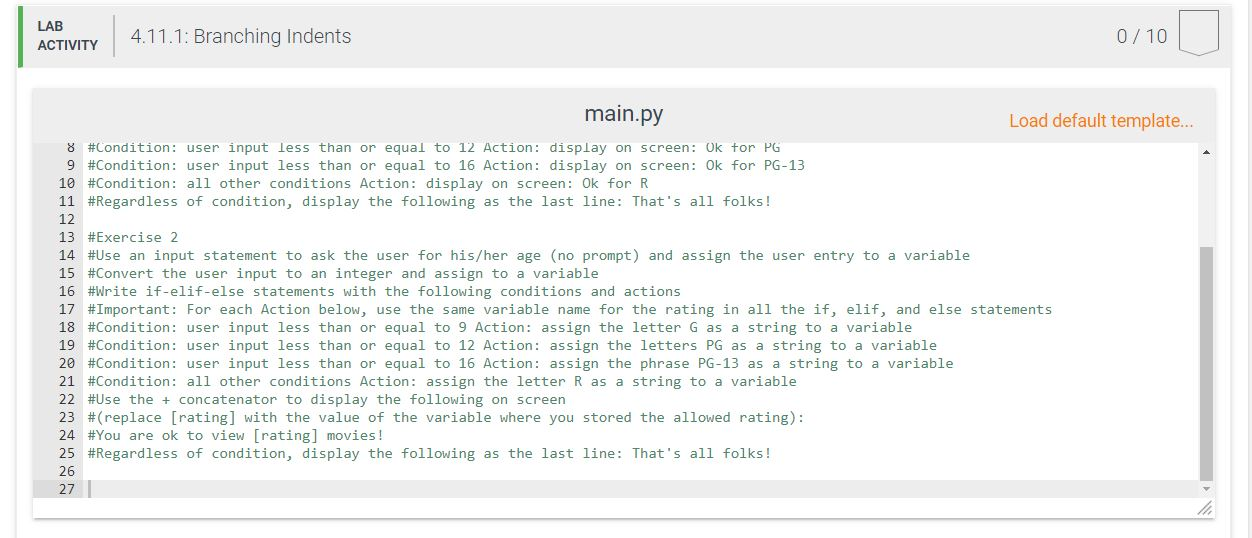
4.11 Branching Indents This will give you practice to learn the importance of indentation in python LABA444. 4.11.1: Branching Indents ACTIVITY 0/10 main.py Load default template... 1 #Write a set of branching statements for movie ratings 3 #Exercise 1 4 #Use an input statement to ask the user for his/her age (no prompt) and assign the user entry to a variable 5 #Convert the user input to an integer and assign it to a variable 6 #Write if-elif-else statements with the following conditions and actions 7 #Condition: user input less than or equal to 9 Action: display on screen: Only G is appropriate 8 #Condition: user input less than or equal to 12 Action: display on screen: Ok for PG 9 #Condition: user input less than or equal to 16 Action: display on screen: Ok for PG-13 10 #Condition: all other conditions Action: display on screen: Ok for R 11 #Regardless of condition, display the following as the last line: That's all folks! 12 13 #Exercise 2 14 #Use an input statement to ask the user for his/her age (no prompt) and assign the user entry to a variable 15 #Convert the user input to an integer and assign to a variable 16 #Write if-elif-else statements with the following conditions and actions LAB ACTIVITY 4.11.1: Branching Indents 0/10 main.py Load default template... 8 #Condition: user input less than or equal to 12 Action: display on screen: Ok tor PG 9 #Condition: user input less than or equal to 16 Action: display on screen: Ok for PG-13 10 #Condition: all other conditions Action: display on screen: Ok for R 11 #Regardless of condition, display the following as the last line: That's all folks! 13 #Exercise 2 14 #Use an input statement to ask the user for his/her age (no prompt) and assign the user entry to a variable 15 #Convert the user input to an integer and assign to a variable 16 #Write if-elif-else statements with the following conditions and actions 17 #Important: For each Action below, use the same variable name for the rating in all the if, elif, and else statements 18 #Condition: user input less than or equal to 9 Action: assign the letter Gas a string to a variable 19 #Condition: user input less than or equal to 12 Action: assign the letters PG as a string to a variable 20 #Condition: user input less than or equal to 16 Action: assign the phrase PG-13 as a string to a variable 21 #Condition: all other conditions Action: assign the letter R as a string to a variable 22 #Use the + concatenator to display the fol 23 #(replace [rating) with the value of the variable where you stored the allowed rating): 24 #You are ok to view [rating] movies! 25 #Regardless of condition, display the following as the last line: That's all folks! 27 4.11 Branching Indents This will give you practice to learn the importance of indentation in python LABA444. 4.11.1: Branching Indents ACTIVITY 0/10 main.py Load default template... 1 #Write a set of branching statements for movie ratings 3 #Exercise 1 4 #Use an input statement to ask the user for his/her age (no prompt) and assign the user entry to a variable 5 #Convert the user input to an integer and assign it to a variable 6 #Write if-elif-else statements with the following conditions and actions 7 #Condition: user input less than or equal to 9 Action: display on screen: Only G is appropriate 8 #Condition: user input less than or equal to 12 Action: display on screen: Ok for PG 9 #Condition: user input less than or equal to 16 Action: display on screen: Ok for PG-13 10 #Condition: all other conditions Action: display on screen: Ok for R 11 #Regardless of condition, display the following as the last line: That's all folks! 12 13 #Exercise 2 14 #Use an input statement to ask the user for his/her age (no prompt) and assign the user entry to a variable 15 #Convert the user input to an integer and assign to a variable 16 #Write if-elif-else statements with the following conditions and actions LAB ACTIVITY 4.11.1: Branching Indents 0/10 main.py Load default template... 8 #Condition: user input less than or equal to 12 Action: display on screen: Ok tor PG 9 #Condition: user input less than or equal to 16 Action: display on screen: Ok for PG-13 10 #Condition: all other conditions Action: display on screen: Ok for R 11 #Regardless of condition, display the following as the last line: That's all folks! 13 #Exercise 2 14 #Use an input statement to ask the user for his/her age (no prompt) and assign the user entry to a variable 15 #Convert the user input to an integer and assign to a variable 16 #Write if-elif-else statements with the following conditions and actions 17 #Important: For each Action below, use the same variable name for the rating in all the if, elif, and else statements 18 #Condition: user input less than or equal to 9 Action: assign the letter Gas a string to a variable 19 #Condition: user input less than or equal to 12 Action: assign the letters PG as a string to a variable 20 #Condition: user input less than or equal to 16 Action: assign the phrase PG-13 as a string to a variable 21 #Condition: all other conditions Action: assign the letter R as a string to a variable 22 #Use the + concatenator to display the fol 23 #(replace [rating) with the value of the variable where you stored the allowed rating): 24 #You are ok to view [rating] movies! 25 #Regardless of condition, display the following as the last line: That's all folks! 27
Step by Step Solution
There are 3 Steps involved in it

Get step-by-step solutions from verified subject matter experts
 Study Help