







Question: Zylab Python 4.10.1 Branching using equality and relational operators, strings, and code indentation HELP!!!! More practice with branching using equality and relational operators, strings, and
Zylab Python 4.10.1 Branching using equality and relational operators, strings, and code indentation HELP!!!!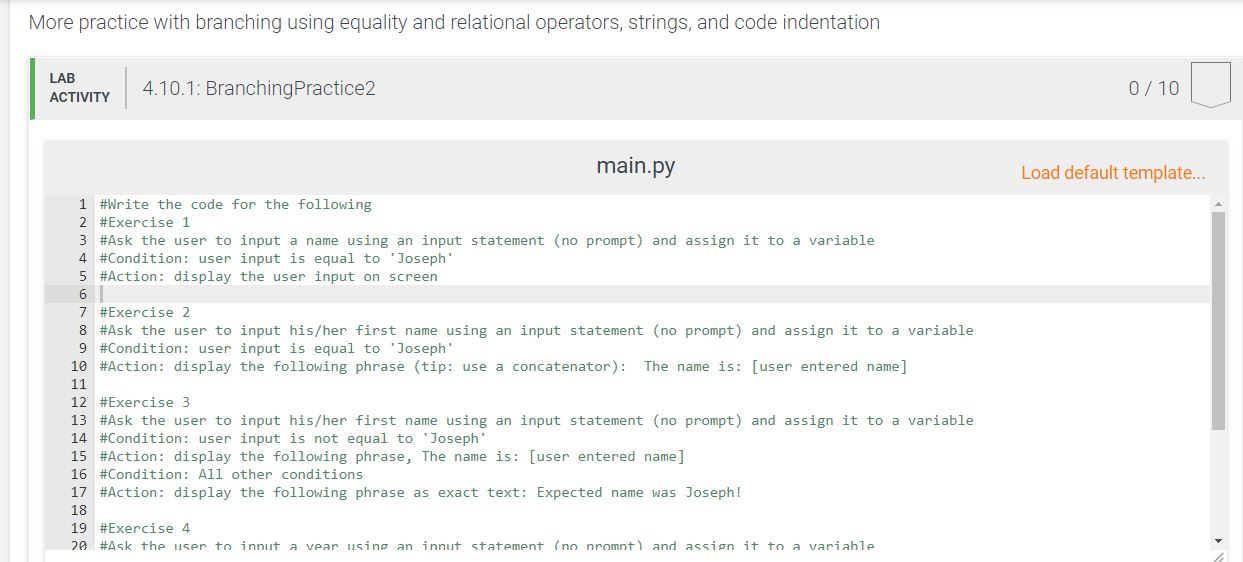
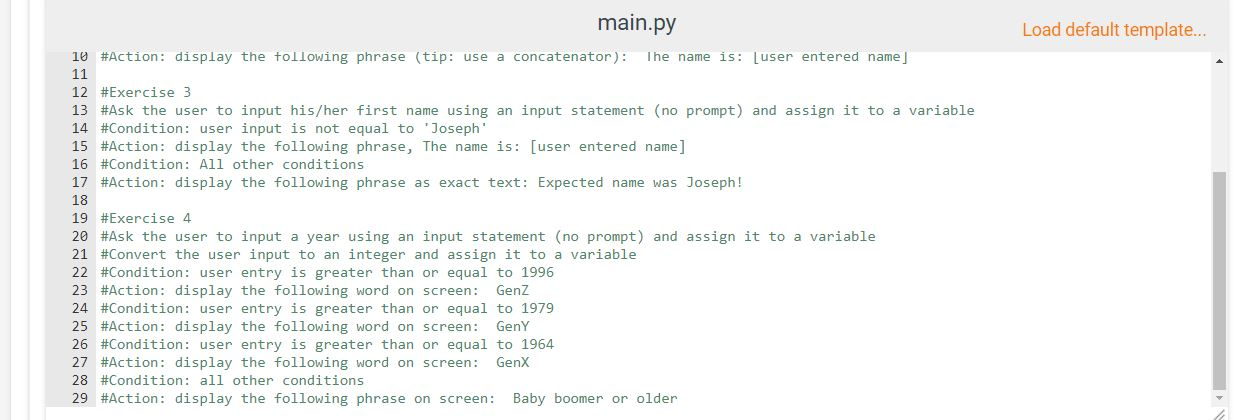
More practice with branching using equality and relational operators, strings, and code indentation LAB ACTIVITY 4.10.1: Branching Practice2 0/10 main.py Load default template... 1 #Write the code for the following 2 #Exercise 1 3 #Ask the user to input a name using an input statement (no prompt) and assign it to a variable 4 #Condition: user input is equal to 'Joseph' 5 #Action: display the user input on screen 7 #Exercise 2 8 #Ask the user to input his/her first name using an input statement (no prompt) and assign it to a variable 9 #Condition: user input is equal to 'Joseph' 10 #Action: display the following phrase (tip: use a concatenator): The name is: [user entered name] 11 12 #Exercise 3 13 #Ask the user to input his/her first name using an input statement (no prompt) and assign it to a variable 14 #Condition: user input is not equal to 'Joseph 15 #Action: display the following phrase, The name is: [user entered name] 16 #Condition: All other conditions 17 #Action: display the following phrase as exact text: Expected name was Joseph! 19 #Exercise 4 20 #Ask the user to input a vear using an innut statement (no nromnt) and assign it to a variable main.py 10 #Action: display the following phrase (tip: use a concatenator): The name is: Luser entered name] Load default template... 12 #Exercise 3 13 #Ask the user to input his/her first name using an input statement (no prompt) and assign it to a variable 14 #Condition: user input is not equal to 'Joseph' 15 #Action: display the following phrase, The name is: [user entered name] 16 #Condition: All other conditions 17 #Action: display the following phrase as exact text: Expected name was Joseph! 18 19 #Exercise 4 20 #Ask the user to input a year using an input statement (no prompt) and assign it to a variable 21 #Convert the user input to an integer and assign it to a variable 22 #Condition: user entry is greater than or equal to 1996 23 #Action: display the following word on screen: Genz 24 #Condition: user entry is greater than or equal to 1979 25 #Action: display the following word on screen: GenY 26 #Condition: user entry is greater than or equal to 1964 27 #Action: display the following word on screen: GenX 28 #Condition: all other conditions 29 #Action: display the following phrase on screen: Baby boomer or older More practice with branching using equality and relational operators, strings, and code indentation LAB ACTIVITY 4.10.1: Branching Practice2 0/10 main.py Load default template... 1 #Write the code for the following 2 #Exercise 1 3 #Ask the user to input a name using an input statement (no prompt) and assign it to a variable 4 #Condition: user input is equal to 'Joseph' 5 #Action: display the user input on screen 7 #Exercise 2 8 #Ask the user to input his/her first name using an input statement (no prompt) and assign it to a variable 9 #Condition: user input is equal to 'Joseph' 10 #Action: display the following phrase (tip: use a concatenator): The name is: [user entered name] 11 12 #Exercise 3 13 #Ask the user to input his/her first name using an input statement (no prompt) and assign it to a variable 14 #Condition: user input is not equal to 'Joseph 15 #Action: display the following phrase, The name is: [user entered name] 16 #Condition: All other conditions 17 #Action: display the following phrase as exact text: Expected name was Joseph! 19 #Exercise 4 20 #Ask the user to input a vear using an innut statement (no nromnt) and assign it to a variable main.py 10 #Action: display the following phrase (tip: use a concatenator): The name is: Luser entered name] Load default template... 12 #Exercise 3 13 #Ask the user to input his/her first name using an input statement (no prompt) and assign it to a variable 14 #Condition: user input is not equal to 'Joseph' 15 #Action: display the following phrase, The name is: [user entered name] 16 #Condition: All other conditions 17 #Action: display the following phrase as exact text: Expected name was Joseph! 18 19 #Exercise 4 20 #Ask the user to input a year using an input statement (no prompt) and assign it to a variable 21 #Convert the user input to an integer and assign it to a variable 22 #Condition: user entry is greater than or equal to 1996 23 #Action: display the following word on screen: Genz 24 #Condition: user entry is greater than or equal to 1979 25 #Action: display the following word on screen: GenY 26 #Condition: user entry is greater than or equal to 1964 27 #Action: display the following word on screen: GenX 28 #Condition: all other conditions 29 #Action: display the following phrase on screen: Baby boomer or older
Step by Step Solution
There are 3 Steps involved in it

Get step-by-step solutions from verified subject matter experts
 Study Help