







Question: Visit the CAQDAS websites listed in Table 13.2 . Using the information available on each website, explore the suitability of each program for the nature
Visit the CAQDAS websites listed in Table 13.2 . Using the information available on each website, explore the suitability of each program for the nature of your data and chosen approach to analyse these data. Find and download a demonstration version of a CAQDAS program that may be suitable for your data and analytical approach, to explore its features. Evaluate how useful you think this program will be to assist you in analysing your data.
Data from in Table 13.2
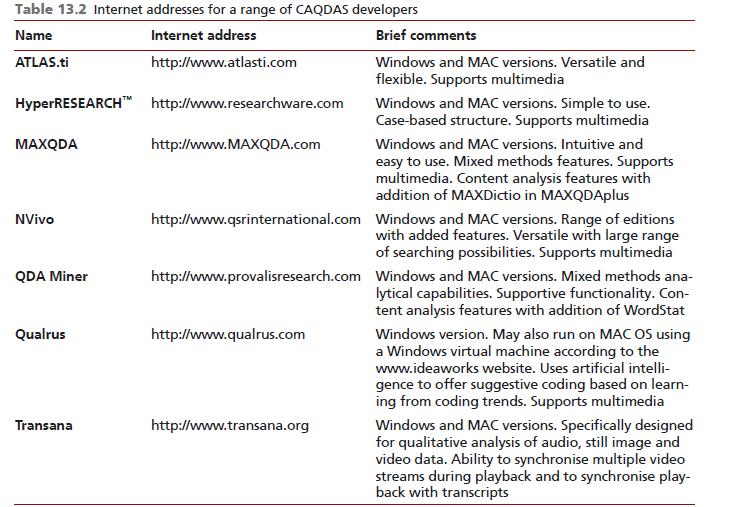
Table 13.2 Internet addresses for a range of CAQDAS developers Name Internet address ATLAS.ti http://www.atlasti.com HyperRESEARCH http://www.researchware.com MAXQDA NVivo QDA Miner Qualrus Transana http://www.MAXQDA.com Brief comments http://www.qualrus.com Windows and MAC versions. Versatile and flexible. Supports multimedia http://www.qsrinternational.com Windows and MAC versions. Range of editions with added features. Versatile with large range of searching possibilities. Supports multimedia http://www.transana.org Windows and MAC versions. Simple to use. Case-based structure. Supports multimedia Windows and MAC versions. Intuitive and easy to use. Mixed methods features. Supports multimedia. Content analysis features with addition of MAXDictio in MAXQDAplus http://www.provalisresearch.com Windows and MAC versions. Mixed methods ana- lytical capabilities. Supportive functionality. Con- tent analysis features with addition of WordStat Windows version. May also run on MAC OS using a Windows virtual machine according to the www.ideaworks website. Uses artificial intelli- gence to offer suggestive coding based on learn- ing from coding trends. Supports multimedia Windows and MAC versions. Specifically designed for qualitative analysis of audio, still image and video data. Ability to synchronise multiple video streams during playback and to synchronise play- back with transcripts
Step by Step Solution
3.35 Rating (164 Votes )
There are 3 Steps involved in it

Get step-by-step solutions from verified subject matter experts
 Study Help