







Question: Enhance the hit_the_target.py program that you saw in Program 3-9 so that, when the projectile misses the target, it displays hints to the user indicating
Enhance the hit_the_target.py program that you saw in Program 3-9 so that, when the projectile misses the target, it displays hints to the user indicating whether the angle and/or the force value should be increased or decreased. For example, the program should display messages such as 'Try a greater angle' and 'Use less force.'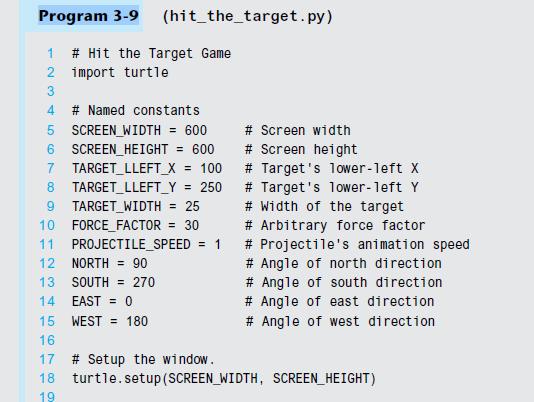
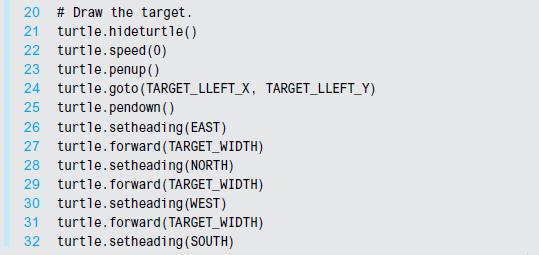
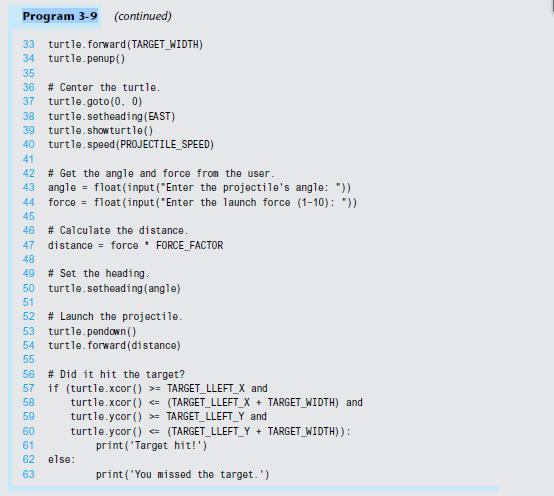
Figure 3-19 Troubleshooting a bad Wi-Fi connection No No Make sure the cables between the router & modem are plugged in firmly. Did that fix the problem? Reboot the computer and try to connect. Reboot the router and try to connect. No Did that fix the problem? Yes Did that fix the problem? Yes Yes
Step by Step Solution
3.56 Rating (163 Votes )
There are 3 Steps involved in it
Algorithm of the code Import the turtle module Define the named constants SCREENWIDTH Width of the game screen SCREENHEIGHT Height of the game screen TARGETLLEFTX Xcoordinate of the targets lowerleft ... View full answer

Get step-by-step solutions from verified subject matter experts
 Study Help