



Question: (Factorial Experiment) Refer to the production output study in Example 11.13, in which the effect of supervisor and shift on production output was studied. Enter
(Factorial Experiment) Refer to the production output study in Example 11.13, in which the effect of supervisor and shift on production output was studied.
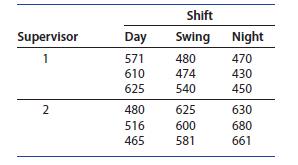
Enter the data into columns A–D of an Excel spreadsheet, using column A for supervisor labels and row 1 for shift labels, just as shown in the table on the previous page.
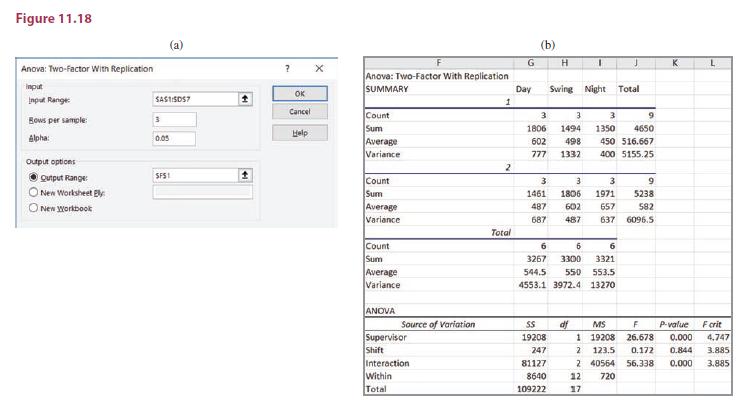
1. Use Data ➤ Data Analysis ➤ Anova: Two-Factor With Replication to generate the Dialog box in Figure 11.18(a). Highlight or type the Input Range (the data in the first four columns) into the first box. Enter the number of replications (3) into “Rows per Sample,” change the significance level if needed, choose an “Output Range,” and click OK. You can adjust the output, possibly changing the labels “Sample” and “Columns”
to “Supervisor” and “Shift,” as shown in Figure 11.18(b).
2. Refer to the ANOVA table at the bottom of the printout. There is a significant interaction between shift and supervisor (p-value5.000). The differences in the treatment means can now be studied by looking at comparisons for the 33256 factor-level combinations.
Supervisor Day Shift Swing Night 1 571 480 470 610 474 430 625 540 450 2 480 625 630 516 600 680 465 581 661
Step by Step Solution
There are 3 Steps involved in it

Get step-by-step solutions from verified subject matter experts