







Question: If necessary, create a new project named TryThis17 Project and save it in the Cpp8Chap11 folder. Enter the C++ instructions shown earlier in Figure 11-19
If necessary, create a new project named TryThis17 Project and save it in the Cpp8\Chap11 folder. Enter the C++ instructions shown earlier in Figure 11-19 into a source file named TryThis17.cpp. Change the filename in the first comment to TryThis17.cpp. Insert a blank line below the first comment, and then enter the following comment: //Also displays the average number of calories consumed.
![1 //Modified Calories.cpp - gets and displays daily calories 2 //Created/revised by on 3 4 #include only the name 5 using namespace std; is optional the name is optional 7 //function prototype 8 void displayArray(int cals[], int numElements);- function prototype 10 int main() 11 { int calories[5]](https://dsd5zvtm8ll6.cloudfront.net/si.question.images/images/question_images/1599/6/2/7/6275f58616be5f171599627626336.jpg)
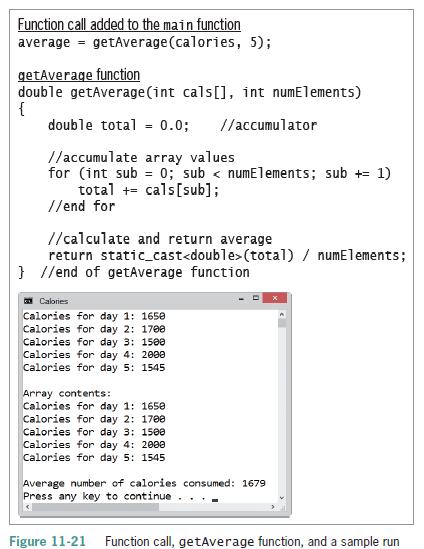
Save and then run the program. Test the program using the following calorie amounts: 1650, 1700, 1500, 2000, and 1545. Now, modify the program to include the function call and getAverage function shown in Figure 11-21. Display the average as a whole number. Save and then run the program. Test the program using the same data shown here.
1 //Modified Calories.cpp - gets and displays daily calories 2 //Created/revised by on 3 4 #include only the name 5 using namespace std; is optional the name is optional 7 //function prototype 8 void displayArray(int cals[], int numElements);- function prototype 10 int main() 11 { int calories[5] - {0}; 12 13 //store data in the array for (int sub 0; sub < 5; su { cout
Step by Step Solution
3.52 Rating (159 Votes )
There are 3 Steps involved in it
TryThis17cpp gets and displays daily calories Also displays the average number of calories consumed ... View full answer

Get step-by-step solutions from verified subject matter experts
 Study Help