







Question: Convert Program 12.5, the tessellated moon surface, to both anaglyph and side-by-side stereoscopic rendering. Animate the camera movement so that it skims along and close
Convert Program 12.5, the tessellated moon surface, to both anaglyph and side-by-side stereoscopic rendering. Animate the camera movement so that it skims along and close to the moon surface.
Program 12.5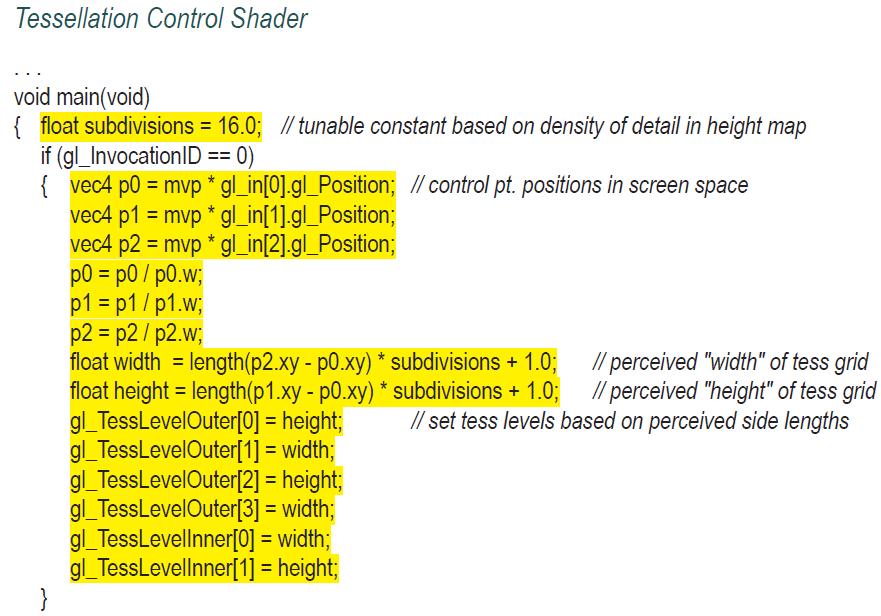
![} //forward texture coordinates and control points to TES as before tcs_out[gl_InvocationID] =](https://dsd5zvtm8ll6.cloudfront.net/images/question_images/1701/6/7/6/914656d8772980aa1701676913896.jpg)
Tessellation Control Shader void main(void) {float subdivisions = 16.0; // tunable constant based on density of detail in height map if (gl_Invocation ID == == 0) {vec4 p0 = mvp * gl_in[0].gl_Position; // control pt. positions in screen space vec4 p1 = mvp * gl_in[1].gl_Position; vec4 p2 = mvp * gl_in[2].gl_Position; p0 = p0/p0.w; P1 = p1/p1.w; p2 = p2/p2.w; float width= length (p2.xy - p0.xy) * subdivisions + 1.0; float height = length(p1.xy - p0.xy) * subdivisions + 1.0; gl_TessLevelOuter[0] = height; = width; gl_TessLevelOuter[1] } gl_TessLevelOuter[2] gl_TessLevelOuter[3] = height; = width; gl_TessLevellnner[0] = width; gl_TessLevellnner[1] = height; // perceived "width" of tess grid // perceived "height" of tess grid // set tess levels based on perceived side lengths
Step by Step Solution
3.32 Rating (155 Votes )
There are 3 Steps involved in it

Get step-by-step solutions from verified subject matter experts
 Study Help