New Semester
Started
Get
50% OFF
Study Help!
--h --m --s
Claim Now
Question Answers
Textbooks
Find textbooks, questions and answers
Oops, something went wrong!
Change your search query and then try again
S
Books
FREE
Study Help
Expert Questions
Accounting
General Management
Mathematics
Finance
Organizational Behaviour
Law
Physics
Operating System
Management Leadership
Sociology
Programming
Marketing
Database
Computer Network
Economics
Textbooks Solutions
Accounting
Managerial Accounting
Management Leadership
Cost Accounting
Statistics
Business Law
Corporate Finance
Finance
Economics
Auditing
Tutors
Online Tutors
Find a Tutor
Hire a Tutor
Become a Tutor
AI Tutor
AI Study Planner
NEW
Sell Books
Search
Search
Sign In
Register
study help
computer science
an introduction programming
An Introduction to Programming with C++ 8th edition Diane Zak - Solutions
In this exercise, you will create a program that converts U.S. dollars to a different currency. The number of American dollars should always be an integer that is greater than or equal to zero. The user should be able to choose the currency from the following list: Canadian Dollar, Euro, Indian
In this exercise, you will create a program that displays both the smallest and largest of three integers entered by the user. For example, if the user enters the numbers 3, 5, and 9, the program should display the messages “Smallest number is 3.” and “Largest number is 9.” on the computer
The owner of Harry’s Car Sales pays each salesperson a commission based on his or her quarterly sales. The sales ranges and corresponding commission rates are shown in Figure 6-43. The program should display an error message if the sales amount is less than 0.Quarterly sales ($)
Karlton Learning wants a program that displays the amount of money a company owes for a seminar. The fee per person is based on the number of people the company registers, as shown in Figure 6-42. For example, if the company registers seven people, then the total amount owed is $700. If the user
Complete TRY THIS Exercise 11. If necessary, create a new project named ModifyThis12 Project, and save it in the Cpp8\Chap06 folder. Enter (or copy) the instructions from the TryThis11.cpp file into a new source file named ModifyThis12.cpp. Be sure to change the filename in the first comment.
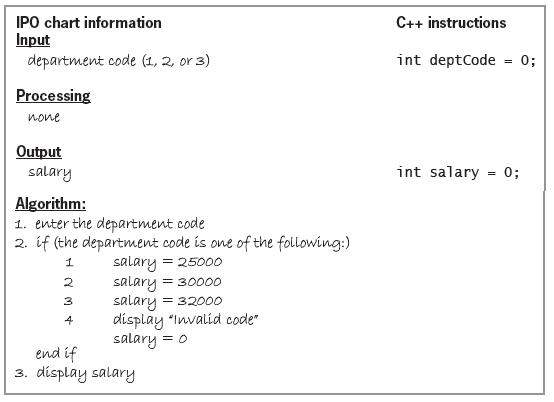
Code the algorithm shown in Figure 6-41. Use the switch statement to code the multiple-alternative selection structure. If necessary, create a new project named TryThis11 Project, and save it in the Cpp8\Chap06 folder. Enter the C++ instructions into a source file named TryThis11.cpp. Also enter
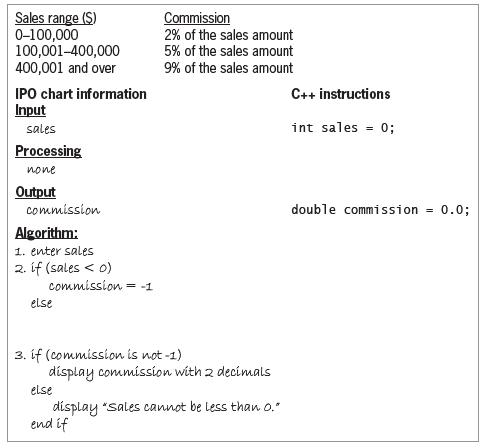
Figure 6-40 shows a partially completed chart for a program that displays the amount of a salesperson’s commission. The commission is based on the salesperson’s sales amount, as indicated in the figure. Complete the selection structure in the Algorithm section of the chart. Also complete the
A program uses a char variable named membership and an int variable named age. The membership variable contains one of the following letters (entered in either uppercase or lowercase): M or N. The letter M stands for member, and the letter N stands for nonmember. The program should display the
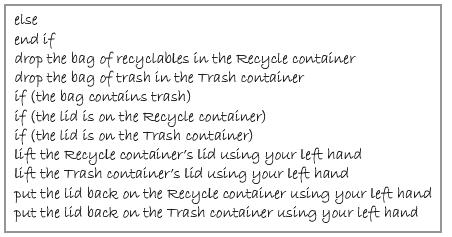
Recycle. In his right hand, he is holding a bag that contains either trash or recyclables. Travis needs to lift the lid from the appropriate container (if necessary), then drop the bag in the container, and then put the lid back on the container. Write an appropriate algorithm, using only the
Complete TRY THIS Exercise 2, and then change the switch statement to the multiple-alternative form of the if statement.
Using the switch statement, write the C++ code that corresponds to the partial flowchart shown in Figure 6-36. Use a char variable named code and a double variable named rate.
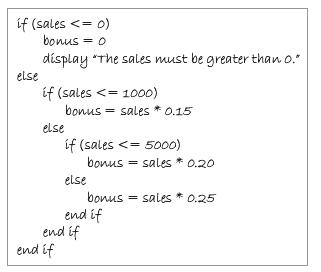
Write the C++ code for the multiple-alternative selection structure shown in Figure 6-35. First, use the longer form of the if statement. Then rewrite the code using the shorter form of the if statement. if (sales
A third-grade teacher at Potter Elementary School wants a program that allows a student to enter the amount of money a customer owes and the amount of money the customer paid. The program should calculate and display the amount of change, as well as how many dollars, quarters, dimes, nickels, and
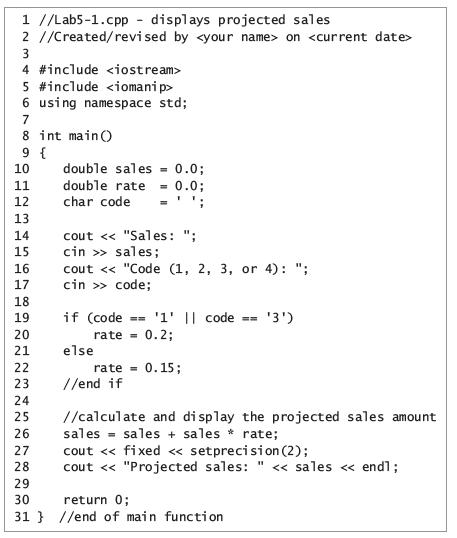
In this exercise, you will modify the program from Lab 5-1. If necessary, create a new project named ModifyThis10 Project, and save it in the Cpp8\Chap05 folder. Enter the instructions shown earlier in Figure 5-23 into a new source file named ModifyThis10.cpp. Currently, the 20% rate is assigned to
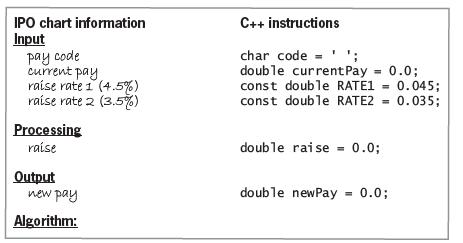
Complete Figure 5-34 by writing the algorithm and corresponding C++ instructions. Employees with a pay code of 1, 4, or 9 receive a 4.5% raise; all other employees receive a 3.5% raise. If necessary, create a new project named TryThis9 Project, and save it in the Cpp8\Chap05 folder. Enter the C++
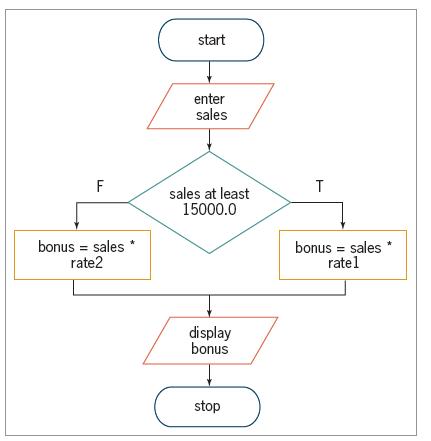
Code the flowchart shown in Figure 5-33. Rate1 and rate2 are 2% and 1.5%, respectively. If necessary, create a new project named TryThis8 Project, and save it in the Cpp8\Chap05 folder. Enter the C++ instructions into a source file named TryThis8.cpp. Also enter appropriate comments and any
Write the C++ code to display the message “Entry error” when the value in the units variable is less than or equal to 0. Otherwise, calculate the total owed by multiplying the units variable’s value by 5. Store the total owed in the total variable, and then display the total owed.
Complete TRY THIS Exercise 1, and then modify the code so that the true path displays “Not equal” and the false path displays “Equal”.
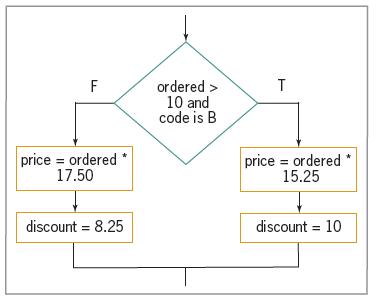
Code the partial flowchart shown in Figure 5-31. Use an int variable named ordered, a char variable named code, and double variables named price and discount. F T ordered > 10 and code is B price ordered * 17.50 price = ordered 15.25 discount = 8.25 %3D discount = 10
Write the C++ code to compare the contents of two int variables named code1 and code2. If both variables contain the same value, display the “Equal” message; otherwise, display the “Not equal” message.
In this exercise, you explore the use of integers in monetary calculations.a. Follow the instructions for starting C++ and opening the Advanced16.cpp file. Run the program. Enter 256.7 and 223.3 as the sales for Store 1 and Store 2, respectively. The total that appears on the computer screen
Follow the instructions for starting C++ and opening the SwatTheBugs17.cpp file. The program declares and initializes a double variable. It then adds 1.5 to the variable before displaying the variable’s value. Run the program. (If you are asked whether you want to run the last successful build,
A local zoo offers three different memberships: an individual membership for $99 per year, a dual membership for $175 per year, and a family membership for $225 per year. The membership director wants a program that displays the total membership revenue for the year, as well as the amount of the
Silvia’s Pizzeria sells four different sizes of pizzas: small, medium, large, and family. The manager of the pizzeria wants a program that displays the total number of pizzas sold, as well as the percentage of the total number contributed by each different size.a. Using the chart shown earlier in
The manager of Keystone Tile wants an application that displays the area of a rectangular floor, given its measurements in feet. It should also display the total cost of tiling the floor, given the price per square foot of tile.a. Using the chart shown earlier in Figure 4-12 as a guide, enter the
The manager of Fish Haven wants a program that displays the number of gallons of water a rectangular aquarium holds, given the aquarium’s length, width, and height measurements in inches.a. Using the chart shown earlier in Figure 4-12 as a guide, enter the input, processing, and output items, as
Jacob Weinstein wants a program that displays his savings account balance at the end of the month, given the beginning balance, total deposits, and total withdrawals.a. Using the chart shown earlier in Figure 4-12 as a guide, enter the input, processing, and output items, as well as the algorithm,
First, complete TRY THIS Exercise 8. If necessary, create a new project named ModifyThis10 Project, and save it in the Cpp8\Chap04 folder. Enter (or copy) the instructions from the TryThis8.cpp file into a new source file named ModifyThis10.cpp.The rent and car payment will always be $750 and
First, complete TRY THIS Exercise 2. Then, if necessary, create a new project named TryThis9 Project, and save it in the Cpp8\Chap04 folder. Enter the C++ instructions from TRY THIS Exercise 2 into a source file named TryThis9.cpp. Also enter appropriate comments and any additional instructions
First, complete TRY THIS Exercise 1. Then, if necessary, create a new project named TryThis8 Project, and save it in the Cpp8\Chap04 folder. Enter the C++ instructions from TRY THIS Exercise 1 into a source file named TryThis8.cpp. Also enter appropriate comments and any additional instructions
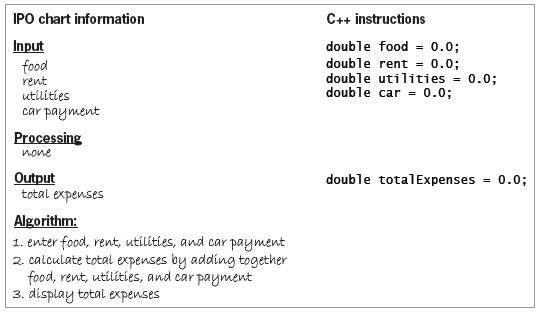
Complete TRY THIS Exercise 1, and then modify the IPO chart information and C++ instructions so that the car payment will always be $253.75.Data from Exercise 1Complete the C++ instructions column in Figure 4-29. IPO chart information C++ instructions Input food rent utilities car payment double
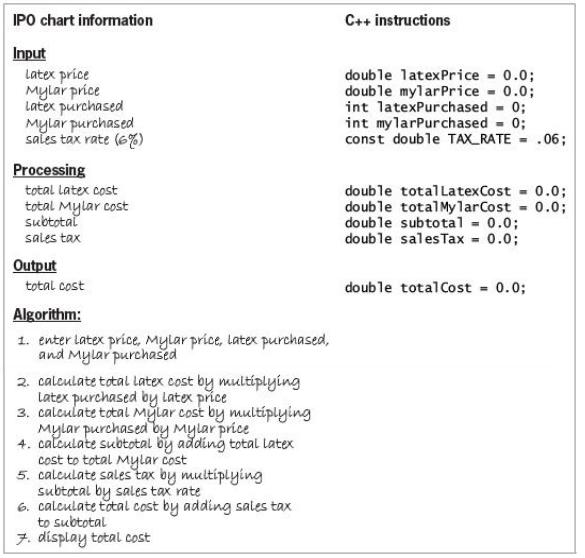
Complete the C++ instructions column in Figure 4-30. IPO chart information C++ instructions Input Latex price Mylar príce Latex purchased Mylar purchased sales tax rate (6) double latexPrice 0.0; double mylarPrice 0.0; int latexPurchased - 0; int mylarPurchased - 0; const double TAX_RATE = .06;
Complete the C++ instructions column in Figure 4-29. IPO chart information C++ instructions Input food rent utilities car payment double food = 0.0; double rent = 0.0; double utilities = 0.0; double car = 0.0; Processing none double totalExpenses Output total expenses 0.0; Algorithm: 1. enter food,
Complete TRY THIS Exercise 2, and then modify the IPO chart information and C++ instructions to indicate that the prices of the latex and Mylar balloons will always be $2.25 and $3.75, respectively.Data from Exercise 2Complete the C++ instructions column in Figure 3-25. The numbers of latex and
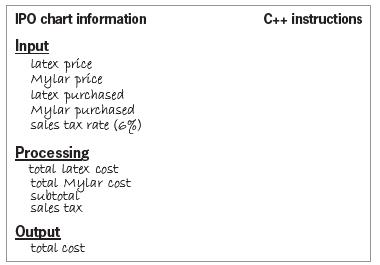
Complete the C++ instructions column in Figure 3-25. The numbers of latex and Mylar balloons purchased will be integers. All of the remaining items will be real numbers. Use the int and double data types. IPO chart information C++ instructions Input latex price Mylar price latex purchased
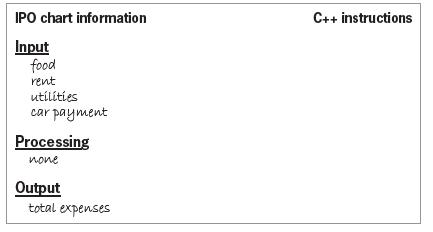
Complete the C++ instructions column in Figure 3-24. Use the double data type for the input and output items. IPO chart information C++ instructions Input food rent utilíties car payment Processing none Output total expenses
Balloon Emporium sells both latex and Mylar balloons. The store owner wants a program that allows him to enter the price of a latex balloon, the price of a Mylar balloon, the number of latex balloons purchased, the number of Mylar balloons purchased, and the sales tax rate. The program should
The principal of a local school wants a program that displays the average number of students per teacher at the school. The principal will enter the number of students enrolled and the number of teachers employed. Complete an IPO chart for this problem.Plan the algorithm using a flowchart. Also
Modify the algorithm shown earlier in Figure 1-5 so that it gives a 25% discount if the customer buying a TV is an employee of the store; all other customers buying a TV should receive a 15% discount.Figure 1-5repeat for (each customer buying a TV)enter the original price of the TVcalculate the
A store gives a 15% discount to customers who are at least 55 years old, and a 10% discount to all other customers. Using only the instructions shown in Figure 1-9, write an algorithm that displays the amount of money a customer owes. Be sure to indent the instructions appropriately. Figure
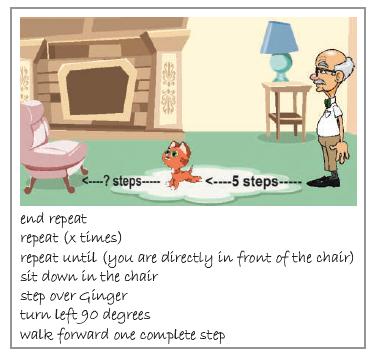
Harold is five steps away from his cat Ginger, who is an unknown distance away from a chair, as illustrated in Figure 1-8. Using only the instructions listed in the figure, create an algorithm that directs Harold to step over Ginger and sit in the chair. You may use an instruction more than once.
Showing 100 - 200
of 141
1
2
Step by Step Answers

 Get 50% OFF
Claim Now
Get 50% OFF
Claim Now