







Question: In this exercise, you will create a Web page in the DBC folder and link it to the HSD Web page in the HSD folder.
In this exercise, you will create a Web page in the DBC folder and link it to the HSD Web page in the HSD folder. A. Figure 7-30 shows the HTML code for a Web page for the DBC folder. Note that the page is called index.html, the same name as the Web page in the HSD folder. This is not a problem because the files are in different folders. Create the index.html Web page in the DBC folder.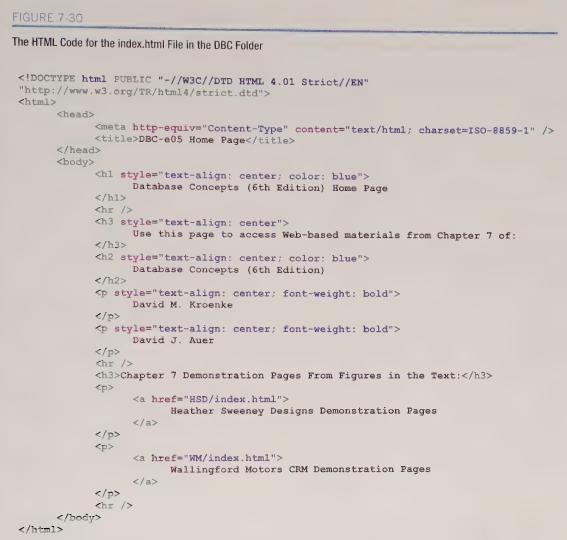
B. Figure 7-31 shows some additional HTML to be added near the end of the code for the HSD Web page in the file index.html in the HSD folder. Update the HSD index.html file with the code.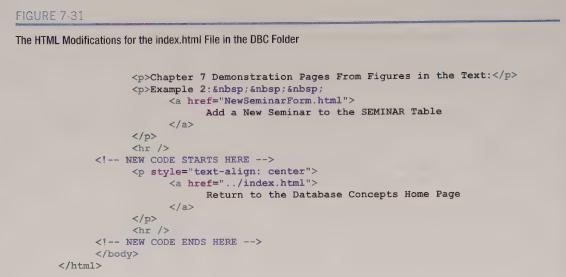 C. Try out the pages. Type http://localhost/DBC into your Web browser to display the DBC home page. From there, you should be able to move back and forth between the two pages by using the hyperlinks on each page. Note: You may need to click the Refresh button on your Web browser when using the HSD home page to get the hyperlink back to the DBC home page to work properly.
7.51. Create a Web page for Heather Sweeney Designs to display all the data in the CUSTOMER table. Add a hyperlink to the HSD home page to access the page.AppendixLO1
FIGURE 7.30 The HTML Code for the index.html File in the DBC Folder DBC-e05 Home Page chi style="text-align: center; color: blue"> Database Concepts (6th Edition) Home Page Use this page to access Web-based materials from Chapter 7 of: Database Concepts (6th Edition) David M. Kroenke David J. Auer Chapter 7 Demonstration Pages From Figures in the Text: Heather Sweeney Designs Demonstration Pages Wallingford Motors CRM Demonstration Pages
Step by Step Solution
There are 3 Steps involved in it

Get step-by-step solutions from verified subject matter experts
 Study Help