







Question: Implement a class named BitOutputStream, as shown in Figure 17.22, for writing bits to an output stream. The writeBit(char bit) method stores the bit in
Implement a class named BitOutputStream, as shown in Figure 17.22, for writing bits to an output stream. The writeBit(char bit) method stores the bit in a byte variable. When you create a BitOutputStream, the byte is empty. After invoking writeBit('1'), the byte becomes 00000001. After invoking writeBit("0101"), the byte becomes 00010101. The first three bits are not filled yet. When a byte is full, it is sent to the output stream. Now the byte is reset to empty. You must close the stream by invoking the close() method. If the byte is neither empty nor full, the close() method first fills the zeros to make a full 8 bits in the byte, and then outputs the byte and closes the stream. For a hint, see Programming Exercise 5.44. Write a test program that sends the bits 010000100100001001101 to the file named Exercise17_17.dat.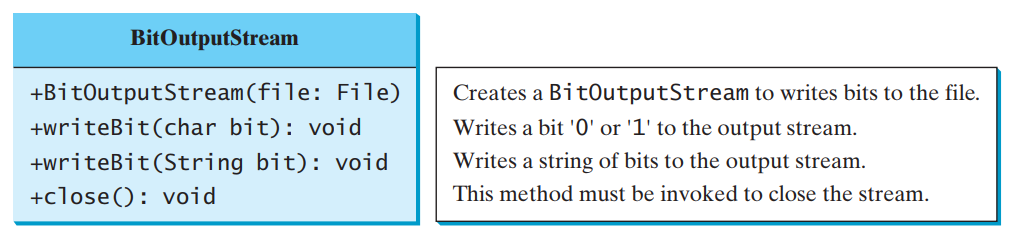
BitOutputStream?outputs a stream of bits to a file.
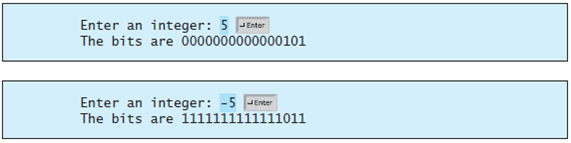
A?short?value is stored in?16?bits. Write a program that prompts the user to enter a short integer and displays the?16?bits for the integer. Here are sample runs:
BitOutputStream +BitOutputStream(file: File) +writeBit(char bit): void +writeBit(String bit): void Creates a BitoutputStream to writes bits to the file. Writes a bit '0' or '1' to the output stream. Writes a string of bits to the output stream. This method must be invoked to close the stream. +close(): void Enter an integer: 5 JEnter The bits are 0000000000000101 integer: -5 The bits are 1111111111111011 Enter an JEnter
Step by Step Solution
3.32 Rating (173 Votes )
There are 3 Steps involved in it
Program to implement a class to write bits to an output stream Program plan Import the required pack... View full answer

Get step-by-step solutions from verified subject matter experts
 Study Help