







Question: Modify GraphView in Listing 28.6 to add a new data field tree with a set method. The edges in the tree are displayed in red.
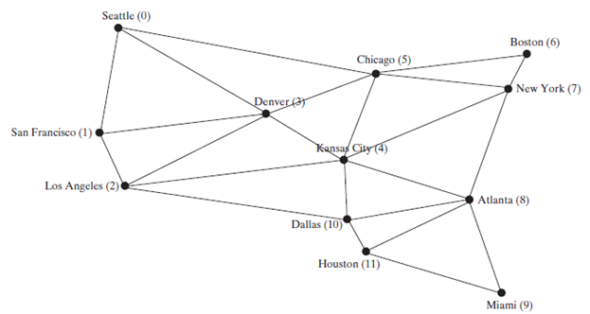
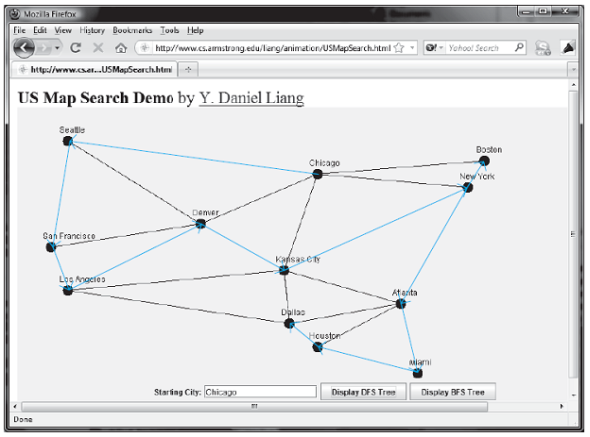
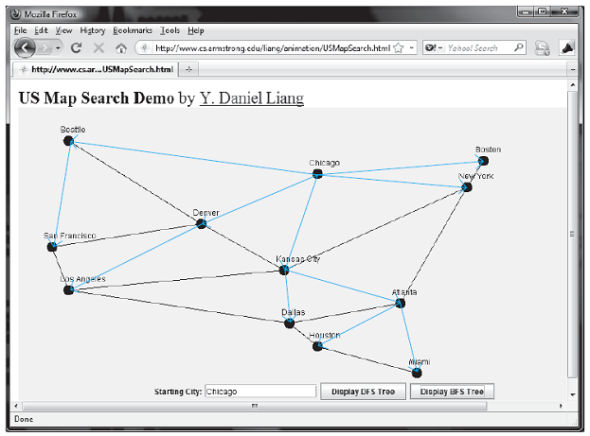
Modify GraphView in Listing 28.6 to add a new data field tree with a set method. The edges in the tree are displayed in red. Write a program that displays the graph in Figure 28.1 and the DFS/BFS tree starting from a specified city, as shown in Figures 28.13 and 28.16. If a city not in the map is entered, the program displays an error message in the label.
Listing
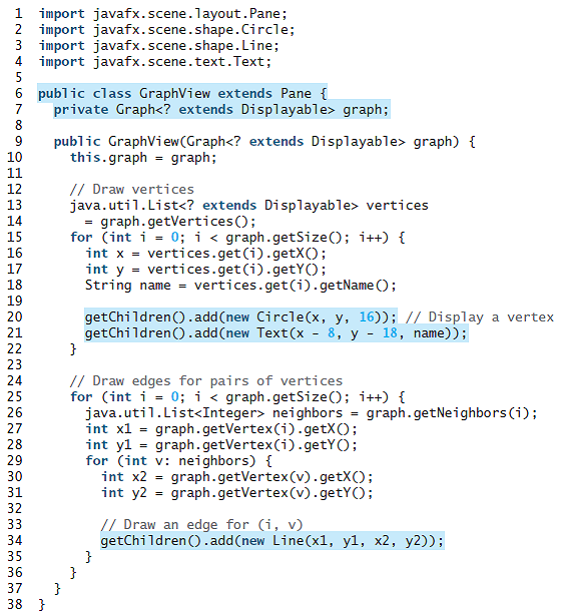
1 import javafx.scene.layout.Pane; 2 import javafx.scene.shape.Circle; 3 import javafx.scene.shape.Line; 4 import javafx.scene.text.Text; 5 6 public class GraphView extends Pane { private Graph
Step by Step Solution
3.38 Rating (173 Votes )
There are 3 Steps involved in it
Program Plan Create a class ViewDfsBfs that extends Application class Start method is used to set the stage and display it to the user setOnAction method in Button class is called every time user clic... View full answer

Get step-by-step solutions from verified subject matter experts
 Study Help