







Question: Write a JSF page to let the user enter taxable income and filing status, as shown in Figure 33.27a. Clicking the Compute Tax button computes
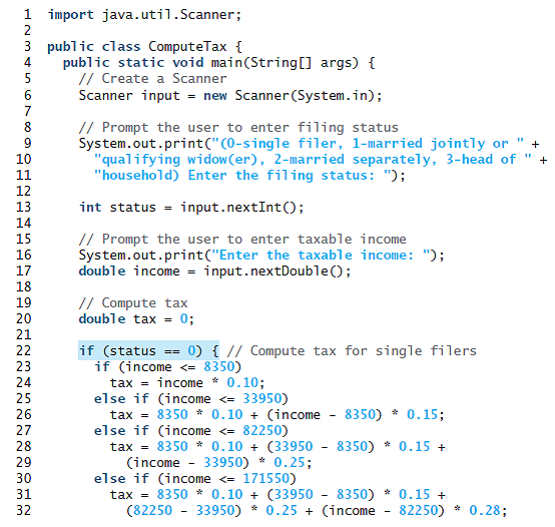
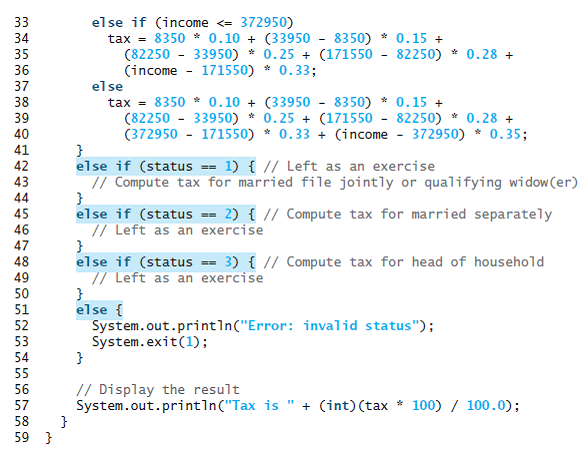
Write a JSF page to let the user enter taxable income and filing status, as shown in Figure 33.27a. Clicking the Compute Tax button computes and displays the tax, as shown in Figure 33.27b. Use the computeTax method introduced in Listing 3.5, ComputeTax.java, to compute tax.
Listing
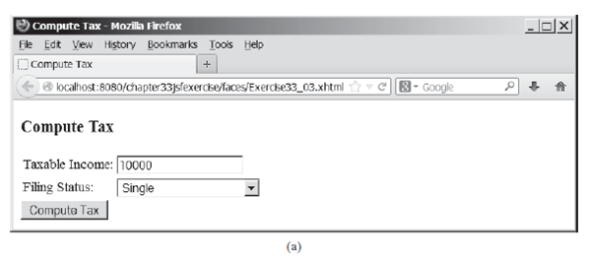
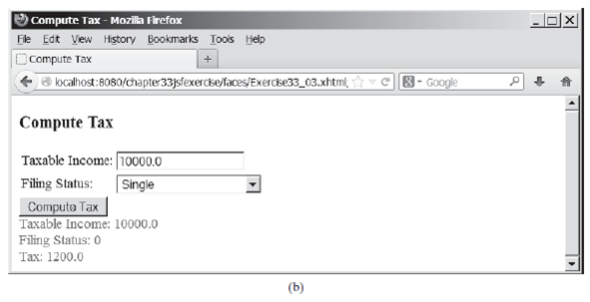
Compute Tax - Mozilla Firefox Fle Edt Vew Hstory Bookmarks Iool Help Compute Tax @ localhost:8080/chapte33}sfexercke/faces/Exercke33_03.xhtml| 8- Google |Compute Tax Taxable Income: [1000 | Single Compute Tax Filing Status: (a) Compute Tax - Mozilla Firefox Fle Edt Vew History Bookmarks Toois Help O Compute Tax ahost:te:33sexere/xceyExercke33_03.xhtml 8-Google Compute Tax Taxable Income: [10000.0 | Single Compute Tax Taxable Income: 10000.0 Filing Status: 0 Filing Status: : 1200.0 (b)
Step by Step Solution
3.47 Rating (154 Votes )
There are 3 Steps involved in it
Program Plan Now create an indexxhtml file in the WEBINF folder in which write all the xhtml code for the GUI In which set the title of web page Set the heading as shown in the textbook Create Labels ... View full answer

Get step-by-step solutions from verified subject matter experts
 Study Help