







Question: In this exercise, you modify the Rectangle class from Lab 15-2 so that it includes an overloaded method. a. If necessary, create a new project
In this exercise, you modify the Rectangle class from Lab 15-2 so that it includes an overloaded method.
a. If necessary, create a new project named Advanced20 Project and save it in the Cpp8\Chap15 folder. Copy the instructions from the Lab15-2 Rectangle.h file (which is located in either the Cpp8\Chap15\Lab15-2 Project folder or the Cpp8\Chap15 folder) into a header file named Advanced20 Rectangle.h. Change the filename in the first comment.
b. Pool-Time, a company that sells in-ground pools, wants a program that its salespeople can use to determine the number of gallons of water required to fill an in-ground pool. To calculate the number of gallons, you need to find the volume of the pool. The volume formula is length * width * depth. Modify the Rectangle class so that it can be used to represent a pool. You will need to include an additional private variable to store the depth value, as well as an additional public method to calculate and return the volume. You also will need to modify the default constructor and also overload the setDimensions method. Be sure to verify that the depth value is greater than 0.0 before assigning the value to the private variable.
c. Use the IPO chart shown in Figure 15-23 to code the program. Enter your C++ instructions in a source file named Advanced20.cpp. Also enter appropriate comments and any additional instructions required by the compiler. Display the volume and number of gallons with two decimal places.
d. Save and then run the program. Use 25 feet as the length, 15 feet as the width, and 6.5 feet as the depth. The program should display 2437.50 as the volume and 18233.84 as the number of gallons of water.
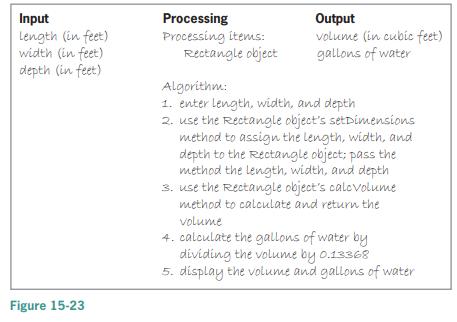
Input Length (in feet) width (in feet) depth (in feet) Processing Processing items: Rectangle object Output volume (in cubic feet) gallons of water Algorithm: 1. enter length, width, and depth 2. use the Rectangle object's setDimensions method to assign the length, width, and depth to the Rectangle object; pass the method the length, width, and depth 3. use the Rectangle object's calovolume method to calculate and return the volume 4. calculate the gallons of water by dividing the volume by o.13368 5. display the volume and gallons of water Figure 15-23
Step by Step Solution
3.37 Rating (163 Votes )
There are 3 Steps involved in it
include include using namespace std class Rectangle private float length width ... View full answer

Get step-by-step solutions from verified subject matter experts
 Study Help