







Question: Open the Multiplication Solution.sln file contained in the VB2017Chap05Multiplication Solution folder. Code the application to display a multiplication table similar to the one shown in
Open the Multiplication Solution.sln file contained in the VB2017\Chap05\Multiplication Solution folder. Code the application to display a multiplication table similar to the one shown in Figure 5-47. Use the For…Next statement in the btnForNext_Click procedure, and use the Do…Loop statement in the btnDoLoop_Click procedure. Save the solution and then start and test the application.
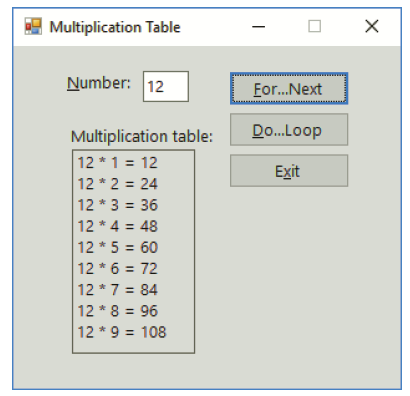
Multiplication Table Number: 12 Er.Next Do..Loop Multiplication table: 12 * 1 = 12 Exit 12 * 2 = 24 12 * 3 = 36 12 * 4 = 48 %3D 12 * 5 = 60 12 * 6 = 72 12 * 7 = 84 12 * 8 = 96 12 * 9 = 108
Step by Step Solution
3.39 Rating (168 Votes )
There are 3 Steps involved in it
Microsoft Visual Studio Solution File Format Version 1200 Visual Studio 15 VisualStudioVersi... View full answer

Get step-by-step solutions from verified subject matter experts
 Study Help