







Question: 1 4 3 9 2 6 5 8 285 OFFSET Function 286 The OFFSET function returns a range that is a specified number of rows
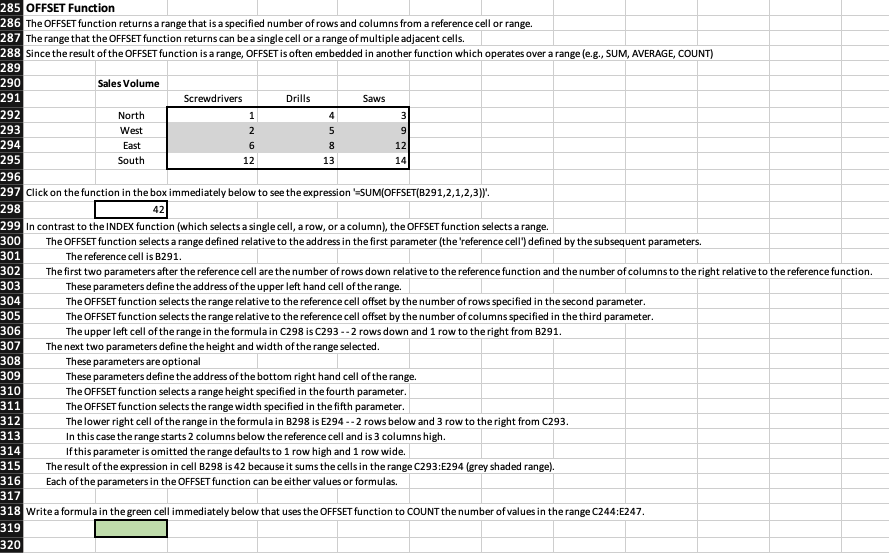
1 4 3 9 2 6 5 8 285 OFFSET Function 286 The OFFSET function returns a range that is a specified number of rows and columns from a reference cell or range. 287 The range that the OFFSET function returns can be a single cell or a range of multiple adjacent cells. 288 Since the result of the OFFSET function is a range, OFFSET is often embedded in another function which operates over a range (e.g., SUM, AVERAGE, COUNT) 289 290 Sales Volume 291 Screwdrivers Drills Saws 292 North 293 West 294 East 12 295 South 12 13 14 296 297 Click on the function in the box immediately below to see the expression 'SUM(OFFSET(B291,2,1,2,3). 298 42 299 In contrast to the INDEX function (which selects a single cell, a row, or a column), the OFFSET function selects a range. 300 The OFFSET function selects a range defined relative to the address in the first parameter (the 'reference cell') defined by the subsequent parameters. 301 The reference cell is B291. 302 The first two parameters after the reference cell are the number of rows down relative to the reference function and the number of columns to the right relative to the reference function. 303 These parameters define the address of the upper left hand cell of the range. 304 The OFFSET function selects the range relative to the reference cell offset by the number of rows specified in the second parameter. 305 The OFFSET function selects the range relative to the reference cell offset by the number of columns specified in the third parameter. 306 The upper left cell of the range in the formula in C298 is C293 -- 2 rows down and 1 row to the right from B291. 307 The next two parameters define the height and width of the range selected. 308 These parameters are optional 309 These parameters define the address of the bottom right hand cell of the range. 310 The OFFSET function selects a range height specified in the fourth parameter. 311 The OFFSET function selects the range width specified in the fifth parameter. 312 The lower right cell of the range in the formula in B298 is E294 --2 rows below and 3 row to the right from C293. 313 In this case the range starts 2 columns below the reference cell and is 3 columns high. 314 If this parameter is omitted the range defaults to 1 row high and 1 row wide. 315 The result of the expression in cell B298 is 42 because it sums the cells in the range C293:E294 (grey shaded range). Each of the parameters in the OFFSET function can be either values or formulas. 317 318 Write a formula in the green cell immediately below that uses the OFFSET function to COUNT the number of values in the range C244:E247. 319 320 316 1 4 3 9 2 6 5 8 285 OFFSET Function 286 The OFFSET function returns a range that is a specified number of rows and columns from a reference cell or range. 287 The range that the OFFSET function returns can be a single cell or a range of multiple adjacent cells. 288 Since the result of the OFFSET function is a range, OFFSET is often embedded in another function which operates over a range (e.g., SUM, AVERAGE, COUNT) 289 290 Sales Volume 291 Screwdrivers Drills Saws 292 North 293 West 294 East 12 295 South 12 13 14 296 297 Click on the function in the box immediately below to see the expression 'SUM(OFFSET(B291,2,1,2,3). 298 42 299 In contrast to the INDEX function (which selects a single cell, a row, or a column), the OFFSET function selects a range. 300 The OFFSET function selects a range defined relative to the address in the first parameter (the 'reference cell') defined by the subsequent parameters. 301 The reference cell is B291. 302 The first two parameters after the reference cell are the number of rows down relative to the reference function and the number of columns to the right relative to the reference function. 303 These parameters define the address of the upper left hand cell of the range. 304 The OFFSET function selects the range relative to the reference cell offset by the number of rows specified in the second parameter. 305 The OFFSET function selects the range relative to the reference cell offset by the number of columns specified in the third parameter. 306 The upper left cell of the range in the formula in C298 is C293 -- 2 rows down and 1 row to the right from B291. 307 The next two parameters define the height and width of the range selected. 308 These parameters are optional 309 These parameters define the address of the bottom right hand cell of the range. 310 The OFFSET function selects a range height specified in the fourth parameter. 311 The OFFSET function selects the range width specified in the fifth parameter. 312 The lower right cell of the range in the formula in B298 is E294 --2 rows below and 3 row to the right from C293. 313 In this case the range starts 2 columns below the reference cell and is 3 columns high. 314 If this parameter is omitted the range defaults to 1 row high and 1 row wide. 315 The result of the expression in cell B298 is 42 because it sums the cells in the range C293:E294 (grey shaded range). Each of the parameters in the OFFSET function can be either values or formulas. 317 318 Write a formula in the green cell immediately below that uses the OFFSET function to COUNT the number of values in the range C244:E247. 319 320 316
Step by Step Solution
There are 3 Steps involved in it

Get step-by-step solutions from verified subject matter experts
 Study Help