







Question: 1. Connect to Switch0 using console interface and configure each Switch0 fastethernet switchport for operation. Correct settings are : - Port type : access port
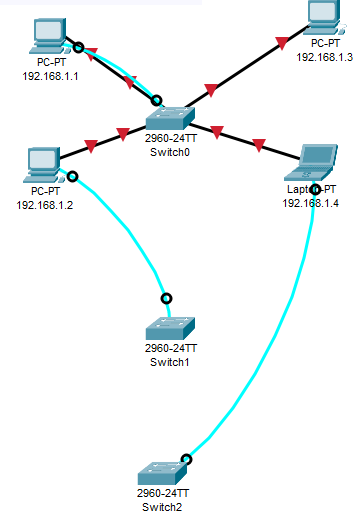
1. Connect to Switch0 using console interface and configure each Switch0 fastethernet switchport for operation. Correct settings are : - Port type : access port - Speed : 100 Mbit/s - Duplex mode : Full Duplex - Autonegotiation disabled 2. PC "192.168.1.4" seems to be unable to ping other PCs in the network. Check switch configuration.
TIP : How many broadcast domains are there in this network ?
3. Choose the right cable to connect : - Switch0 gigabitethernet 1/1 to Switch1 gigabitethernet 1/1 - Switch1 gigabitethernet 1/2 to Switch2 gigabitethernet 1/2
4. Configure those two links as trunk lines without using trunk negotiation between switches
PC-PT 192.168.1.3 PC-PT 192.168.1.1 2960-24TT Switch PC-PT 192.168.1.2 Lapto PT 192.168.1.4 2960-24TT Switch1 2960-24TT Switch2
Step by Step Solution
There are 3 Steps involved in it

Get step-by-step solutions from verified subject matter experts
 Study Help