







Question: 1 import tkinter as tk 4 def pressed): GUI Layout Example II 6 Button callback function (comand) We're continuing the theme of laying out buttons
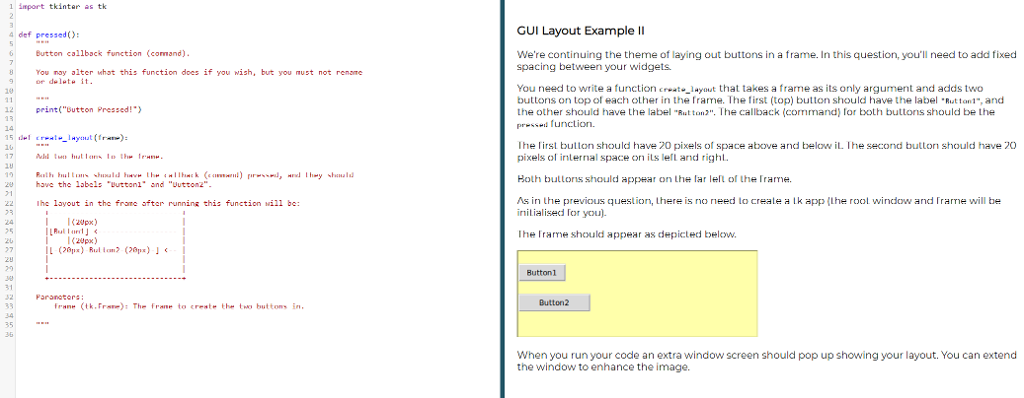
1 import tkinter as tk 4 def pressed): GUI Layout Example II 6 Button callback function (comand) We're continuing the theme of laying out buttons in a frame. In this question, you'll need to add fixed spacing between yr widgets. You nay alter whot this function does if you wish, but you must not rename or delate it You need to write a function cayout that takes a frame as its only argument and adds two buttons on top of each other in the Trame. The first (top) button should have the label tton1-,and the other should have the label "Ruton2". The callback (command) Iorboth buttons should be Lhe 10 12 print("Dutton Pressed!) Ihe irst bullon should have 20 pixels of space above and below iL. The second buttorn should have 20 pixels of internal space on its le and righ Rulh hullu.1% vhnuld hav" thw have the labals "Duttanl" and "Uutton2 11ba-ck (cami :) r.rw**m/, "rul Ihwy -hnuld Hoth butlons should appear on Lhe lar lell of the Irarme. /s in the previous question, lhere is no need lo crea le a l k app {the rool window and rame will be nilialised Tor you) 22 Ihc layout in thc frome after running this function wil1 be: 2Upx) Ihe Trame should appear as depicted below. 7 Button1 31 Parsnetor frane (tk.Fre)s The Frane to create the to buttons in When you run your code an extra window screen should pop up showing your layout. You can extend the window to enhance the image. 1 import tkinter as tk 4 def pressed): GUI Layout Example II 6 Button callback function (comand) We're continuing the theme of laying out buttons in a frame. In this question, you'll need to add fixed spacing between yr widgets. You nay alter whot this function does if you wish, but you must not rename or delate it You need to write a function cayout that takes a frame as its only argument and adds two buttons on top of each other in the Trame. The first (top) button should have the label tton1-,and the other should have the label "Ruton2". The callback (command) Iorboth buttons should be Lhe 10 12 print("Dutton Pressed!) Ihe irst bullon should have 20 pixels of space above and below iL. The second buttorn should have 20 pixels of internal space on its le and righ Rulh hullu.1% vhnuld hav" thw have the labals "Duttanl" and "Uutton2 11ba-ck (cami :) r.rw**m/, "rul Ihwy -hnuld Hoth butlons should appear on Lhe lar lell of the Irarme. /s in the previous question, lhere is no need lo crea le a l k app {the rool window and rame will be nilialised Tor you) 22 Ihc layout in thc frome after running this function wil1 be: 2Upx) Ihe Trame should appear as depicted below. 7 Button1 31 Parsnetor frane (tk.Fre)s The Frane to create the to buttons in When you run your code an extra window screen should pop up showing your layout. You can extend the window to enhance the image
Step by Step Solution
There are 3 Steps involved in it

Get step-by-step solutions from verified subject matter experts
 Study Help