







Question: GUI of Python Here is the false code 1 import tkinter as tk GUI Layout Example IlI 4 def pressed): Button callback function (command) We're
GUI of Python
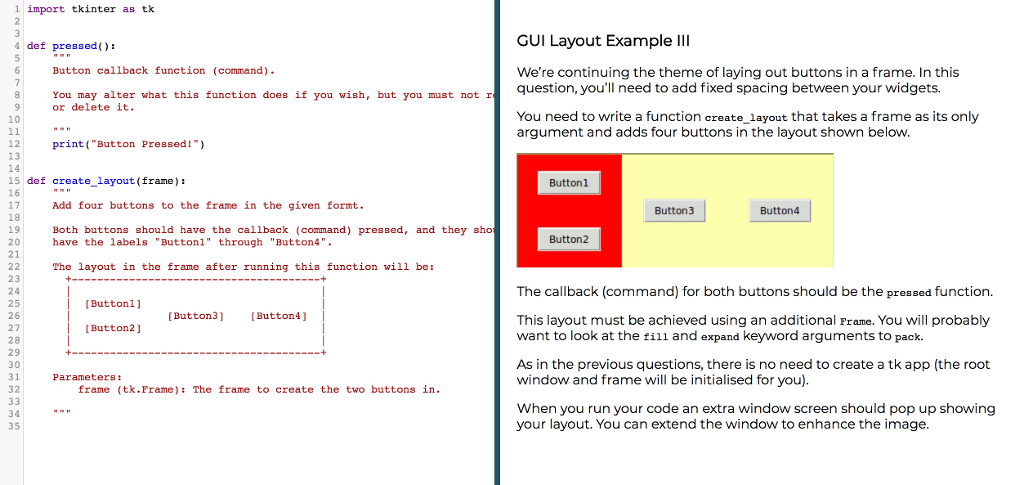
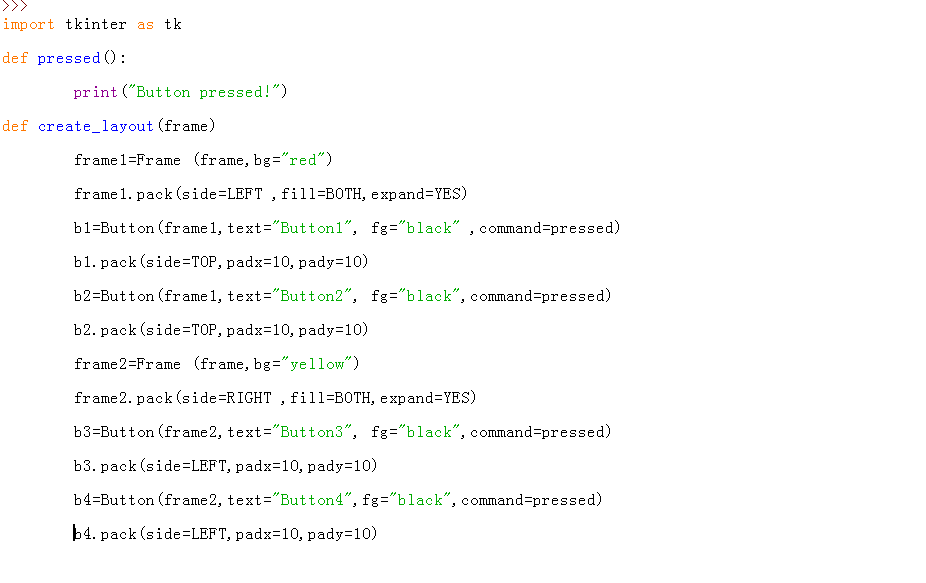
Here is the false code
1 import tkinter as tk GUI Layout Example IlI 4 def pressed): Button callback function (command) We're continuing the theme of laying out buttons in a frame. In this question, you'll need to add fixed spacing between your widgets. You may alter what this function does if you wish, but you must not r or delete it. You need to write a function create_layout that takes a frame as its only argument and addsfour buttons in the layout shown belovw 10 12 13 14 print( Button Pressed!") 15 def create layout (frane): 16 17 18 19 20 21 Button1 Add four buttons to the frame in the given formt. Button3 Button4 Both buttons should have the callback (command) pressed, and they sho have the labels "Buttonl" through "Button4" Button2 The layout in the frame after running this function will be: 23 24 25 26 27 28 29 30 31 32 The callback (command) for both buttons should be the pressed function. [Buttonl] Button3 Button4) This layout must be achieved using an additional Frame. You will probably want to look at the fill and expand keyword arguments to pack. [Button2] As in the previous questions, there is no need to create a tk app (the root window and frame will be initialised for you) Parameterst frame (tk.Frame): The frame to create the two buttons in 34 35 When you run your code an extra window screen should pop up showing your layout. You can extend the window to enhance the image
Step by Step Solution
There are 3 Steps involved in it

Get step-by-step solutions from verified subject matter experts
 Study Help