







Question: 1. Project Introduction In this project, we will see how processes are managed in Linux and make a system call to log the information of
1. Project Introduction In this project, we will see how processes are managed in Linux and make a system call to log the information of the current running processes. Your task for this project is to make your own system call to enable the given application sysps to show the information of the current running processes. 2. Implementations 2.0 Environment ? The project should be performed in Ubuntu environment. (Kernel Version 4.9.x) ? You can install Ubuntu or use a virtual machine to carry out your project. ? If you use a virtual machine, make sure to allocate enough memory to the machine (at least 2 GB). 2.1 Core Function Analysis ? Download the Linux kernel from https://www.kernel.org/ $ wget https://cdn.kernel.org/pub/linux/kernel/v4.x/linux-4.15.14.tar.xz ? Use ftrace to find the functions that create processes. ? You will have to describe its functionalities later in your report. (You need not explain the functions entirely. We will only check to see that you have properly understood how they work.) 2.2 Output The user application sysps will be provided to print the following. ? UID: user ID (root, $USER) ? PID: process ID ? PPID: process ID of the parent process ? NICE: nice value of the current process (-20 ~ 19) ? STATE: current state of the process (S: sleeping, R: running, Z: zombie) ? CPU#: CPU # of where the process is scheduled ? CMD: the executable name of the process ? nr_switches: # of context switches the processes made ? nr_running: # of running processes in the runqueue where the process is in ? list of siblings: information of the processs siblings ? list of children: information of the processs children
? range of VMA: the start and end addresses of each virtual memory address (CODE, DATA,
HEAP, STACK*) ? number of VMA: the number of the virtual memory address
Output Examples $ ./sysps : print [UID] [PID] [PPID] [NICE] [STATE] [CPU#] [CMD]
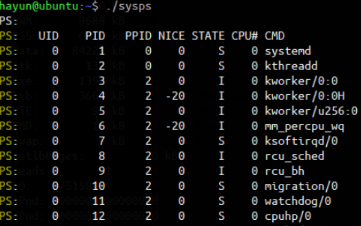
$ ./sysps -C : print [CPU#] [nr_switches] [nr_running]
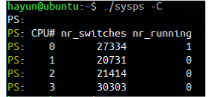
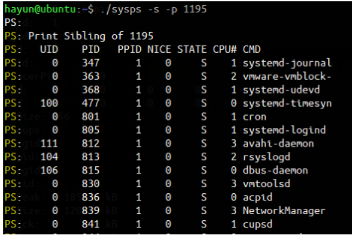
$ ./sysps -s -p 1195 : print the siblings of process 1195
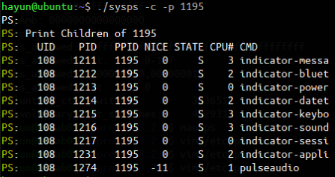
$ ./sysps -c -p 1195 : print the children of process 1195
$ ./sysps -v : print [PID] [CODE] [DATA] [HEAP] [STACK] [# of VMA]
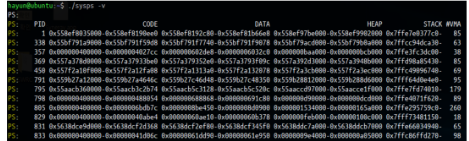
Your task is to make a system call to implement the functionalities shown above.
2.3 Tips ? Do NOT modify the given sysps.c file ? Compile sysps.c with the following command. $ gcc -o sysps sysps.c ? The information of a process is managed by the task_struct structure in Linux. ? The runqueue is managed by the rq structure in Linux. ? You can use the information from the /proc filesystem. If /proc does not provide you with the information you inquire, it is possible to retrieve the information from the structures in the kernel. ? sysps is a user-level application. Make sure to make your own system call to retrieve information from the kernel (use the return values of system calls). To do so, you must find a way to create and use your own system call. ? You may refer to the ps application in the open-source project PROCPS (https://gitlab.com/procps-ng/procps). It shows the information about the current running processes via the /proc filesystem. $ git clone https://gitlab.com/procps-ng/procps ? Build a binary executable of ps. Check the markdown files (e.g., INSTALL.md) to figure out how to build the project code. For this, you will need to install several dependent libraries.
3. Evaluation Policy ? Successfully made your own system call (5 points) ? The sysps program outputs normal information of all processes (15 points) ? The sysps program outputs normal information of all CPUs (15 points) ? The sysps program outputs normal information of all sibling processes (7.5 points) ? The sysps program outputs normal information of all children processes (7.5 points) ? The sysps program outputs VMA information of the given process (15 points) ? Report (35 points) - Analysis of the function path (see section 2.1) using ftrace (20 points) - Detailed explanation of your implementations (e.g., task_struct, rq, mm_struct) (15 points)
syspc.c
/******************************************************* * * * This file is part of OS Project 1. * * This file can not be copied and/or distributed without the express * permission of ESLAB *******************************************************/
#include
#define SYSCALL_NUMBER 333
enum { OPT_PS = 0, OPT_CPU_INFO, OPT_SIBLING, OPT_CHILDREN, OPT_VMA, };
int isPositiveInteger(char *str) { int i = 0; while (isdigit(str[i])) i++;
if (str[i] == '\0') return 1; return 0; }
char *options[][2] = {"-C", "print CPU information", "-s", "print sibling (need -p option)", "-c", "print children (need -p option)", "-v", "print vma information", "-p
void printHelp(void) { int i; printf("Usage: "); printf("./sysps [OPTION] "); printf("Options: "); for (i=0; options[i][0]!=NULL; i++) printf(" %-10s%s ", options[i][0], options[i][1]); }
int main(int argc, char *argv[]) { int opt, pid = 1; int flag_C = 0, flag_s = 0, flag_c = 0, flag_v = 0, flag_p = 0;
int c; while ( (c = getopt(argc, argv, "Cscvp:h")) != -1) { switch (c) { case 'C': flag_C = 1; break; case 's': flag_s = 1; break; case 'c': flag_c = 1; break; case 'v': flag_v = 1; break; case 'p': flag_p = 1; if (isPositiveInteger(optarg)) pid = atoi(optarg); else { printf("pid is not integer "); exit(1); } break; case '?': printf("Invalid option "); case 'h': printHelp(); exit(1); } }
if (!(flag_C || flag_s || flag_c || flag_v)) syscall(SYSCALL_NUMBER, OPT_PS, pid); else { if (flag_C) syscall(SYSCALL_NUMBER, OPT_CPU_INFO, pid); if (flag_s) syscall(SYSCALL_NUMBER, OPT_SIBLING, pid); if (flag_c) syscall(SYSCALL_NUMBER, OPT_CHILDREN, pid); if (flag_v) syscall(SYSCALL_NUMBER, OPT_VMA, pid); }
execl("/usr/bin/sudo", "sudo", "dmesg", "-tc", NULL);
return 0; }
hayun@ubuntu:-$-/sysps PS: UID PID PPID NICE STATE CPU# CMD 2.29 2 ? 1 1 kworker/e:0 ? kworker/9:0H ekworker/u256:0 ? migration/0 hayun@ubuntu:-$-/sysps PS: UID PID PPID NICE STATE CPU# CMD 2.29 2 ? 1 1 kworker/e:0 ? kworker/9:0H ekworker/u256:0 ? migration/0
Step by Step Solution
There are 3 Steps involved in it

Get step-by-step solutions from verified subject matter experts
 Study Help