







Question: 1. Run a linear regression using artofstat. Direction is given below. (2 points) 1). Go to artofstat.com > Web Apps >Linear Regression (Links to an
1. Run a linear regression using artofstat. Direction is given below. (2 points)
1). Go to artofstat.com > Web Apps >Linear Regression
(Links to an external site.)
2). In the "Enter Data" drop down box select "Enter Own".
3). In the "Name of X-Variable:" box put the name of the variable you are analyzing.
4). In the "Name of Y-Variable:" box put Price.
5). Copy and paste the data for the variable you are analyzing into the "xVar" column.
6). Copy and paste the data for Price into the "yVar" column.
7). In "Plot Options:" select "Regression Line". Click the red Submit Data button.
8). Taking a screenshot or use the snipping tool to copy the Scatterplot and Model Summary (found under the scatterplot) and paste them onto the document. (You can search how to take a screenshot using your computer online.)
2. Describe the scatterplot using the characteristics Directions, Outliers, Trend, Strength. (2 points)
3. What is the response variable? What is the predictor variable? (2 point)
4. State and interpret R-squared. (Use the value for R-Sq, not the R-Sq(adj).) (2 points)
5. State and interpret the correlation coefficient. (2 points)
6. Does this variable appear to be a good predictor of price? Explain your answer in a couple of sentences. Using the information found in the previous section to support your claim. Hint:Use information about the statistical concepts that you learned in the regression module and used in this project to justify your claim. (3 points)
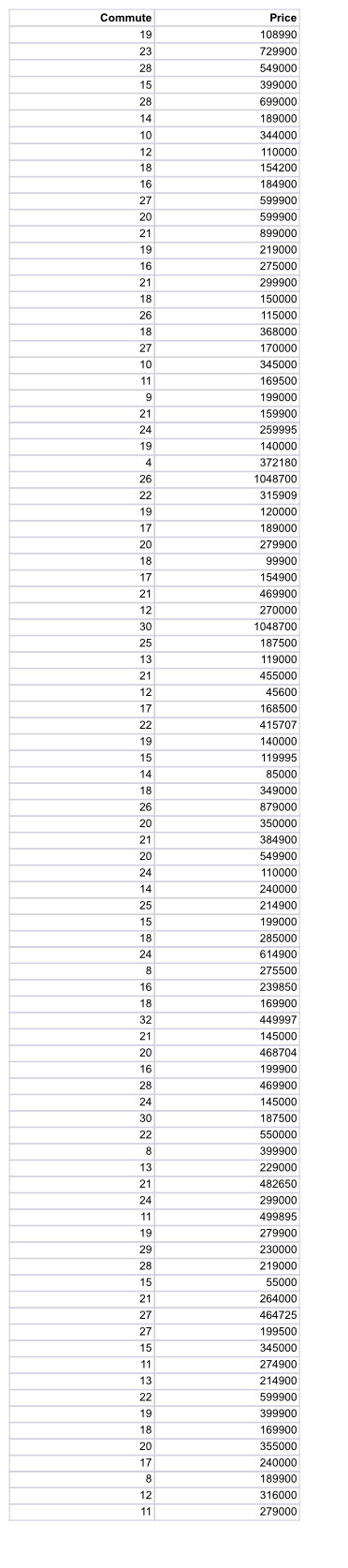
Commute Price 19 108990 23 729900 28 549000 15 399000 28 699000 14 189000 10 344000 12 110000 18 154200 16 184900 27 599900 20 599900 21 399000 19 219000 16 275000 21 299900 18 150000 26 115000 18 368000 27 170000 10 345000 11 169500 9 199000 21 159900 24 259995 19 140000 4 372180 26 1048700 22 315909 19 120000 17 189000 20 279900 18 99900 17 154900 21 469900 12 270000 30 1048700 25 187500 13 119000 21 455000 12 45600 17 168500 22 415707 19 140000 15 119995 14 85000 18 349000 26 879000 20 350000 21 384900 20 549900 24 110000 14 240000 25 214900 15 199000 18 285000 24 614900 8 275500 16 239850 18 169900 32 449997 21 145000 20 468704 16 199900 28 469900 24 145000 30 187500 22 550000 8 399900 13 229000 21 482650 24 299000 11 499895 19 279900 29 230000 28 219000 15 55000 21 264000 27 464725 27 199500 15 345000 11 274900 13 214900 22 599900 19 399900 18 169900 20 355000 17 240000 8 189900 12 316000 279000
Step by Step Solution
There are 3 Steps involved in it

Get step-by-step solutions from verified subject matter experts
 Study Help