







Question: 1) See the attached image resources as guide. 2) Create Layout: name: activity_arithmetic.xml Then follow the image below to design the UI layout. After you
1) See the attached image resources as guide.
2) Create Layout:
name: activity_arithmetic.xml
Then follow the image below to design the UI layout. After you design this UI layout.
3) Modify the Activity class.
Create a java code based on the following task:
Create new method for each arithmetic operation. This method accepts two integer operands, and return the result of the operation.
Example:
Sample Addition method:
int add(int num1, int num2) {
return num1 + num2;
}
The input values to be used for the method will come from the values from num1 and num2 of XML layout
(Example values in the sample layout: num1=8, num2=2)
The result of the operation will be displayed to the Addition text view.
Create a method also for other arithmetic operations (subtraction, division, multiplication)
See the image below as guide in creating the java code.
Note:
You may use either findViewById() or View Binding method
Use the built-in setText() method of the TextView or EditText component to set the value.
Uset the built-in getText() method of the TextView or EditText component to get the value.
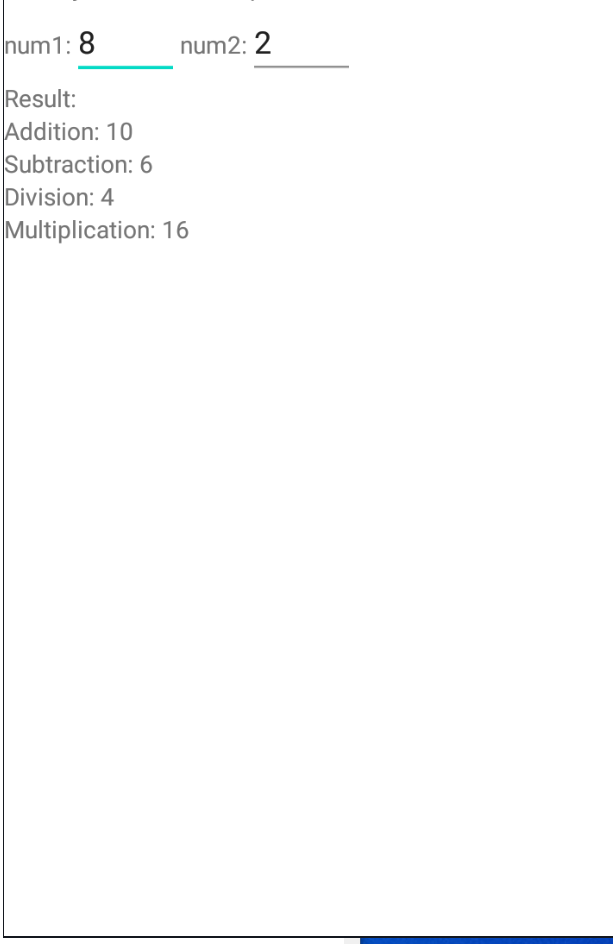
num1: 8 num2: 2 Result: Addition: 10 Subtraction: 6 Division: 4 Multiplication: 16
Step by Step Solution
There are 3 Steps involved in it

Get step-by-step solutions from verified subject matter experts
 Study Help