







Question: 1. Sleep Tracking Application Write a Java application named SleepTracker that will allow the user to enter their optimal sleep time and sleep history, and
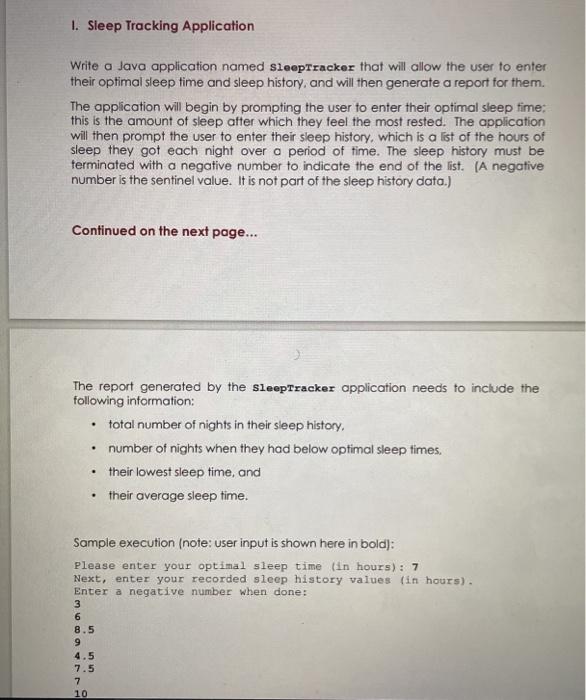
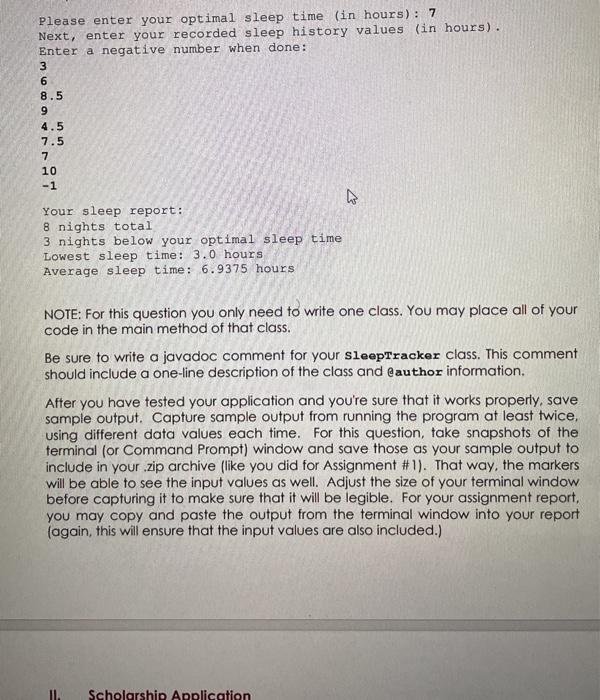
1. Sleep Tracking Application Write a Java application named SleepTracker that will allow the user to enter their optimal sleep time and sleep history, and will then generate a report for them. The application will begin by prompting the user to enter their optimal sleep time: this is the amount of sleep after which they feel the most rested. The application will then prompt the user to enter their sleep history, which is a list of the hours of sleep they got each night over a period of time. The sleep history must be terminated with a negative number to indicate the end of the list. (A negative number is the sentinel value. It is not part of the sleep history data.) Continued on the next page... The report generated by the sleepTracker application needs to include the following information: total number of nights in their sleep history, number of nights when they had below optimal sleep times. their lowest sleep time, and their average sleep time. . . Sample execution (note: user input is shown here in bold): Please enter your optimal sleep time in hours): 7 Next, enter your recorded sleep history values (in hours). Enter a negative number when done: 8.5 4.5 7.5 7 10 Please enter your optimal sleep time (in hours): 7 Next, enter your recorded sleep history values (in hours). Enter a negative number when done: 3 8.5 9 4.5 7.5 10 -1 Your sleep report: 8 nights total 3 nights below your optimal sleep time Lowest sleep time: 3.0 hours Average sleep time: 6.9375 hours NOTE: For this question you only need to write one class. You may place all of your code in the main method of that class. Be sure to write a javadoc comment for your sleepTracker class. This comment should include a one-line description of the class and @author information. After you have tested your application and you're sure that it works properly, save sample output. Capture sample output from running the program at least twice, using different data values each time. For this question, take snapshots of the terminal (or Command Prompt) window and save those as your sample output to include in your .zip archive (like you did for Assignment #1). That way, the markers will be able to see the input values as well. Adjust the size of your terminal window before capturing it to make sure that it will be legible. For your assignment report, you may copy and paste the output from the terminal window into your report (again, this will ensure that the input values are also included.) Scholarship Application
Step by Step Solution
There are 3 Steps involved in it

Get step-by-step solutions from verified subject matter experts
 Study Help