







Question: 1. There is the code for two tables given below. You must copy this to Notepad++ (copy it exactly!!, though it has been provided). Once
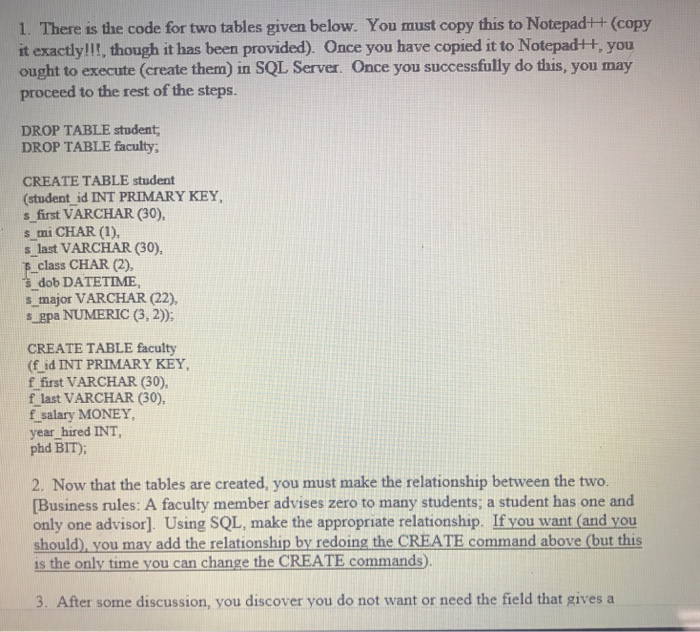
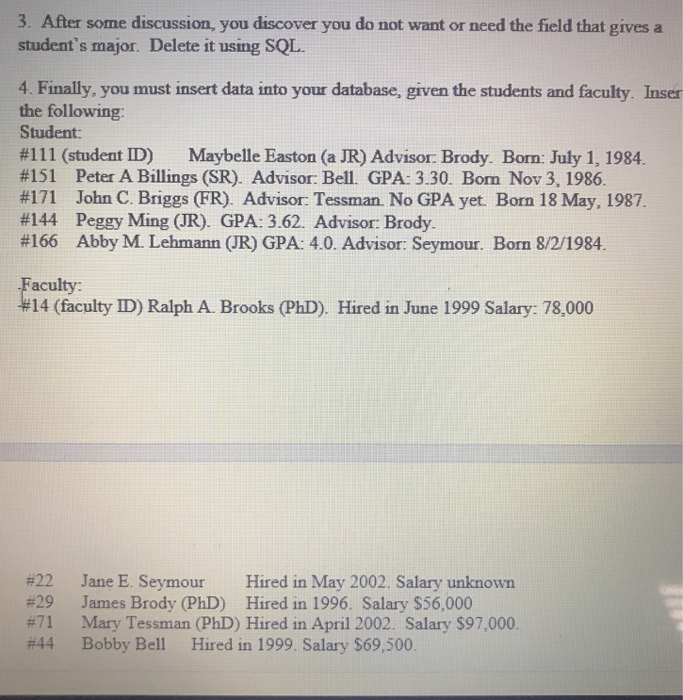
1. There is the code for two tables given below. You must copy this to Notepad++ (copy it exactly!!, though it has been provided). Once you have copied it to Notepad++, you ought to execute (create them) in SQL Server. Once you successfully do this, you may proceed to the rest of the steps. DROP TABLE student DROP TABLE faculty CREATE TABLE student (student id INT PRIMARY KEY s first VARCHAR (30), s mi CHAR (1), s last VARCHAR (30), E class CHAR (2), s dob DATETIME, s major VARCHAR (22), s gpa NUMERIC (3, 2)) CREATE TABLE faculty (f id INT PRIMARY KEY f first VARCHAR (30), f last VARCHAR (30), f salary MONEY, year hired INT phd BIT): 2. Now that the tables are created, you must make the relationship between the two. Business rules: A faculty member advises zero to many students; a student has one and only one advisor]. Using SQL, make the appropriate relationship. If you want (and you should), you may add the relationship by redoing the CREATE command above (but this is the only time you can change the CREATE commands). 3. After some discussion, you discover you do not want or need the field that gives a
Step by Step Solution
There are 3 Steps involved in it

Get step-by-step solutions from verified subject matter experts
 Study Help