







Question: 1 . Use Grids or Flexboxes for the form structure. 1 mark 2 . The input form on the left side 3 marks Name should
Use Grids or Flexboxes for the form structure. mark
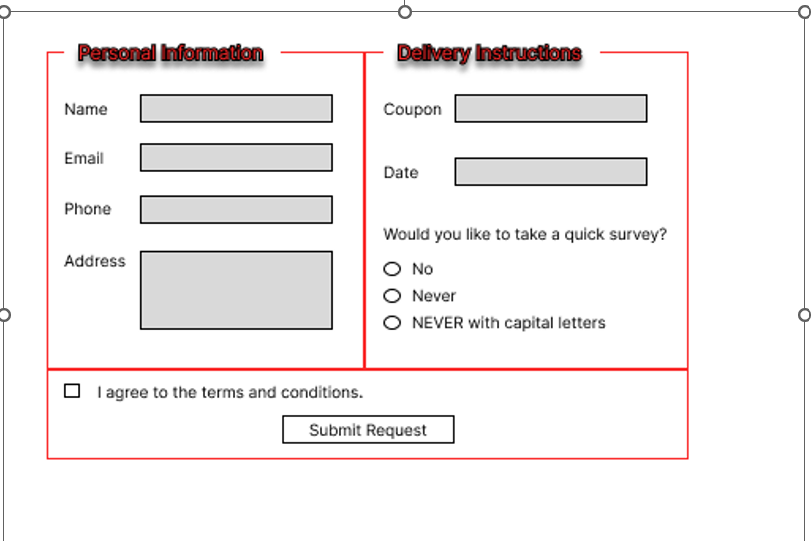
The input form on the left side marks
Name should be text field. Required.
Email should be email input field. Required.
Phone should be text input field
Address should be textarea. Required
The input field on the right side marks
Coupon should be number input field. Minimum of numbers is required
Date should be date input field
The radio buttons should toggle between the three values
Add a checkbox and submit button mark
The css design should match the given picture. Colors dont have to be exact. Carefully analyze what css properties should be added. Important: The input fields are shown in grey but dont add grey color to the fields. Keep the input fields color as is marks
Step by Step Solution
There are 3 Steps involved in it
1 Expert Approved Answer
Step: 1 Unlock

Question Has Been Solved by an Expert!
Get step-by-step solutions from verified subject matter experts
Step: 2 Unlock
Step: 3 Unlock
 Study Help