





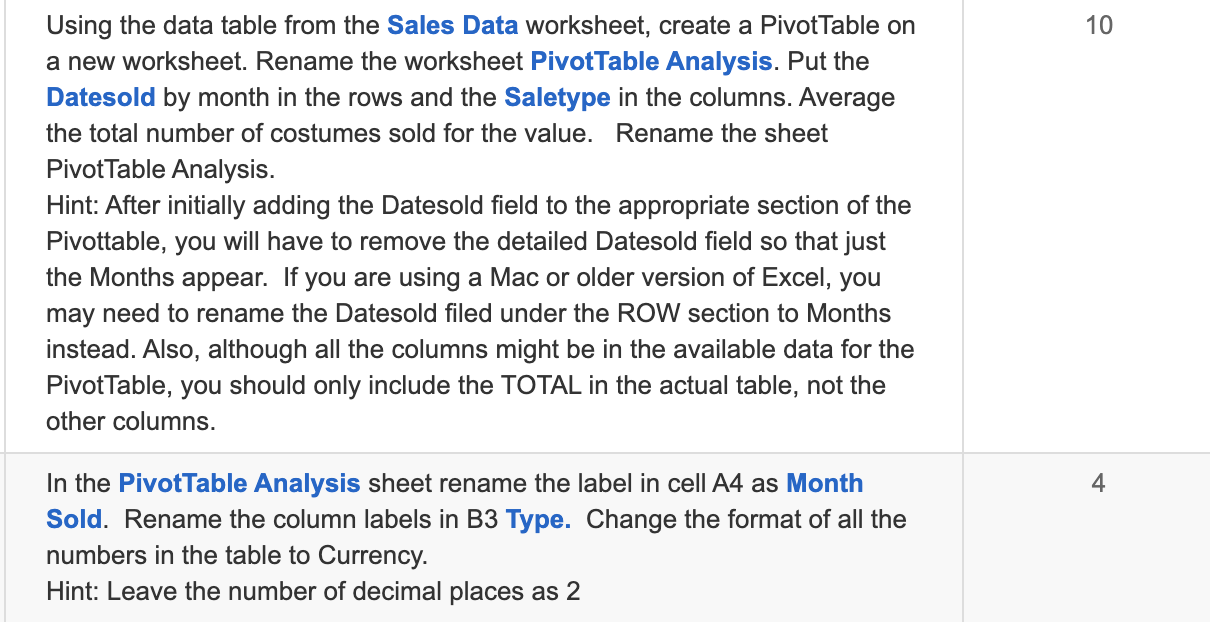
Question: 10 Using the data table from the Sales Data worksheet, create a Pivot Table on a new worksheet. Rename the worksheet PivotTable Analysis. Put the
10 Using the data table from the Sales Data10 Using the data table from the Sales Data

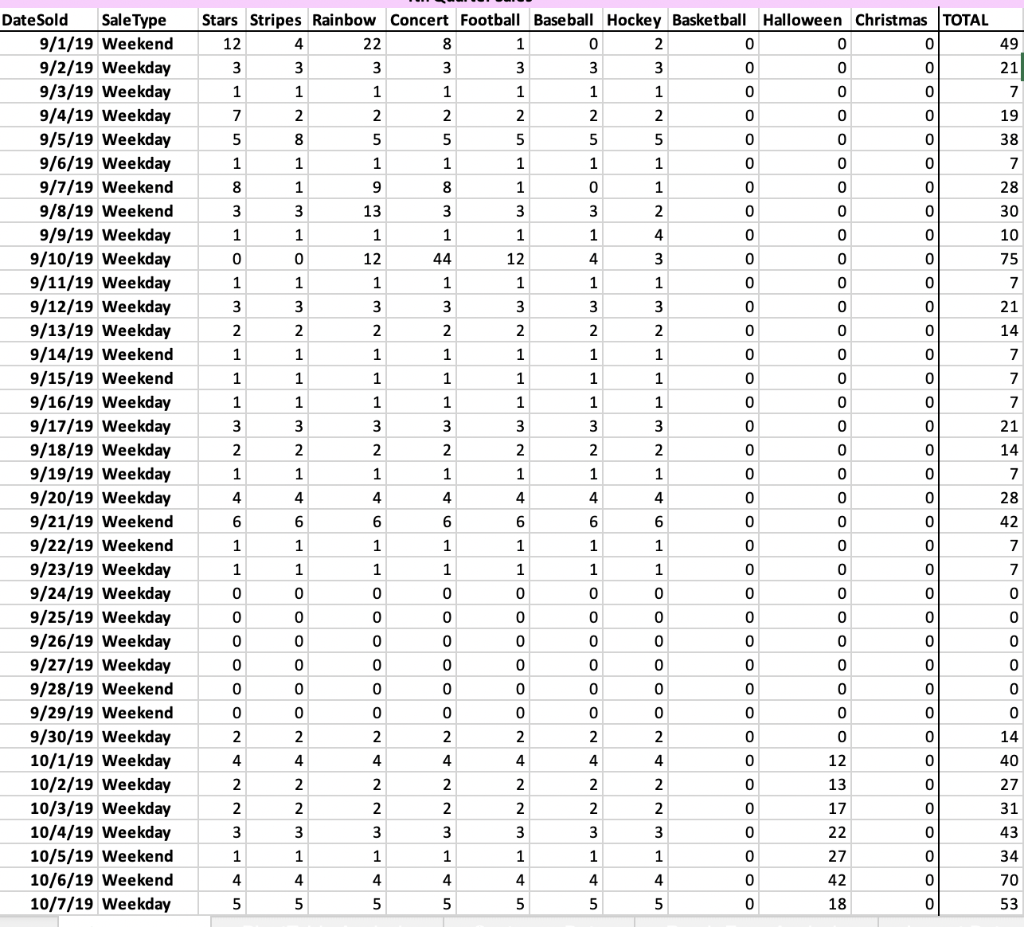
10 Using the data table from the Sales Data worksheet, create a Pivot Table on a new worksheet. Rename the worksheet PivotTable Analysis. Put the Datesold by month in the rows and the Saletype in the columns. Average the total number of costumes sold for the value. Rename the sheet Pivot Table Analysis. Hint: After initially adding the Datesold field to the appropriate section of the Pivottable, you will have to remove the detailed Datesold field so that just the Months appear. If you are using a Mac or older version of Excel, you may need to rename the Datesold filed under the ROW section to Months instead. Also, although all the columns might be in the available data for the Pivot Table, you should only include the TOTAL in the actual table, not the other columns. 4 In the PivotTable Analysis sheet rename the label in cell A4 as Month Sold. Rename the column labels in B3 Type. Change the format of all the numbers in the table to Currency. Hint: Leave the number of decimal places as 2 49 21 7 19 38 7 28 30 10 75 7 21 14 7 Date Sold Sale Type 9/1/19 Weekend 9/2/19 Weekday 9/3/19 Weekday 9/4/19 Weekday 9/5/19 Weekday 9/6/19 Weekday 9/7/19 Weekend 9/8/19 Weekend 9/9/19 Weekday 9/10/19 Weekday 9/11/19 Weekday 9/12/19 Weekday 9/13/19 Weekday 9/14/19 Weekend 9/15/19 Weekend 9/16/19 Weekday 9/17/19 Weekday 9/18/19 Weekday 9/19/19 Weekday 9/20/19 Weekday 9/21/19 Weekend 9/22/19 Weekend 9/23/19 Weekday 9/24/19 Weekday 9/25/19 Weekday 9/26/19 Weekday 9/27/19 Weekday 9/28/19 Weekend 9/29/19 Weekend 9/30/19 Weekday 10/1/19 Weekday 10/2/19 Weekday 10/3/19 Weekday 10/4/19 Weekday 10/5/19 Weekend 10/6/19 Weekend 10/7/19 Weekday Stars Stripes Rainbow Concert Football Baseball Hockey Basketball Halloween Christmas TOTAL 12 4 22 8 1 0 2 0 0 3 3 3 3 3 3 3 0 0 0 1 1 1 1 1 1 1 0 0 7 2 2 2 2 2 2 0 0 5 8 5 5 5 5 5 0 0 1 1 1 1 1 1 1 0 0 8 1 9 8 1 0 1 0 0 0 3 3 13 3 3 3 2 0 0 1 1 1 1 1 1 4 0 0 0 0 12 44 12 4 3 0 0 0 1 1 1 1 1 1 1 0 0 0 3 3 3 3 3 3 3 0 0 0 0 2 2 2 2 2 2 2 0 0 0 1 1 1 1 1 1 1 0 0 0 1 1 1 1 1 1 1 0 0 0 1 1 1 1 1 1 1 0 0 0 3 3 3 3 3 3 3 0 0 0 2 2 2 2 2 2 2 0 0 0 1 1 1 1 1 1 1 0 0 0 4 4 4 4 4 4 4 0 0 0 6 6 6 6 6 6 6 0 0 0 1 1 1 1 1 1 1 0 0 0 1 1 1 1 1 1 1 0 0 0 0 0 0 0 0 0 0 0 0 0 0 0 0 0 0 0 0 0 0 0 0 0 0 0 0 0 0 0 0 0 0 0 0 0 0 0 0 0 0 0 0 0 0 0 0 0 0 0 0 0 0 0 0 0 0 0 0 0 0 0 2 2 2 2 2 2 2 0 0 4 4 4 4 4 4 4 0 12 2 2 2 2 2 2 2 0 13 2 2 2 2 2 2 2 0 17 3 3 3 3 3 3 3 0 22 1 1 1 1 1 1 1 1 0 27 4 4 4 4 4 4 4 0 5 5 5 5 5 5 5 0 18 7 7 21 14 7 28 42 7 7 0 0 0 0 0 0 14 40 27 31 43 34 42 70 53 10 Using the data table from the Sales Data worksheet, create a Pivot Table on a new worksheet. Rename the worksheet PivotTable Analysis. Put the Datesold by month in the rows and the Saletype in the columns. Average the total number of costumes sold for the value. Rename the sheet Pivot Table Analysis. Hint: After initially adding the Datesold field to the appropriate section of the Pivottable, you will have to remove the detailed Datesold field so that just the Months appear. If you are using a Mac or older version of Excel, you may need to rename the Datesold filed under the ROW section to Months instead. Also, although all the columns might be in the available data for the Pivot Table, you should only include the TOTAL in the actual table, not the other columns. 4 In the PivotTable Analysis sheet rename the label in cell A4 as Month Sold. Rename the column labels in B3 Type. Change the format of all the numbers in the table to Currency. Hint: Leave the number of decimal places as 2 49 21 7 19 38 7 28 30 10 75 7 21 14 7 Date Sold Sale Type 9/1/19 Weekend 9/2/19 Weekday 9/3/19 Weekday 9/4/19 Weekday 9/5/19 Weekday 9/6/19 Weekday 9/7/19 Weekend 9/8/19 Weekend 9/9/19 Weekday 9/10/19 Weekday 9/11/19 Weekday 9/12/19 Weekday 9/13/19 Weekday 9/14/19 Weekend 9/15/19 Weekend 9/16/19 Weekday 9/17/19 Weekday 9/18/19 Weekday 9/19/19 Weekday 9/20/19 Weekday 9/21/19 Weekend 9/22/19 Weekend 9/23/19 Weekday 9/24/19 Weekday 9/25/19 Weekday 9/26/19 Weekday 9/27/19 Weekday 9/28/19 Weekend 9/29/19 Weekend 9/30/19 Weekday 10/1/19 Weekday 10/2/19 Weekday 10/3/19 Weekday 10/4/19 Weekday 10/5/19 Weekend 10/6/19 Weekend 10/7/19 Weekday Stars Stripes Rainbow Concert Football Baseball Hockey Basketball Halloween Christmas TOTAL 12 4 22 8 1 0 2 0 0 3 3 3 3 3 3 3 0 0 0 1 1 1 1 1 1 1 0 0 7 2 2 2 2 2 2 0 0 5 8 5 5 5 5 5 0 0 1 1 1 1 1 1 1 0 0 8 1 9 8 1 0 1 0 0 0 3 3 13 3 3 3 2 0 0 1 1 1 1 1 1 4 0 0 0 0 12 44 12 4 3 0 0 0 1 1 1 1 1 1 1 0 0 0 3 3 3 3 3 3 3 0 0 0 0 2 2 2 2 2 2 2 0 0 0 1 1 1 1 1 1 1 0 0 0 1 1 1 1 1 1 1 0 0 0 1 1 1 1 1 1 1 0 0 0 3 3 3 3 3 3 3 0 0 0 2 2 2 2 2 2 2 0 0 0 1 1 1 1 1 1 1 0 0 0 4 4 4 4 4 4 4 0 0 0 6 6 6 6 6 6 6 0 0 0 1 1 1 1 1 1 1 0 0 0 1 1 1 1 1 1 1 0 0 0 0 0 0 0 0 0 0 0 0 0 0 0 0 0 0 0 0 0 0 0 0 0 0 0 0 0 0 0 0 0 0 0 0 0 0 0 0 0 0 0 0 0 0 0 0 0 0 0 0 0 0 0 0 0 0 0 0 0 0 0 2 2 2 2 2 2 2 0 0 4 4 4 4 4 4 4 0 12 2 2 2 2 2 2 2 0 13 2 2 2 2 2 2 2 0 17 3 3 3 3 3 3 3 0 22 1 1 1 1 1 1 1 1 0 27 4 4 4 4 4 4 4 0 5 5 5 5 5 5 5 0 18 7 7 21 14 7 28 42 7 7 0 0 0 0 0 0 14 40 27 31 43 34 42 70 53

Step by Step Solution

There are 3 Steps involved in it

1 Expert Approved Answer
Step: 1 Unlock blur-text-image

Question Has Been Solved by an Expert!

Get step-by-step solutions from verified subject matter experts

Step: 2 Unlock
Step: 3 Unlock

Students Have Also Explored These Related General Management Questions!