Question: Tasks: Using the data in the Monthly App Downloads worksheet, create a new worksheet called App Downloads Report with the following four charts (All your
Tasks: Using the data in the Monthly App
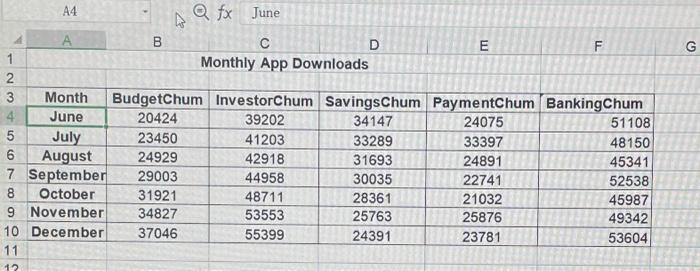
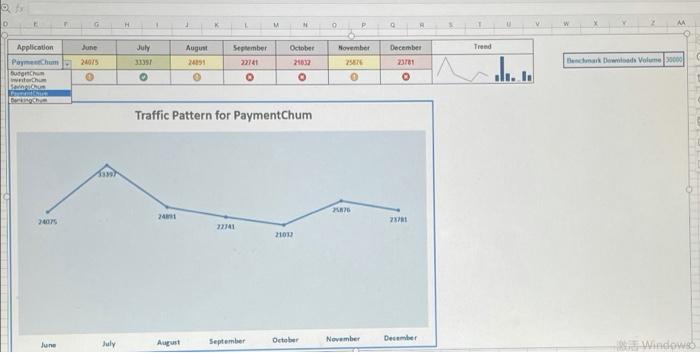
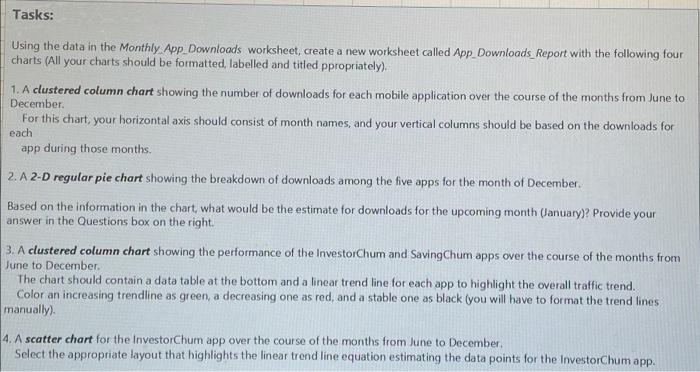
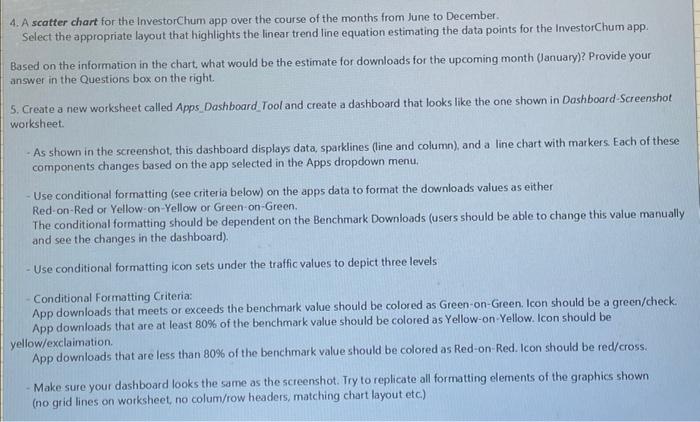
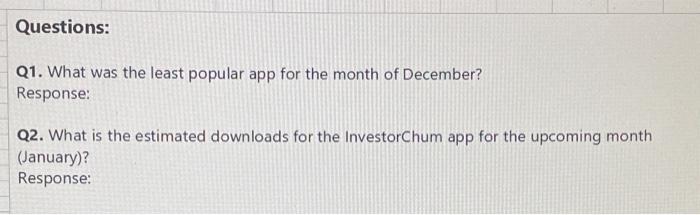
Tasks: Using the data in the Monthly App Downloads worksheet, create a new worksheet called App Downloads Report with the following four charts (All your charts should be formatted, labelled and titled ppropriately). 1. A clustered column chart showing the number of downloads for each mobile application over the course of the months from June to December For this chart, your horizontal axis should consist of month names, and your vertical columns should be based on the downloads for each app during those months. 2. A 2-D regular pie chart showing the breakdown of downloads among the five apps for the month of December Based on the information in the chart, what would be the estimate for downloads for the upcoming month January)? Provide your answer in the Questions box on the right. 3. A clustered column chart showing the performance of the InvestorChum and Saving Chum apps over the course of the months from June to December The chart should contain a data table at the bottom and a linear trendline for each app to highlight the overall traffic trend. Color an increasing trendline as green, a decreasing one as red, and a stable one as black (you will have to format the trend lines manually). 4. A scatter chart for the InvestorChum app over the course of the months from June to December Select the appropriate layout that highlights the linear trend line equation estimating the data points for the InvestorChum app. 4. A scatter chart for the InvestorChum app over the course of the months from June to December Select the appropriate layout that highlights the linear trendline equation estimating the data points for the InvestorChum app. Based on the information in the chart, what would be the estimate for downloads for the upcoming month (January)? Provide your answer in the Questions box on the right. 5. Create a new worksheet called Apps Dashboard Tool and create a dashboard that looks like the one shown in Dashboard-Screenshot worksheet - As shown in the screenshot, this dashboard displays data, sparklines (line and column), and a line chart with markers. Each of these components changes based on the app selected in the Apps dropdown menu. Use conditional formatting (see criteria below) on the apps data to format the downloads values as either Red-on-Red or Yellow-on-Yellow or Green-on-Green. The conditional formatting should be dependent on the Benchmark Downloads (users should be able to change this value manually and see the changes in the dashboard). Use conditional formatting icon sets under the traffic values to depict three levels Conditional Formatting Criteria: App downloads that meets or exceeds the benchmark value should be colored as Green-on-Green Icon should be a green/check. App downloads that are at least 80% of the benchmark value should be colored as Yellow-on-Yellow. Icon should be yellow/exclaimation App downloads that are less than 80% of the benchmark value should be colored as Red-on-Red. Icon should be red/cross Make sure your dashboard looks the same as the screenshot. Try to replicate all formatting elements of the graphics shown (no grid lines on worksheet, no colum/row headers matching chart layout etc) Questions: Q1. What was the least popular app for the month of December? Response: Q2. What is the estimated downloads for the InvestorChum app for the upcoming month (January)? Response: . A4 afx June B D E F 1 Monthly App Downloads 2 3 Month BudgetChum InvestorChum SavingsChum PaymentChum Banking Chum 4 June 20424 39202 34147 24075 51108 5 July 23450 41203 33289 33397 48150 6 August 24929 42918 31693 24891 45341 7 September 29003 44958 30035 22741 52538 8 October 31921 48711 28361 21032 45987 9 November 34827 53553 25763 25876 49342 10 December 37046 55399 24391 23781 53604 11 12 D P 0 AA November Trend July 33357 August 2011 September 22741 O Application June Paymchum 24075 TO Chu SUS October 21032 O 2576 December 23701 O Benchmark wood Volume 0000 O Traffic Pattern for PaymentChum 24 2407 271 22141 2100 July June August September October November December Windowed
Step by Step Solution

There are 3 Steps involved in it

1 Expert Approved Answer
Step: 1 Unlock blur-text-image

Question Has Been Solved by an Expert!

Get step-by-step solutions from verified subject matter experts

Step: 2 Unlock
Step: 3 Unlock

Students Have Also Explored These Related General Management Questions!