







Question: 1)Enter the information from the lecture notes into MS Project (your trial version) 2) Click on the View Then More Views and then the Network
1)Enter the information from the lecture notes into MS Project (your trial version)
2) Click on the "View" Then "More Views" and then the Network Diagram view
3) Compare your work to the answers inLecture Notes
4) Submit your .MMP file to me as your HW upload
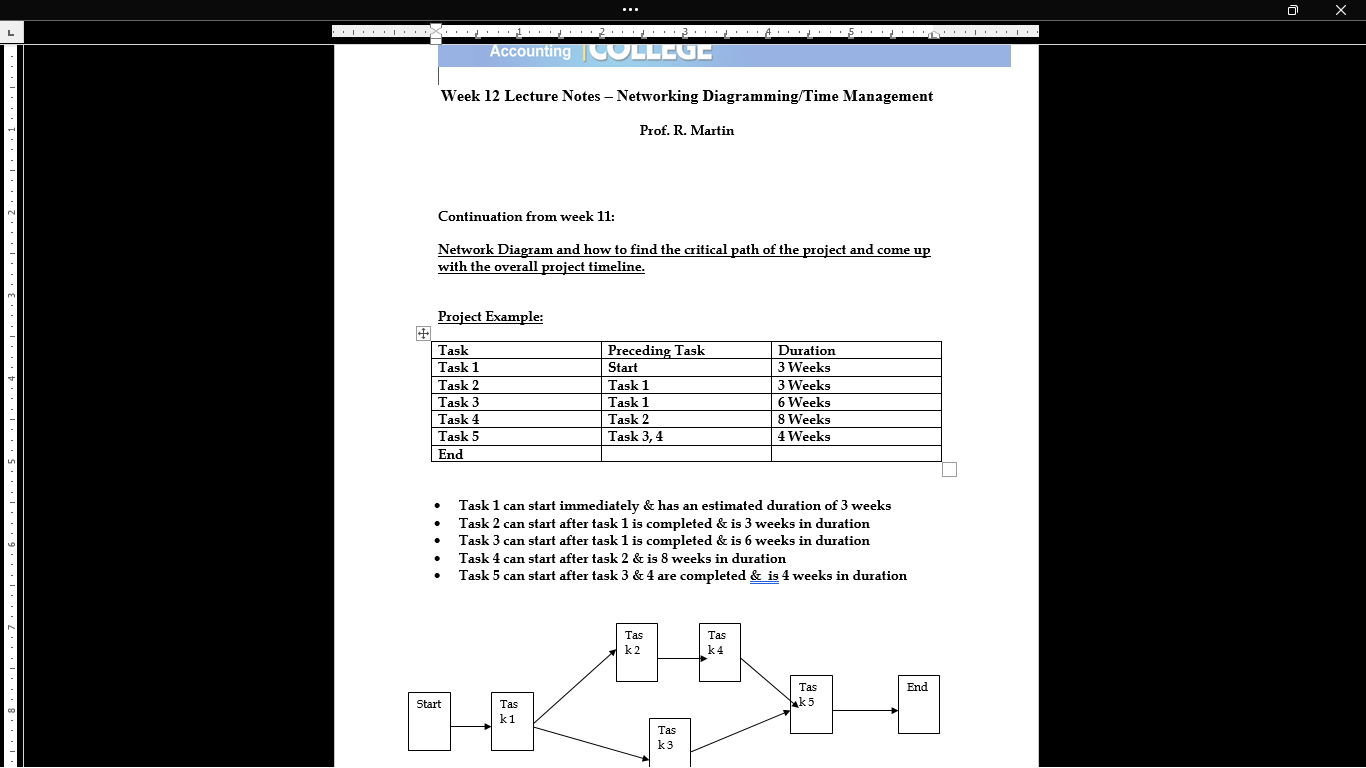
Week 12 Lecture Notes Networking Diagramming/Time Management Prof. R. Martin Continuation from week 11 Network Diagram and how to find the critical path of the project and come up with the overall project timeline. Project Example: F Task Preceding Task Duration Task 1 Start 3 Weeks Task2 Task1 3 Weeks Task 3 Task1 6 Weeks Task4 Task2 8 Weeks Task 5 Task 3,4 4 Weeks End Task 1 can start immediately & has an estimated duration of 3 weeks Task 2 can start after task 1 is completed & is 3 weeks in duration Task 3 can start after task 1 is completed & is 6 weeks in duration Task 4 can start after task 2 & is 8 weeks in duration Task 5 can start after task 3 & 4 are completed & is 4 weeks in duration
Step by Step Solution
There are 3 Steps involved in it

Get step-by-step solutions from verified subject matter experts
 Study Help