







Question: VISUAL BASIC 2015 vb.net Exercise 11-1 Create and use an Inventory Item class In this exercise, youll add a class to an Inventory Maintenance application
VISUAL BASIC 2015 vb.net
Exercise 11-1 Create and use an Inventory Item class
In this exercise, youll add a class to an Inventory Maintenance application and then add code to the two forms that use this class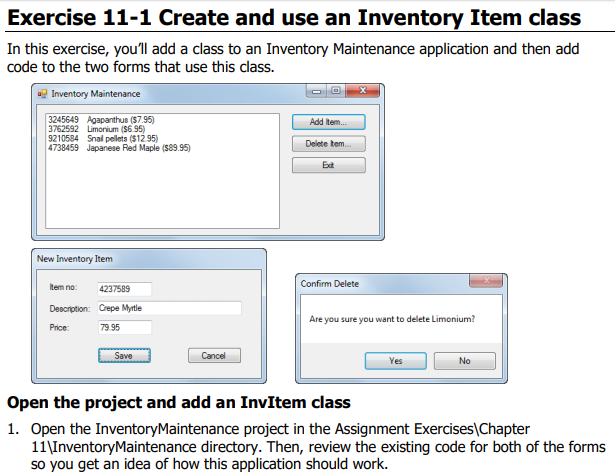
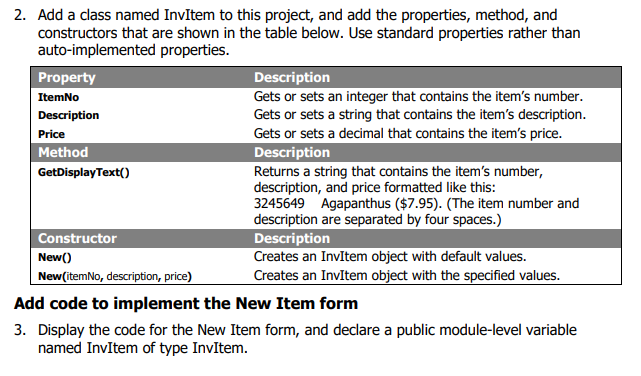
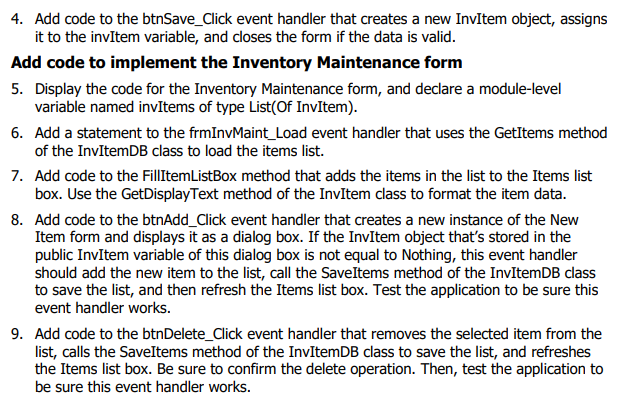
The code that I was given to start with is as follows:
Public Class frmInvMaint
' Add a statement here that declares the list of items.
Private Sub frmInvMaint_Load(sender As Object, e As EventArgs) Handles MyBase.Load ' Add code here that gets the list of items and fills the list box. End Sub
Private Sub FillItemListBox() lstItems.Items.Clear() ' Add code here that loads the list box with the items in the list. End Sub
Private Sub btnAdd_Click(sender As Object, e As EventArgs) Handles btnAdd.Click ' Add code here that creates an instance of the New Item form, ' displays the form as a dialog box, and gets the new item ' entered on that form. End Sub
Private Sub btnDelete_Click(sender As Object, e As EventArgs) Handles btnDelete.Click Dim i As Integer = lstItems.SelectedIndex If i -1 Then ' Add code here that displays a dialog box to confirm ' the deletion and then removes the item from the list, ' saves the list of products, and refreshes the list box ' if the deletion is confirmed. End If End Sub
Private Sub btnExit_Click(sender As Object, e As EventArgs) Handles btnExit.Click Me.Close() End Sub End Class
Public Class frmNewItem
' Add a statement here that declares a public inventory item.
Private Sub btnSave_Click(sender As Object, e As EventArgs) Handles btnSave.Click If IsValidData() Then ' Add code here that creates a new item ' and closes the form. End If End Sub
Private Function IsValidData() As Boolean Return Validator.IsPresent(txtItemNo) AndAlso Validator.IsInt32(txtItemNo) AndAlso Validator.IsPresent(txtDescription) AndAlso Validator.IsPresent(txtPrice) AndAlso Validator.IsDecimal(txtPrice) End Function
Private Sub btnCancel_Click(sender As Object, e As EventArgs) Handles btnCancel.Click Me.Close() End Sub End Class
Public Class Validator
Public Shared Property Title As String = "Entry Error"
Public Shared Function IsPresent(textBox As TextBox) _ As Boolean If textBox.Text = "" Then MessageBox.Show(textBox.Tag.ToString & " is a required field.", Title) textBox.Select() Return False Else Return True End If End Function
Public Shared Function IsDecimal(textBox As TextBox) _ As Boolean Dim number As Decimal = 0 If Decimal.TryParse(textBox.Text, number) Then Return True Else MessageBox.Show(textBox.Tag.ToString & " must be a decimal value.", Title) textBox.Select() textBox.SelectAll() Return False End If End Function
Public Shared Function IsInt32(textBox As TextBox) _ As Boolean Dim number As Integer = 0 If Int32.TryParse(textBox.Text, number) Then Return True Else MessageBox.Show(textBox.Tag.ToString & " must be an integer value.", Title) textBox.Select() textBox.SelectAll() Return False End If End Function
Public Shared Function IsWithinRange(textBox As TextBox, min As Decimal, max As Decimal) As Boolean Dim number As Decimal = CDec(textBox.Text) If number max Then MessageBox.Show(textBox.Tag.ToString & " must be between " & min & " and " & max & ".", Title) textBox.Select() textBox.SelectAll() Return False Else Return True End If End Function End Class
Exercise 11-1 Create and use an Inventory Item class In this exercise, you'll add a class to an Inventory Maintenance application and then add code to the two forms that use this class. 2 a Inventory Maintenance 245649 Agapanthus ($7.95 3762592 Limorium ($6 95) 9210584 Snal pelets ($12.95 4738459 Japanese Red Maple ($89.95) Add item Delete temm Edt New Inventory Item Confirm Delete em no: 4237589 Descrption: Crepe Myrtle Price: Are you sure you want to delete Limonium? 7995 Save Cancel No Open the project and add an InvItem class 1. Open the InventoryMaintenance project in the Assignment Exercises Chapter 11 InventoryMaintenance directory. Then, review the existing code for both of the forms so you get an idea of how this application should work
Step by Step Solution
There are 3 Steps involved in it

Get step-by-step solutions from verified subject matter experts
 Study Help