







Question: Need code for this 41Extra exercises for Murach's Visual Basic 2015 Extra 22-1 Work with an XML file In this exercise, you'll add code to
 Need code for this
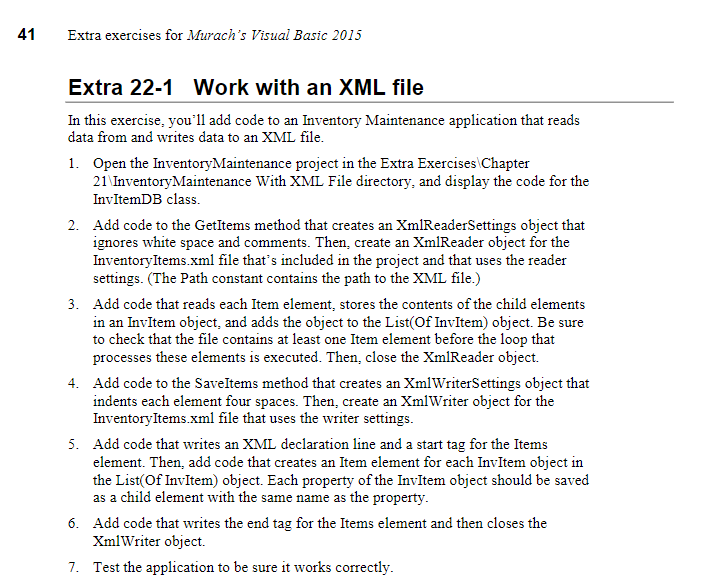
41Extra exercises for Murach's Visual Basic 2015 Extra 22-1 Work with an XML file In this exercise, you'll add code to an Inventory Maintenance application that reads data from and writes data to an XML file Open the InventoryMaintenance project in the Extra Exercises Chapter 21 InventoryMaintenance With XML File directory, and display the code for the InvItemDB class. 1. 2. Add code to the Getltems method that creates an XmlReaderSettings object that ignores white space and comments. Then, create an XmlReader object for the InventoryItems.xml file that's included in the project and that uses the reader settings. (The Path constant contains the path to the XML file.) Add code that reads each Item element, stores the contents of the child elements in an InvItem object, and adds the object to the List(Of InvItem) object. Be sure to check that the file contains at least one Item element before the loop that processes these elements is executed. Then, close the XmlReader object. 3. Add code to the Saveltems method that creates an XmlWriterSettings object that indents each element four spaces. Then, create an XmlWriter object for the InventoryItems.xml file that uses the writer settings. Add code that writes an XML declaration line and a start tag for the Items element. Then, add code that creates an Item element for each InvItem object in the List(Of InvItem) object. Each property of the InvItem object should be saved as a child element with the same name as the property Add code that writes the end tag for the Items element and then closes the XmlWriter object. 4. 5. 6. 7. Test the application to be sure it works correctly 41Extra exercises for Murach's Visual Basic 2015 Extra 22-1 Work with an XML file In this exercise, you'll add code to an Inventory Maintenance application that reads data from and writes data to an XML file Open the InventoryMaintenance project in the Extra Exercises Chapter 21 InventoryMaintenance With XML File directory, and display the code for the InvItemDB class. 1. 2. Add code to the Getltems method that creates an XmlReaderSettings object that ignores white space and comments. Then, create an XmlReader object for the InventoryItems.xml file that's included in the project and that uses the reader settings. (The Path constant contains the path to the XML file.) Add code that reads each Item element, stores the contents of the child elements in an InvItem object, and adds the object to the List(Of InvItem) object. Be sure to check that the file contains at least one Item element before the loop that processes these elements is executed. Then, close the XmlReader object. 3. Add code to the Saveltems method that creates an XmlWriterSettings object that indents each element four spaces. Then, create an XmlWriter object for the InventoryItems.xml file that uses the writer settings. Add code that writes an XML declaration line and a start tag for the Items element. Then, add code that creates an Item element for each InvItem object in the List(Of InvItem) object. Each property of the InvItem object should be saved as a child element with the same name as the property Add code that writes the end tag for the Items element and then closes the XmlWriter object. 4. 5. 6. 7. Test the application to be sure it works correctly
Step by Step Solution
There are 3 Steps involved in it

Get step-by-step solutions from verified subject matter experts
 Study Help