







Question: (40 points) Based on the Entity Relationship Diagram (shown on the next page) for the Academic Database, complete the following: Create the SQL statements for
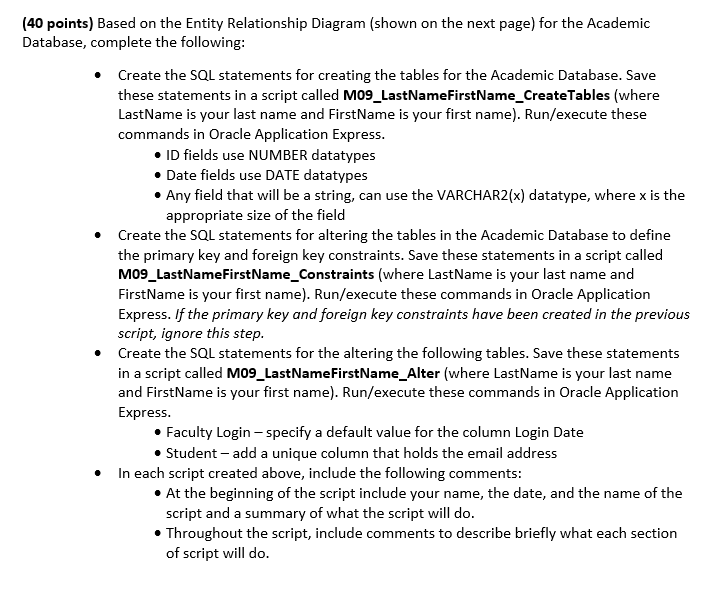
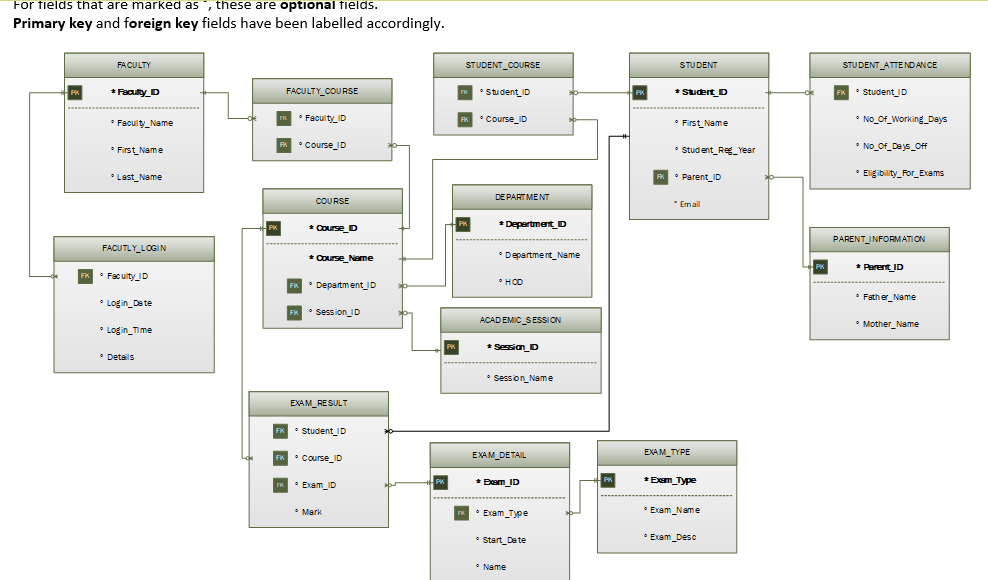
(40 points) Based on the Entity Relationship Diagram (shown on the next page) for the Academic Database, complete the following: Create the SQL statements for creating the tables for the Academic Database. Save these statements in a script called M09_LastNameFirstName_CreateTables (where LastName is your last name and FirstName is your first name). Run/execute these commands in Oracle Application Express ID fields use NUMBER datatypes Date fields use DATE datatypes Any field that will be a string, can use the VARCHAR2(x) datatype, where x is the appropriate size of the field Create the SQL statements for altering the tables in the Academic Database to define the primary key and foreign key constraints. Save these statements in a script called M09 LastNameFirstName_Constraints (where LastName is your last name and FirstName is your first name). Run/execute these commands in Oracle Application Express. If the primary key and foreign key constraints have been created in the previous script, ignore this step Create the SQL statements for the altering the following tables. Save these statements in a script called M09 LastNameFirstName Alter (where LastName is your last name and FirstName is your first name). Run/execute these commands in Oracle Application Express e Faculty Login specify a default value for the column Login Date Student - add a unique column that holds the email address In each script created above, include the following comments: At the beginning of the script include your name, the date, and the name of the script and a summary of what the script will do Throughout the script, include comments to describe briefly what each section of script will do
Step by Step Solution
There are 3 Steps involved in it

Get step-by-step solutions from verified subject matter experts
 Study Help