







Question: 5. Create a pivot table from the sheet Store Sales and call it SalesPlus5 and put Stores in the Row area and Amount in the

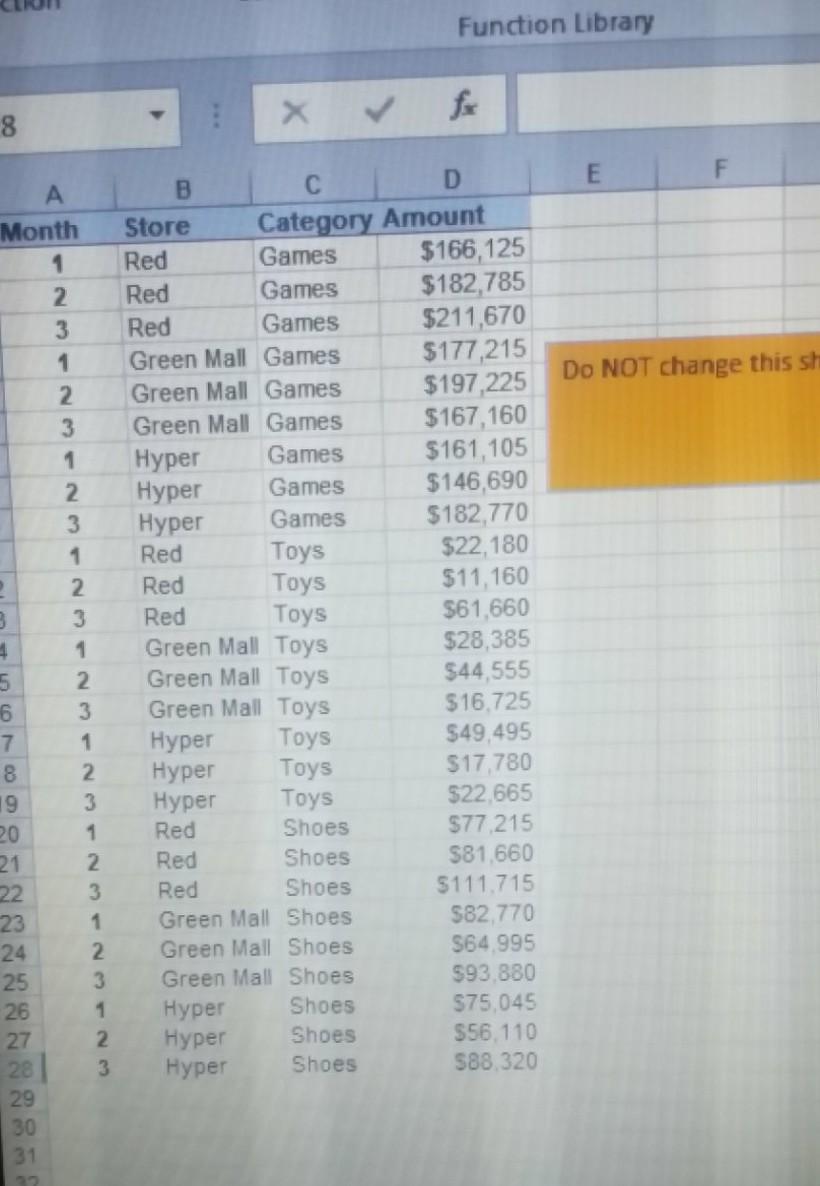
5. Create a pivot table from the sheet "Store Sales" and call it "SalesPlus5" and put Stores in the Row area and Amount in the values area twice. Display the percent sales of each store relative to the total Add a calculation to show Sales increased by 5% and name this field "Sales2021" Pivot table should start in cell A1 4 marks Function Library 8 E Do NOT change this sh A Month 1 2 3 1 2 3 1 2. 3 1 2. 3 3 4 1 5 2 6 3 7 1 8 2 19 3 20 1 21 2 22 3 23 1 2 25 3 26 1 27 2 2 3 29 30 31 B C D Store Category Amount Red Games $166,125 Red Games $182,785 Red Games $211,670 Green Mall Games $177,215 Green Mall Games $197,225 Green Mall Games $167,160 Hyper Games $161,105 Hyper Games $146,690 Hyper Games $182,770 Red Toys $22,180 Red Toys $11,160 Red Toys $61,660 Green Mall Toys $28,385 Green Mall Toys $44,555 Green Mall Toys $16.725 Hyper Toys $49,495 Hyper Toys $17,780 Hyper Toys $22,665 Red Shoes $77.215 Red Shoes $81,660 Red Shoes $111.715 Green Mall Shoes $82.770 Green Mall Shoes $64 995 Green Mall Shoes $93.880 Hyper Shoes $75,045 Hyper Shoes $56.110 Hyper Shoes 588.320 24
Step by Step Solution
There are 3 Steps involved in it
1 Expert Approved Answer
Step: 1 Unlock

Question Has Been Solved by an Expert!
Get step-by-step solutions from verified subject matter experts
Step: 2 Unlock
Step: 3 Unlock
 Study Help