







Question: Basic Procedures You must: Fill out a readme.txt file with your information (goes in your user folder, an example readme.txt file is provided) Have
![Have code that runs with the command: java Computer [filename] You may:](https://s3.amazonaws.com/si.experts.images/answers/2024/08/66bdb7a93f3d1_35266bdb7a89d597.jpg)
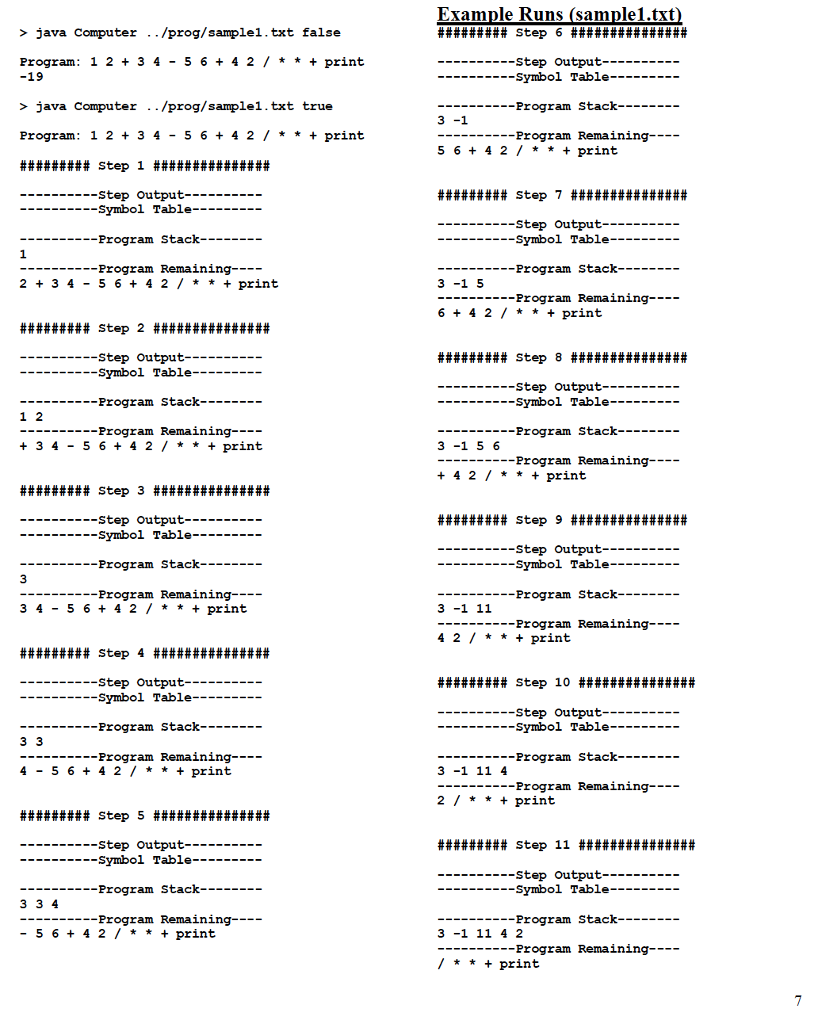
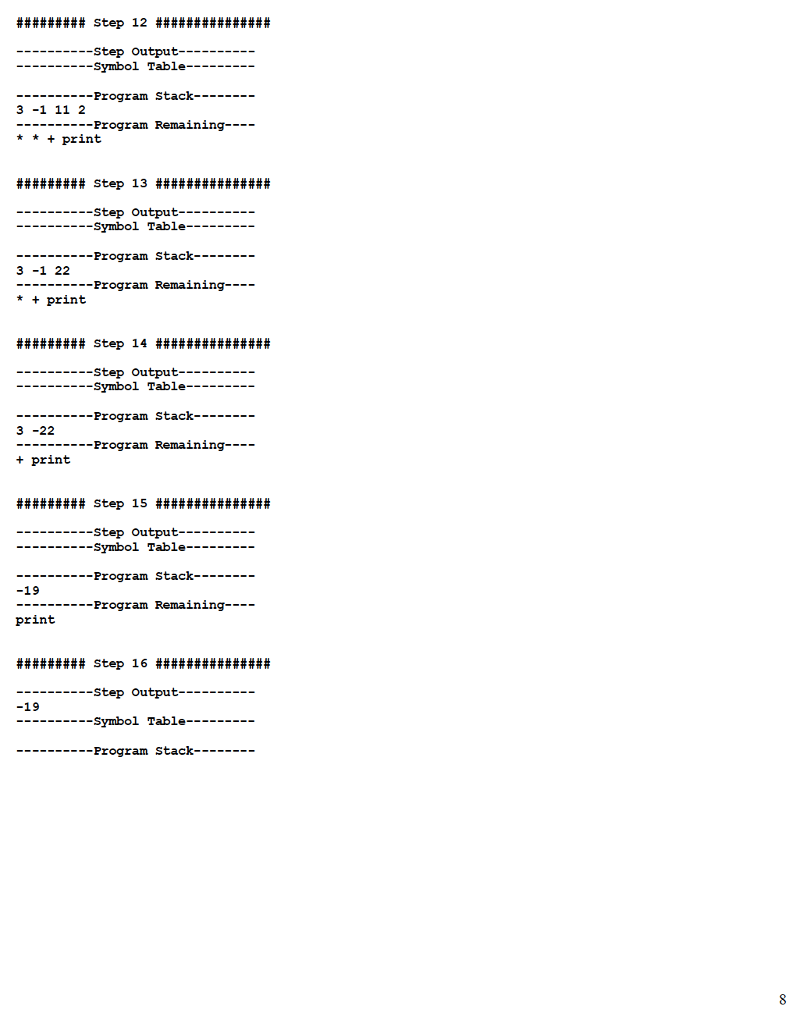
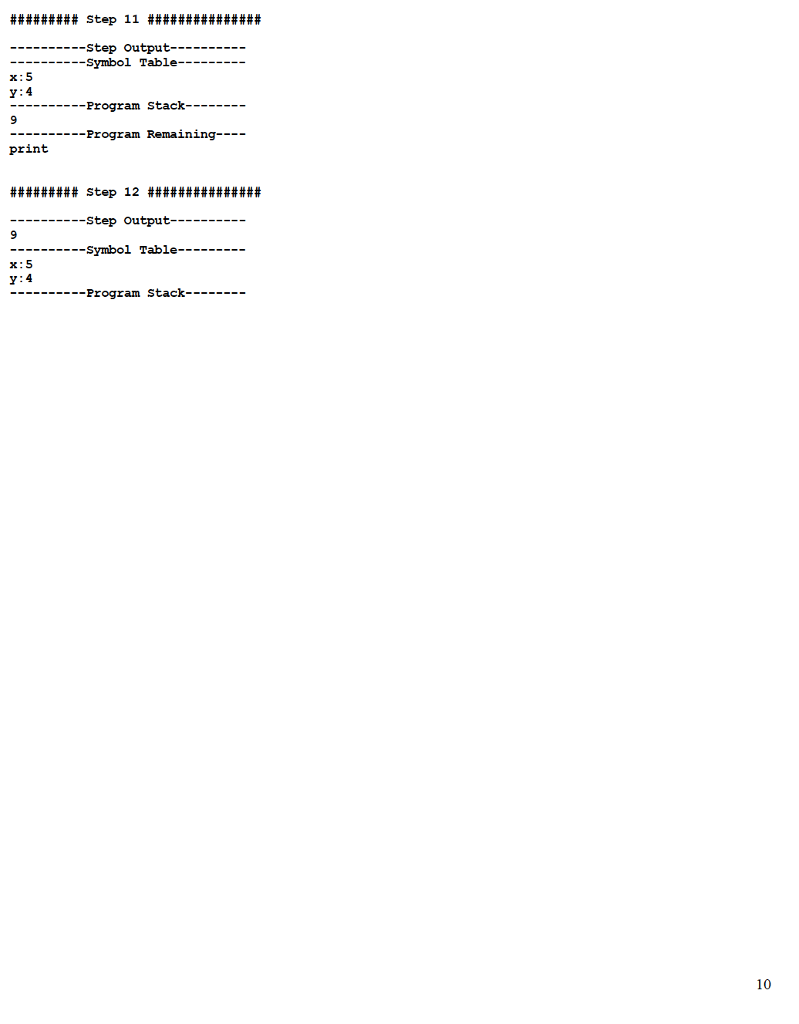
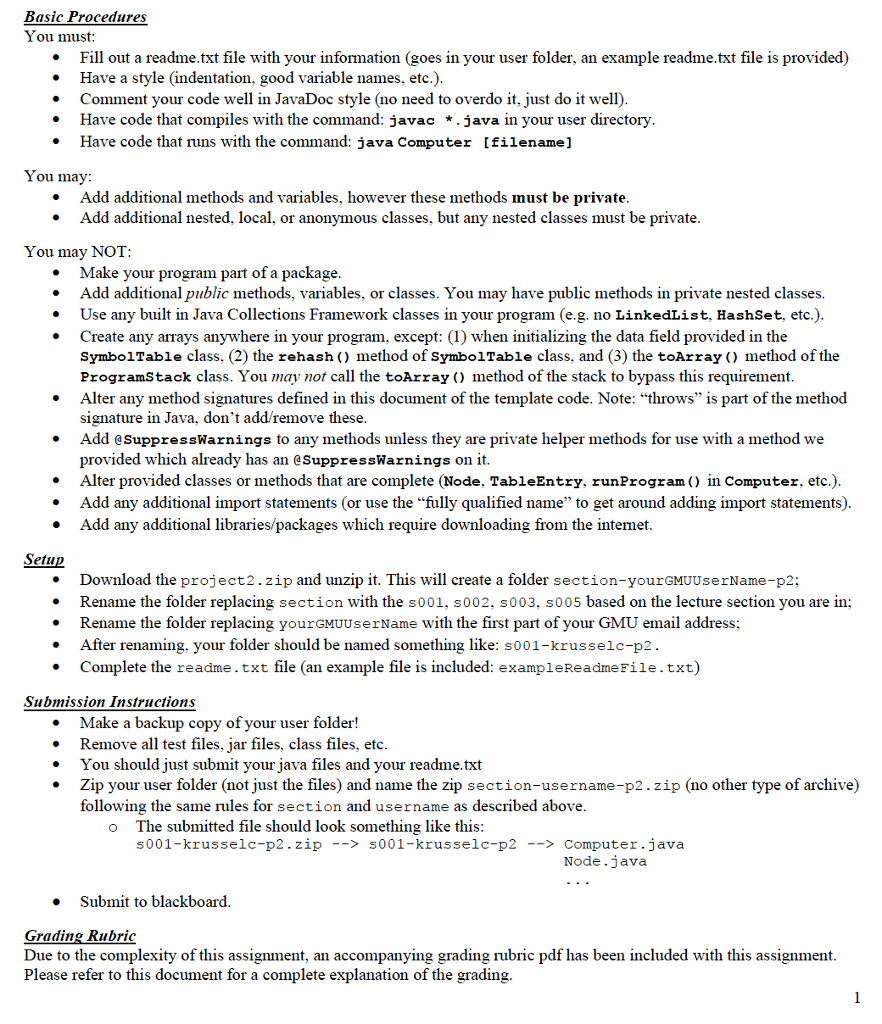
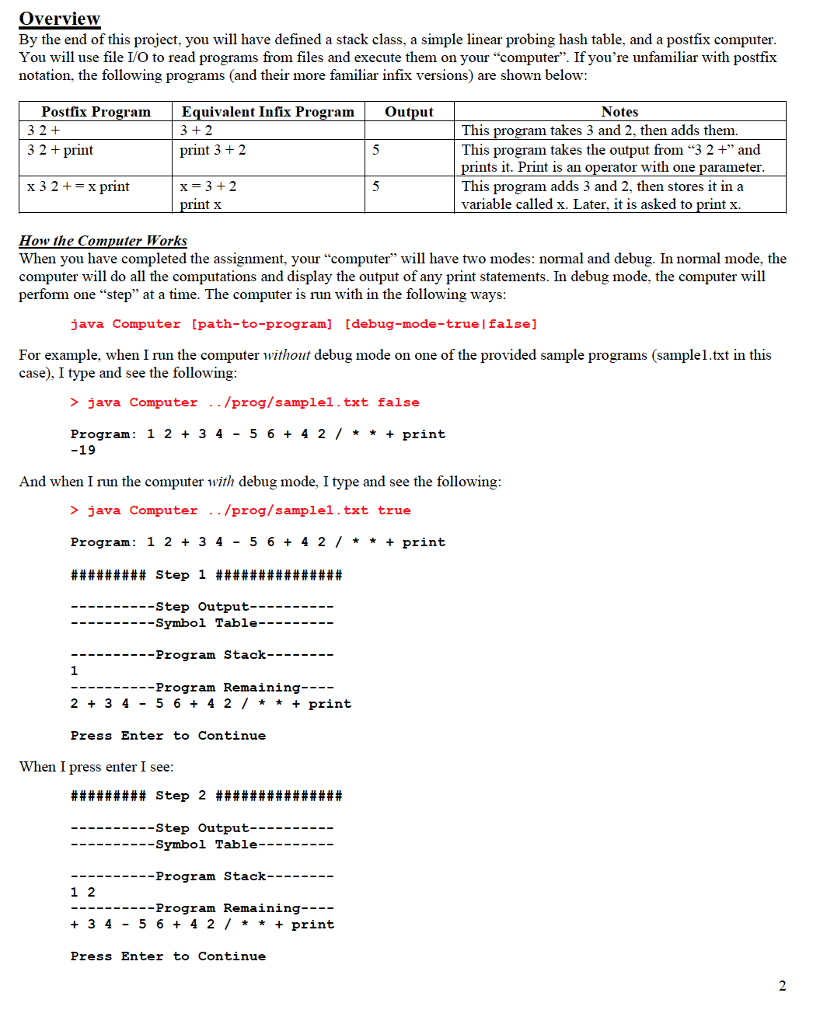
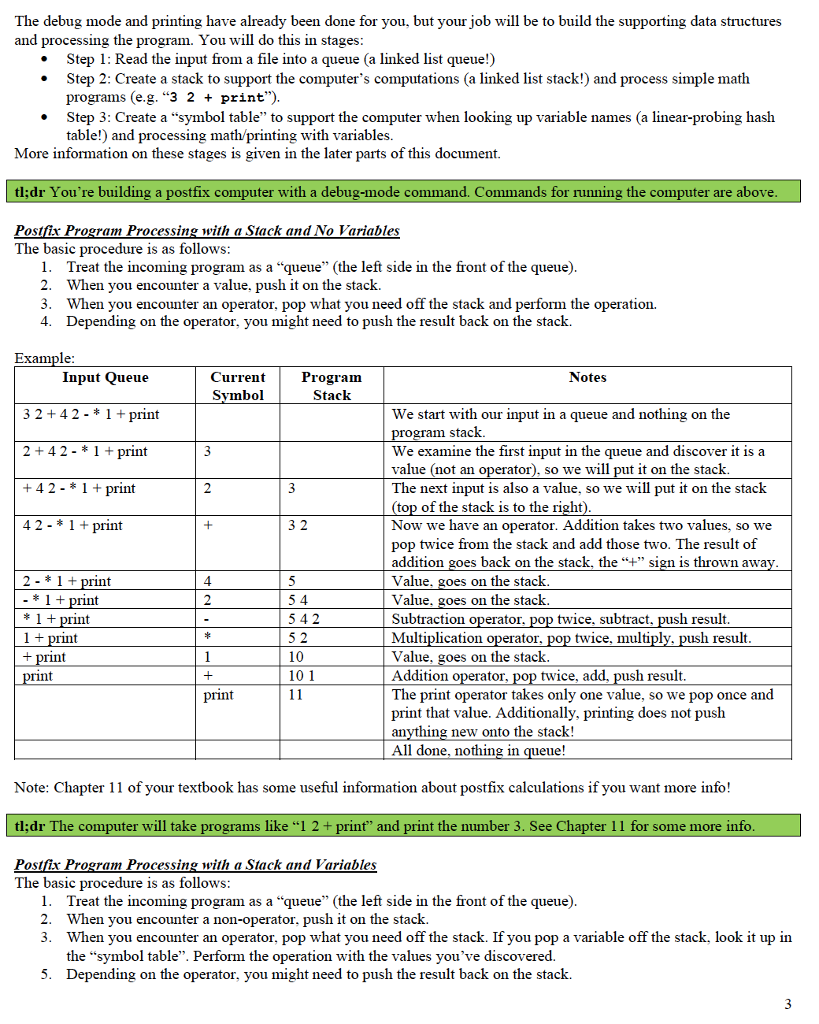
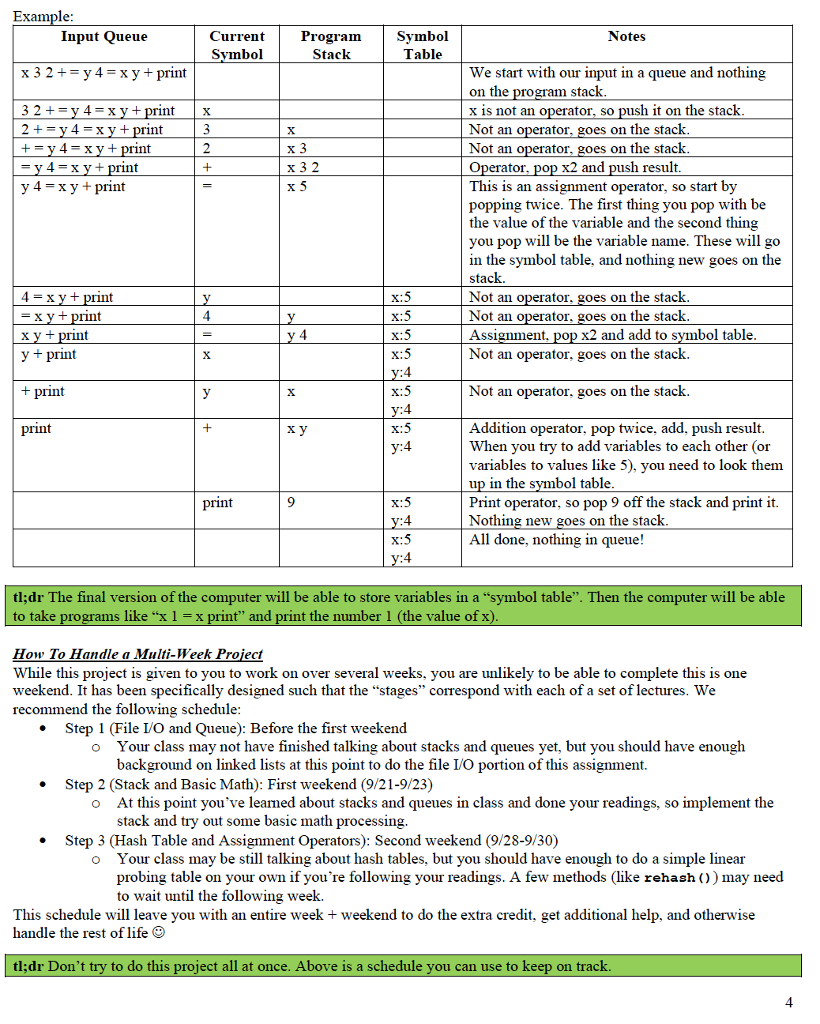
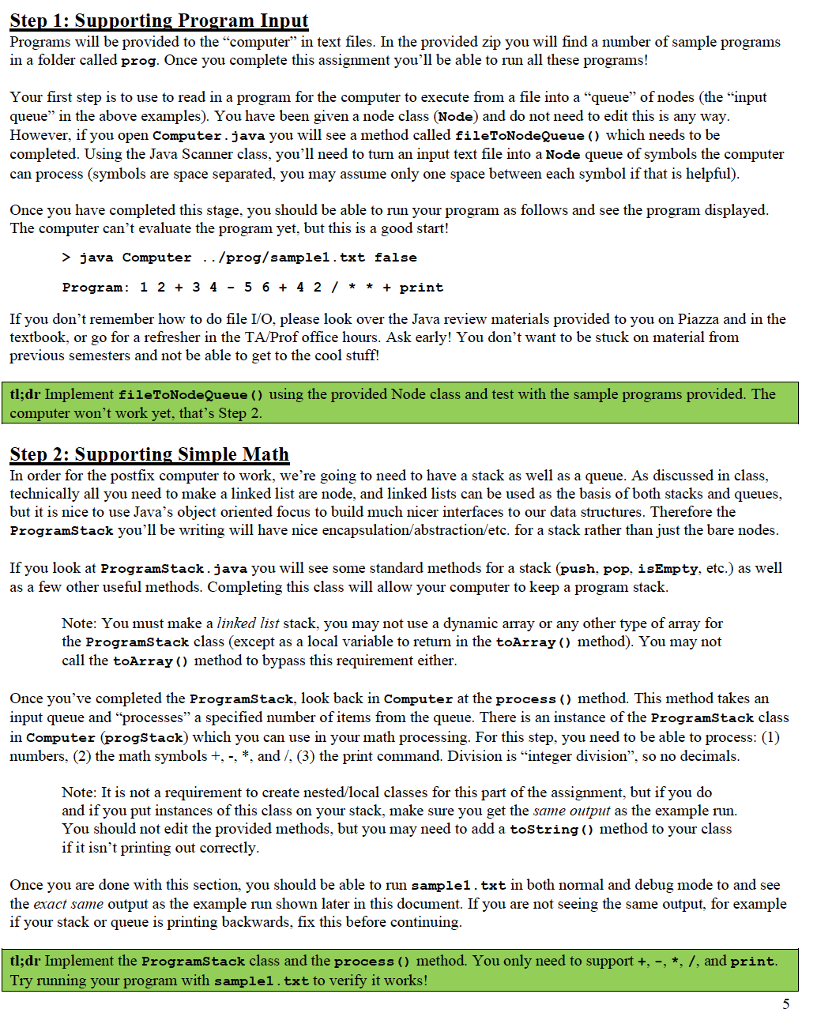
Basic Procedures You must: Fill out a readme.txt file with your information (goes in your user folder, an example readme.txt file is provided) Have a style (indentation, good variable names, etc.). Comment your code well in JavaDoc style (no need to overdo it, just do it well). Have code that compiles with the command: javac *.java in your user directory. Have code that runs with the command: java Computer [filename] You may: Add additional methods and variables, however these methods must be private. Add additional nested, local, or anonymous classes, but any nested classes must be private. You may NOT: Make your program part of a package. Add additional public methods, variables, or classes. You may have public methods in private nested classes. Use any built in Java Collections Framework classes in your program (e.g. no LinkedList, HashSet, etc.). Create any arrays anywhere in your program, except: (1) when initializing the data field provided in the SymbolTable class, (2) the rehash () method of SymbolTable class, and (3) the toArray () method of the ProgramStack class. You may not call the toArray () method of the stack to bypass this requirement. Alter any method signatures defined in this document of the template code. Note: "throws" is part of the method signature in Java, don't add/remove these. Add @SuppressWarnings to any methods unless they are private helper methods for use with a method we provided which already has an @SuppressWarnings on it. Alter provided classes or methods that are complete (Node, TableEntry, runProgram () in Computer, etc.). Add any additional import statements (or use the "fully qualified name" to get around adding import statements). Add any additional libraries/packages which require downloading from the internet. Setup Download the project2.zip and unzip it. This will create a folder section-yourGMUUserName-p2; Rename the folder replacing section with the s001, s002, s003, s005 based on the lecture section you are in; Rename the folder replacing your GMUUserName with the first part of your GMU email address; After renaming, your folder should be named something like: s001-krusselc-p2. Complete the readme.txt file (an example file is included: example Readme File.txt) Submission Instructions Make a backup copy of your user folder! Remove all test files, jar files, class files, etc. You should just submit your java files and your readme.txt Zip your user folder (not just the files) and name the zip section-username-p2.zip (no other type of archive) following the same rules for section and username as described above. The submitted file should look something like this: s001-krusselc-p2.zip --> s001-krusselc-p2 - Computer.java Node.java Submit to blackboard. Grading Rubric Due to the complexity of this assignment, an accompanying grading rubric pdf has been included with this assignment. Please refer to this document for a complete explanation of the grading. 1 Overview By the end of this project, you will have defined a stack class, a simple linear probing hash table, and a postfix computer. You will use file I/O to read programs from files and execute them on your "computer". If you're unfamiliar with postfix notation, the following programs (and their more familiar infix versions) are shown below: Equivalent Infix Program Postfix Program 32+ 3+2 32+ print print 3+2 x 32 += x print x=3+2 print x How the Computer Works Output 5 5 Notes This program takes 3 and 2, then adds them. This program takes the output from "3 2 + and prints it. Print is an operator with one parameter. This program adds 3 and 2, then stores it in a variable called x. Later, it is asked to print x. When you have completed the assignment, your "computer" will have two modes: normal and debug. In normal mode, the computer will do all the computations and display the output of any print statements. In debug mode, the computer will perform one "step" at a time. The computer is run with in the following ways: java Computer [path-to-program] [debug-mode-true |false] For example, when I run the computer without debug mode on one of the provided sample programs (sample1.txt in this case), I type and see the following: > java Computer ../prog/sample1.txt false Program: 12 + 34-56 + 4 2 /* * + print -19 And when I run the computer with debug mode, I type and see the following: > java Computer /prog/samplel.txt true - Program: 12 +34 56 +42/ * * + print 1 %23%23%23%23%23%23%23 Step 1 %2%23%23%2%3 ---Step Output--- ---Symbol Table-------- ---Program Stack-------- ------Program Remaining---- 2 + 3 4 5 6 + 4 2 /* * + print Press Enter to Continue When I press enter I see: 1 2 #23%23%23%23%23%23 Step 2 #### ---Step Output- --Symbol Table- --Program Stack- -------Program Remaining---- + 3 4 5 6 + 4 2 /* * + print - Press Enter to Continue 2 The debug mode and printing have already been done for you, but your job will be to build the supporting data structures and processing the program. You will do this in stages: Step 1: Read the input from a file into a queue (a linked list queue!) Step 2: Create a stack to support the computer's computations (a linked list stack!) and process simple math programs (e.g. "3 2 + print"). Step 3: Create a "symbol table" to support the computer when looking up variable names (a linear-probing hash table!) and processing math/printing with variables. More information on these stages is given in the later parts of this document. tl;dr You're building a postfix computer with a debug-mode command. Commands for running the computer are above. Postfix Program Processing with a Stack and No Variables The basic procedure is as follows: 1. Treat the incoming program as a "queue" (the left side in the front of the queue). 2. When you encounter a value, push it on the stack. 3. Notes When you encounter an operator, pop what you need off the stack and perform the operation. 4. Depending on the operator, you might need to push the result back on the stack. Example: Input Queue 32+42 1+ print 2+42 - * 1 + print Current Symbol Program Stack 3 +42 - * 1 + print 2 42 - * 1 + print + 32 2-1+ print 4 * 1 + print 2 54 *1+print 1+ print +print print - 542 52 * 1 10 + print 101 11 We start with our input in a queue and nothing on the program stack. We examine the first input in the queue and discover it is a value (not an operator), so we will put it on the stack. The next input is also a value, so we will put it on the stack (top of the stack is to the right). Now we have an operator. Addition takes two values, so we pop twice from the stack and add those two. The result of addition goes back on the stack, the + sign is thrown away. Value, goes on the stack. Value, goes on the stack. Subtraction operator, pop twice, subtract, push result. Multiplication operator, pop twice, multiply, push result. Value, goes on the stack. Addition operator, pop twice, add, push result. The print operator takes only one value, so we pop once and print that value. Additionally, printing does not push anything new onto the stack! All done, nothing in queue! Note: Chapter 11 of your textbook has some useful information about postfix calculations if you want more info! tl;dr The computer will take programs like 1 2+ print and print the number 3. See Chapter 11 for some more info. Postfix Program Processing with a Stack and Variables The basic procedure is as follows: 1. Treat the incoming program as a queue (the left side in the front of the queue). 2. When you encounter a non-operator, push it on the stack. 3. When you encounter an operator, pop what you need off the stack. If you pop a variable off the stack, look it up in the "symbol table". Perform the operation with the values you've discovered. 5. Depending on the operator, you might need to push the result back on the stack. 3 Example: Input Queue x32+ y4 x y + print 32+ y4=xy+print 2+y4=xy+print +y4=xy+print =y4=xy+print y4=xy+print 4 = xy + print = xy + print x y + print y + print + print print X Current Symbol Program Stack Symbol Table 3 x 2 + = x 3 x 32 x5 x:5 y 4 y x:5 = y 4 x:5 X x:5 y:4 y x x:5 y:4 + x:5 y:4 print x:5 Notes We start with our input in a queue and nothing on the program stack. x is not an operator, so push it on the stack. Not an operator, goes on the stack. Not an operator, goes on the stack. Operator, pop x2 and push result. This is an assignment operator, so start by popping twice. The first thing you pop with be the value of the variable and the second thing you pop will be the variable name. These will go in the symbol table, and nothing new goes on the stack. Not an operator, goes on the stack. Not an operator, goes on the stack. Assignment, pop x2 and add to symbol table. Not an operator, goes on the stack. Not an operator, goes on the stack. Addition operator, pop twice, add, push result. When you try to add variables to each other (or variables to values like 5), you need to look them up in the symbol table. Print operator, so pop 9 off the stack and print it. Nothing new goes on the stack. y:4 x:5 All done, nothing in queue! y:4 tl;dr The final version of the computer will be able to store variables in a symbol table". Then the computer will be able to take programs like x 1 = x print and print the number 1 (the value of x). How To Handle a Multi-Week Project While this project is given to you to work on over several weeks, you are unlikely to be able to complete this is one weekend. It has been specifically designed such that the "stages" correspond with each of a set of lectures. We recommend the following schedule: Step 1 (File I/O and Queue): Before the first weekend o Your class may not have finished talking about stacks and queues yet, but you should have enough background on linked lists at this point to do the file I/O portion of this assignment. Step 2 (Stack and Basic Math): First weekend (9/21-9/23) At this point you've learned about stacks and queues in class and done your readings, so implement the stack and try out some basic math processing. Step 3 (Hash Table and Assignment Operators): Second weekend (9/28-9/30) Your class may be still talking about hash tables, but you should have enough to do a simple linear probing table on your own if you're following your readings. A few methods (like rehash ()) may need to wait until the following week. This schedule will leave you with an entire week + weekend to do the extra credit, get additional help, and otherwise handle the rest of life tl;dr Don't try to do this project all at once. Above is a schedule you can use to keep on track. 4 Step 1: Supporting Program Input Programs will be provided to the "computer" in text files. In the provided zip you will find a number of sample programs in a folder called prog. Once you complete this assignment you'll be able to run all these programs! Your first step is to use to read in a program for the computer to execute from a file into a "queue" of nodes (the "input queue" in the above examples). You have been given a node class (Node) and do not need to edit this is any way. However, if you open Computer.java you will see a method called fileToNodeQueue () which needs to be completed. Using the Java Scanner class, you'll need to turn an input text file into a Node queue of symbols the computer can process (symbols are space separated, you may assume only one space between each symbol if that is helpful). Once you have completed this stage, you should be able to run your program as follows and see the program displayed. The computer can't evaluate the program yet, but this is a good start! > java Computer /prog/samplel.txt false Program: 1234-56+42 / * * + print If you don't remember how to do file I/O, please look over the Java review materials provided to you on Piazza and in the textbook, or go for a refresher in the TA/Prof office hours. Ask early! You don't want to be stuck on material from previous semesters and not be able to get to the cool stuff! tl;dr Implement fileToNodeQueue () using the provided Node class and test with the sample programs provided. The computer won't work yet, that's Step 2. Step 2: Supporting Simple Math In order for the postfix computer to work, we're going to need to have a stack as well as a queue. As discussed in class, technically all you need to make a linked list are node, and linked lists can be used as the basis of both stacks and queues, but it is nice to use Java's object oriented focus to build much nicer interfaces to our data structures. Therefore the ProgramStack you'll be writing will have nice encapsulation/abstraction/etc. for a stack rather than just the bare nodes. If you look at ProgramStack.java you will see some standard methods for a stack (push, pop, is Empty, etc.) as well as a few other useful methods. Completing this class will allow your computer to keep a program stack. Note: You must make a linked list stack, you may not use a dynamic array or any other type of array for the ProgramStack class (except as a local variable to return in the toArray () method). You may not call the toArray () method to bypass this requirement either. Once you've completed the ProgramStack, look back in Computer at the process () method. This method takes an input queue and "processes" a specified number of items from the queue. There is an instance of the ProgramStack class in Computer (progStack) which you can use in your math processing. For this step, you need to be able to process: (1) numbers, (2) the math symbols +, -, *, and /, (3) the print command. Division is "integer division", so no decimals. Note: It is not a requirement to create nested/local classes for this part of the assignment, but if you do and if you put instances of this class on your stack, make sure you get the same output as the example run. You should not edit the provided methods, but you may need to add a toString() method to your class if it isn't printing out correctly. Once you are done with this section, you should be able to run samplel.txt in both normal and debug mode to and see the exact same output as the example run shown later in this document. If you are not seeing the same output, for example if your stack or queue is printing backwards, fix this before continuing. tl;dr Implement the ProgramStack class and the process () method. You only need to support +, -, *, /, and print. Try running your program with sample1.txt to verify it works! 5 Step 3: Supporting Variables When a computer looks up a variable, it needs to do it fast. Hash tables offer an O(1) average case lookup as long as we don't care about the ordering of our data. If you open SymbolTable.java you'll find the outline of a hash table (with typical methods like put, get, remove, etc.). This hash table specifically maps Strings to some other data type, so that the keys always have a predictable hash code (use the string class' hashCode () method). Once this hash table data structure is completed, look back at the process () method in computer and at the overview section of this document outlining how to process variables when you encounter them in the queue. An instance of SymbolTable (symbols) has already been setup for you in the Computer class, which you need to update when variables are assigned values. When everything looks good, try sample2.txt (and create other sample files for yourself) and test the computer in both debug and non-debug modes. tl;dr Implement the SymbolTable class and enhance the process () method to support the = operator. Try running your program with sample2.txt to verify it works! [Extra Credit, 5 pts] Step 4: Challenge Support the additional operators defined in the Computer's ASSIGN_OPS (+=, -=, *=, /=). The sample3.txt file should work after you do this, but you'll want to do a lot more testing than just that! tl;dr Really? Ok... no extra credit for you :P Requirements Summary An overview of the requirements are listed below, please see the grading rubric for more details. Implementing the classes - You will need to implement required classes and fill the provided template files. JavaDocs - You are required to write JavaDoc comments for all the required classes and methods. Check provided classes for example JavaDoc comments. Big-O - Template files provided to you contains instructions on the REQUIRED Big-O runtime for many methods. Your implementation of those methods should NOT have a higher Big-O. Input Format/Samples We provide an initial set of input files in prog folder of the project package. Feel free to write more for your own testing. You can assume the following with the postfix program you need to process: All inputs are well-structured postfix programs with no syntax errors; There will not be any division by zero; There is always a single space between different numbers, operators, and names in an input file; The postfix program only include integer numbers; You only need to support +, -, *, /, =, and print; all arithmetic operations are binary. You will need to support additionally +=,=,=, /= if you attempt for extra credit. Testing The main methods provided in the template files contain useful code to test your project as you work. You can use command like "java ProgramStack" to run the testing defined in main (). You could also edit main() to perform additional testing. JUnit test cases will not be provided for this project, but feel free to create JUnit tests for yourself. A part of your grade will be based on automatic grading using test cases made from the specifications provided. tl;dr You need to: write code, document it, meet the big-O reqs, and test your code. > java Computer /prog/samplel.txt false Program: 12 +34- 56 + 4 2 /* * + print -19 > java Computer /prog/sample1.txt true Program: 12 + 34-56+4 2 / * * + print 1 %%23%23 Step 1 %## ---Step Output- --Symbol Table-- ---Program Stack-- Program Remaining---- 2+34-56 + 4 2 / * * + print 12 Step 2 %%%%%2 ----Step Output-- ---Symbol Table- ---Program Stack------ -------Program Remaining---- + 3 4 5 6 + 4 2 / + print 3 %23%23%23%23 Step 3 %23##### -----Step Output-- ------Symbol Table----- --Program Stack- --Program Remaining---- 34-56 +4 2 / * * + print 33 %3%23%23 Step 4 %23%2# ----Step Output- --Symbol Table-- -----Program Stack------ -------Program Remaining---- 4-56+42 / ** + print 3 3 4 %23%23%23 Step 5 %23%2# ----Step Output- ---Symbol Table- ---Program Stack- -Program Remaining---- 56 + 4 2 /* * + print Example Runs (sample1.txt) %%%%%%23%23 Step 6 ######## ------Step Output---- --------Symbol Table- 3 -1 ---Program Stack------ Program Remaining---- 56 + 42 / * * + print %%%%23%23 Step 7 ##### 3-15 ----Step Output--- -Symbol Table------ --Program Stack- ----------Program Remaining---- 6 +42/ * + print 3%23%23%23 Step 8 %23## ----Step Output- --Symbol Table----- ------Program Stack----- 3-156 ----------Program Remaining---- +42 + print #23%23%23 step 9 %2% %2%# -----Step Output- 3 -1 11 --Symbol Table- ---Program Stack-- ---------Program Remaining---- 4 2 print %23%23%23%23%23%23%23 Step 10 %23%23%23%23 ---Step Output--- ---Symbol Table------- ------Program Stack- 3 -1 11 4 ----------Program Remaining---- 2 print %%23%23 Step 11 %2%23%# ----Step Output- --Symbol Table- ---Program Stack- 3 -1 11 4 2 ----------Program Remaining---- / * * + print 7 Step 12 ##3 -Step Output- -Symbol Table- ---Program Stack- 3 -1 11 2 ---------Program Remaining---- + print 3 -1 22 %23%23%23 Step 13 %23## --Step Output- -Symbol Table- -Program Stack-- --------Program Remaining---- * + print 3 -22 + print %%23%23 Step 14 % # --Step Output- -Symbol Table- -Program Stack-- -Program Remaining---- %3%23%23 Step 15 %### -Step Output- -Symbol Table- -Program Stack-- -19 Program Remaining---- print Step 16 #### -Step Output- -19 ---Symbol Table- -Program Stack------- 8 x:5 y:4 9 print 9 x:5 y:4 %23%23%23 Step 11 ####3 -Step Output---- --Symbol Table------- -Program Stack------- -----Program Remaining---- %23%23%23 Step 12 %##### -Step Output- --Symbol Table--- -Program Stack-- 10
Step by Step Solution
There are 3 Steps involved in it
Since you have shared the project requirements for a postfix computer assignment lets begin with breaking down the steps to implement the solution Step 1 Supporting Program Input Node Class Likely pro... View full answer

Get step-by-step solutions from verified subject matter experts
 Study Help