







Question: Android Studio Java: For this project you are to create a RecycleView grid view based on the example from the book (book was linearview). You
Android Studio Java:
For this project you are to create a RecycleView grid view based on the example from the book (book was linearview). You are to put the data arrays (from the book) in a separate class named data When the recycleview grid is created it is to randomly select and image, title, and text so each card content is randomly generated. See screenshot.
data arrays to put into a class name data:
| private String[] titles = {"Chapter One", | |
| "Chapter Two", | |
| "Chapter Three", | |
| "Chapter Four", | |
| "Chapter Five", | |
| "Chapter Six", | |
| "Chapter Seven", | |
| "Chapter Eight"}; | |
| private String[] details = {"Item one details", | |
| "Item two details", "Item three details", | |
| "Item four details", "Item five details", | |
| "Item six details", "Item seven details", | |
| "Item eight details"}; | |
| private int[] images = { R.drawable.android_image_1, | |
| R.drawable.android_image_2, | |
| R.drawable.android_image_3, | |
| R.drawable.android_image_4, | |
| R.drawable.android_image_5, | |
| R.drawable.android_image_6, | |
| R.drawable.android_image_7, | |
| R.drawable.android_image_8 }; |
Screenshots: 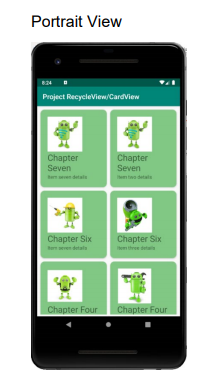
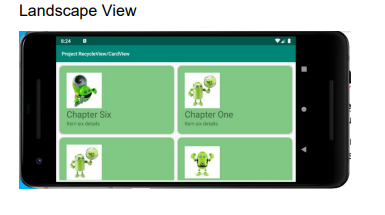
Portrait View Project RecycleView/Card View Chapter Seven Chapter Seven detale Chapter Six Chapter Six Chapter Four Chapter Four Landscape View Petacchi di Chapter Six Chapter One
Step by Step Solution
There are 3 Steps involved in it
1 Expert Approved Answer
Step: 1 Unlock

Question Has Been Solved by an Expert!
Get step-by-step solutions from verified subject matter experts
Step: 2 Unlock
Step: 3 Unlock
 Study Help