







Question: ARDUINO IDE | PROTEUS To create an Arduino IDE code for Proteus Design Suite that meets the following requirements: 1. Display any key pressed at
ARDUINO IDE | PROTEUS To create an Arduino IDE code for Proteus Design Suite that meets the following requirements:
1. Display any key pressed at the keypad on a 7-Segment display. 2. Display the letter "H" if the "#" key is pressed. 3. Display the letter "A" if the "*" key is pressed. 4. Use an Arduino Uno board instead of the MCU shown in the provided image.
Please if you can, Include an image of the new circuit diagram that corresponds to your code. If you can't that's fine. Just explain me where to put the pins. Thanks!
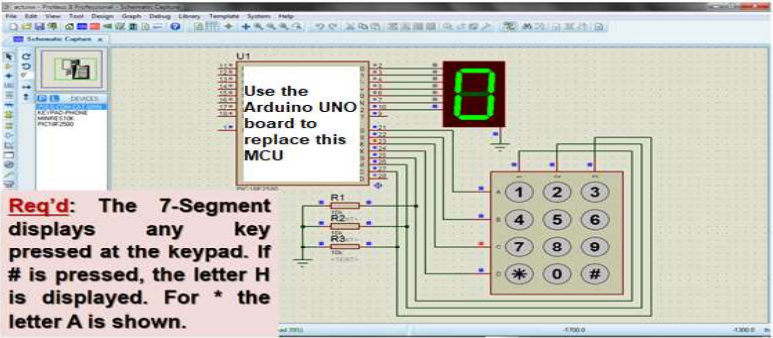
Req'd: The 7-Segment displays any key pressed at the keypad. It \# is pressed, the letter H is displayed. For * the letter A is shown
Step by Step Solution
There are 3 Steps involved in it

Get step-by-step solutions from verified subject matter experts
 Study Help