







Question: Assignment 0 3 - Build the Trips Log app For this assignment, you will build a data - driven web app that uses view models
Assignment Build the Trips Log app
For this assignment, you will build a datadriven web app that uses view models to pass data from
controllers to views, the ViewBag object to pass data from views to the layout, and TempData to persist
data between requests.
Specifications
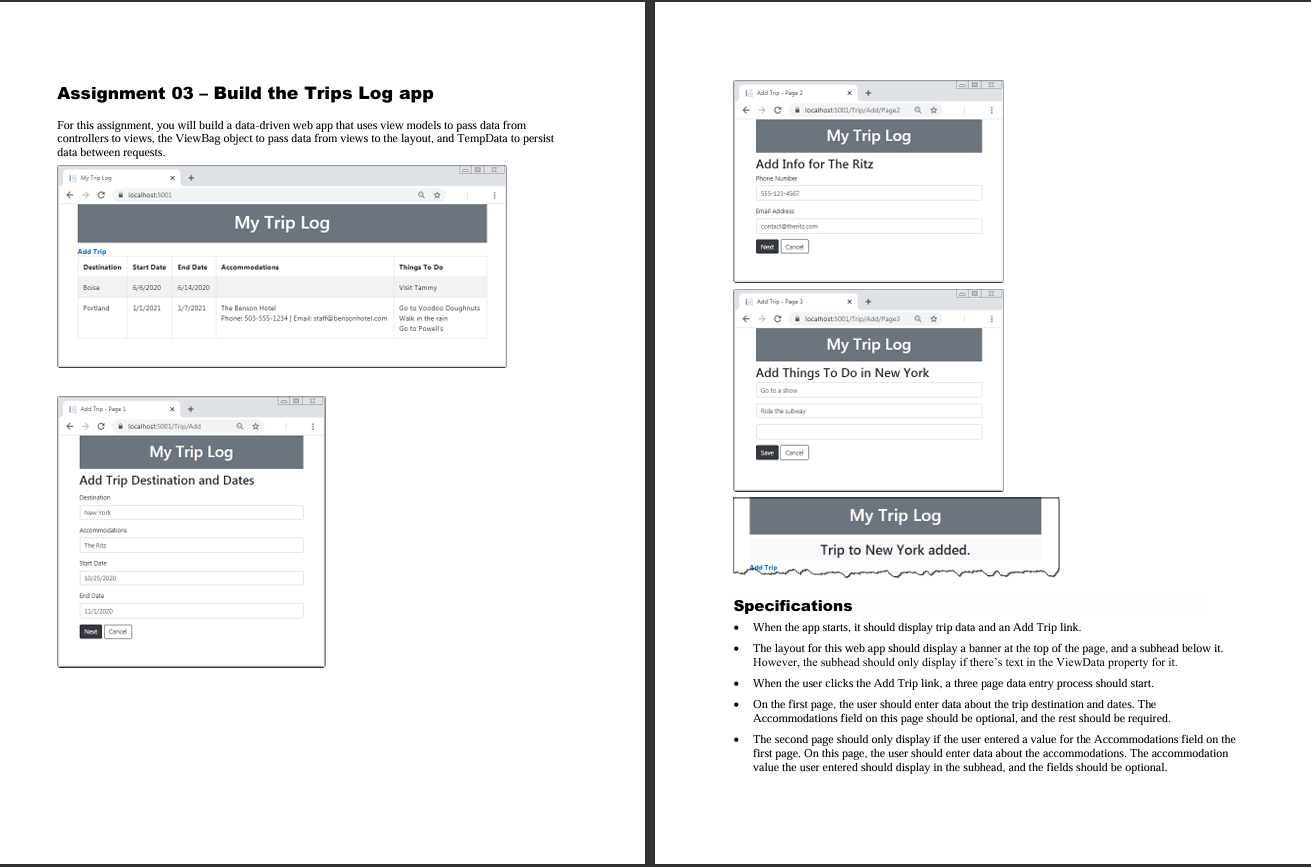
When the app starts, it should display trip data and an Add Trip link.
The layout for this web app should display a banner at the top of the page, and a subhead below it
However, the subhead should only display if there's text in the ViewData property for it
When the user clicks the Add Trip link, a three page data entry process should start.
On the first page, the user should enter data about the trip destination and dates. The
Accommodations field on this page should be optional, and the rest should be required.
The second page should only display if the user entered a value for the Accommodations field on the
first page. On this page, the user should enter data about the accommodations. The accommodation
value the user entered should display in the subhead, and the fields should be optional. On the third page, the user should enter data about things to do on their trip. The destination the user entered on the first page should display in the subhead, and the fields should be optional. When the user clicks the Next button on the first or second page, the web app should save the data posted from the page in TempData. Use this data to get the user entries to display in the subheads as needed, but make sure any data that needs to be saved to the database persists in TempData. When the user clicks the Save button on the third page, the web app should save the data posted from the page and the data in TempData to the database. Then, the Home page should display with a temporary message that the trip has been added. When the user clicks the Cancel button on any of the Add pages, the data in TempData should be cleared and the Home page should display. You can use this statement to clear the data: TempData.Clear; To keep things simple, store all fields for the trip in a single table like this: columns TripIdpkint.not null Destination StartDate,EndDate,Accommodation,AccommodationPhone,AccommodationEmail,and so on
Step by Step Solution
There are 3 Steps involved in it
1 Expert Approved Answer
Step: 1 Unlock

Question Has Been Solved by an Expert!
Get step-by-step solutions from verified subject matter experts
Step: 2 Unlock
Step: 3 Unlock
 Study Help