







Question: Assignment 2: Excel Assignment 1. On your computer open a new Microsoft excel workbook. 2. Fill in the following data as its shown Employee name
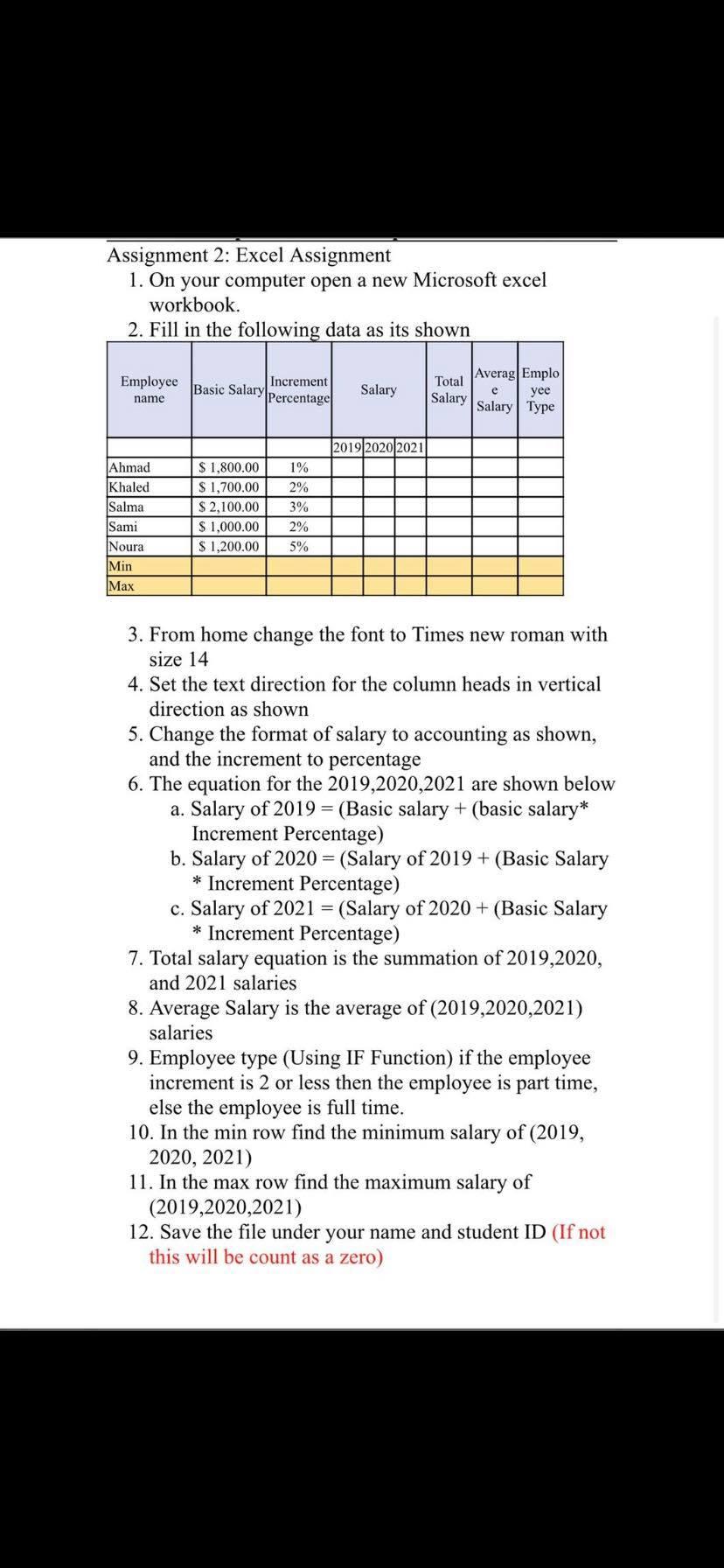
Assignment 2: Excel Assignment 1. On your computer open a new Microsoft excel workbook. 2. Fill in the following data as its shown Employee name Increment Basic Salary Percentage Salary Total Salary Averag Emplo yee Salary Type e 2019 2020 2021 Ahmad Khaled Salma Sami Noura Min Max $ 1,800.00 $ 1,700.00 $ 2,100.00 $ 1,000.00 $ 1,200.00 1% 2% 3% 2% 5% 3. From home change the font to Times new roman with size 14 4. Set the text direction for the column heads in vertical direction as shown 5. Change the format of salary to accounting as shown, and the increment to percentage 6. The equation for the 2019,2020,2021 are shown below a. Salary of 2019 = (Basic salary + (basic salary* Increment Percentage) b. Salary of 2020 = (Salary of 2019 + (Basic Salary * Increment Percentage) c. Salary of 2021 = (Salary of 2020 + (Basic Salary * Increment Percentage) 7. Total salary equation is the summation of 2019,2020, and 2021 salaries 8. Average Salary is the average of (2019,2020,2021) salaries 9. Employee type (Using IF Function) if the employee increment is 2 or less then the employee is part time, else the employee is full time. 10. In the min row find the minimum salary of (2019, 2020, 2021) 11. In the max row find the maximum salary of (2019,2020,2021) 12. Save the file under your name and student ID (If not this will be count as a zero)
Step by Step Solution
There are 3 Steps involved in it

Get step-by-step solutions from verified subject matter experts
 Study Help