Question: Assignment 4 (MS Project) - 30 pts. - Individual Assignment Submit the MS Project Plan to the Appropriate Assignment Module In general, to start a
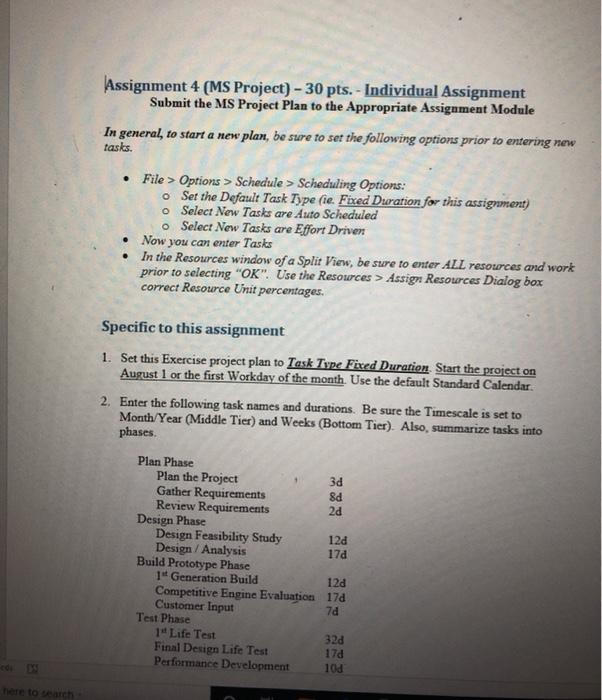
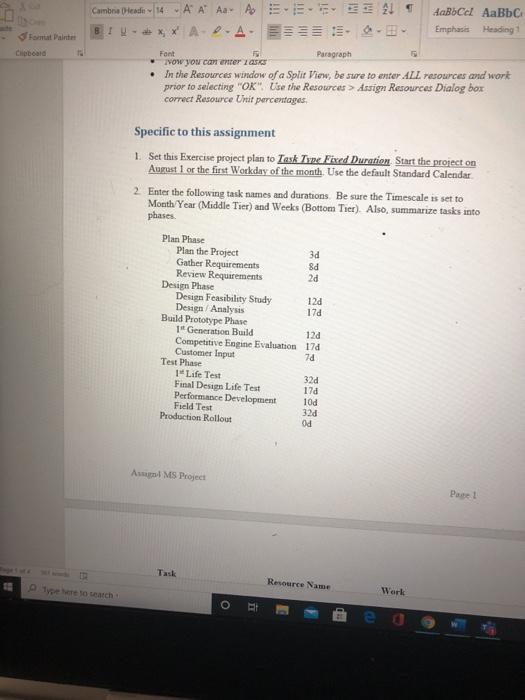
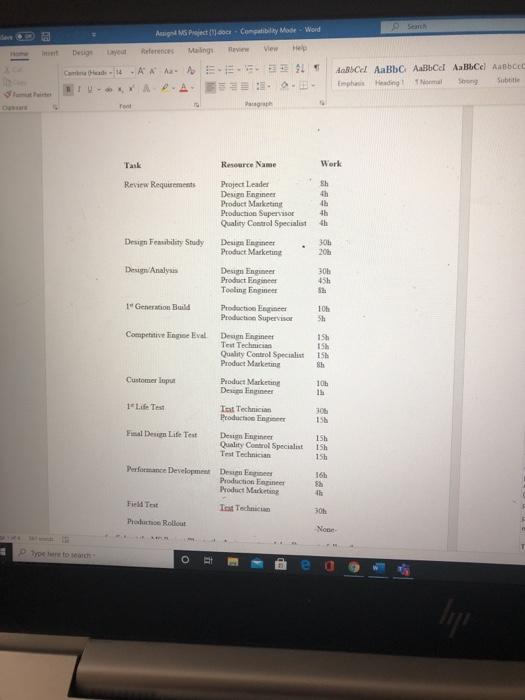
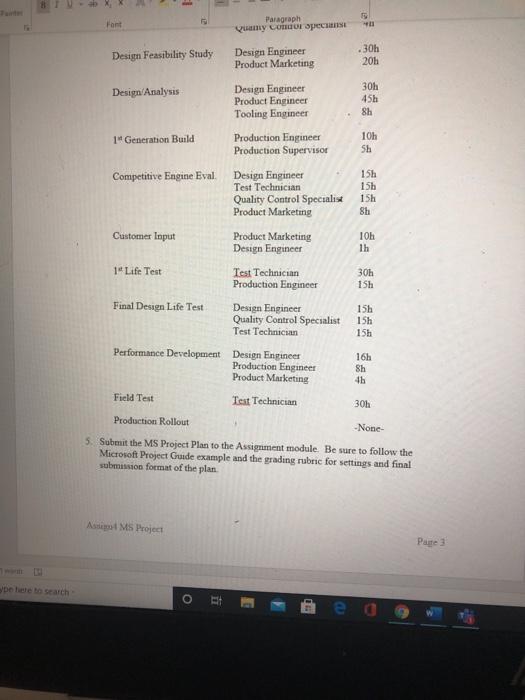
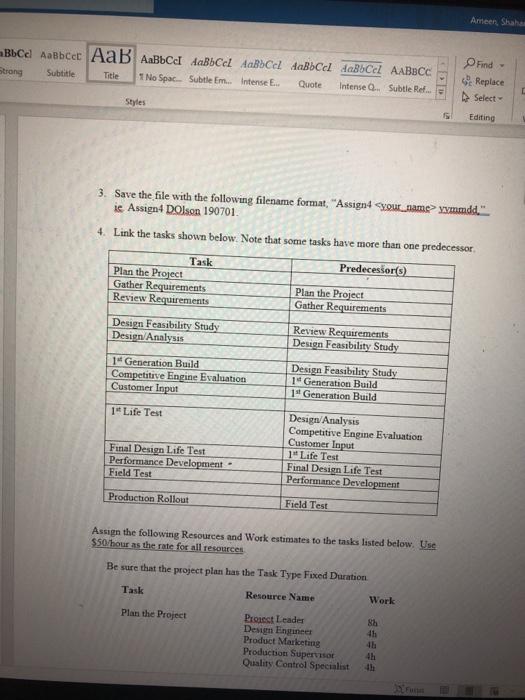
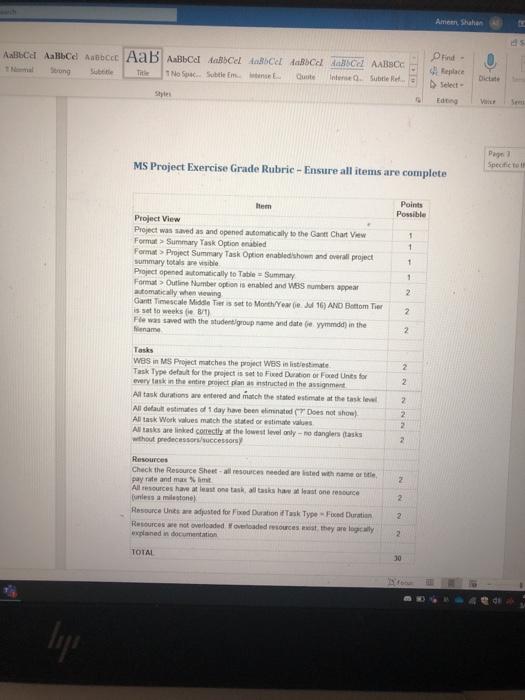
Assignment 4 (MS Project) - 30 pts. - Individual Assignment Submit the MS Project Plan to the Appropriate Assignment Module In general, to start a new plan, be sure to set the following options prior to entering new tasks. . File > Options > Schedule > Scheduling Options: o Set the Default Task Type (ie Fixed Duration for this assignment) o Select New Tasks are Auto Scheduled o Select New Tasks are Effort Driven Now you can enter Tasks In the Resources window of a Split View, be sure to enter ALL resources and work prior to selecting "OK". Use the Resources > Assign Resources Dialog box correct Resource Unit percentages. Specific to this assignment 1. Set this Exercise project plan to Task Type Fixed Duration Start the project on August 1 or the first Workday of the month. Use the default Standard Calendar. 2. Enter the following task names and durations. Be sure the Timescale is set to Month/Year (Middle Tier) and Weeks (Bottom Tier). Also, summarize tasks into phases. Plan Phase Plan the Project 3d Gather Requirements 8d Review Requirements 2d Design Phase Design Feasibility Study 124 Design / Analysis 178 Build Prototype Phase 1 Generation Build 12d Competitive Engine Evaluation 17d Customer Input 70 Test Phase 1 Life Test 320 Final Design Life Test 170 Performance Development 100 to search Fort Paint Chipboard Cambra desde 14 A A A A 21 AaB Cel AaBb C BU XX A.A. - Emphasis Heading Font Paragraph Now you can enter AS . In the Resources window of a Split View, be sure to enter ALL resources and work prior to selecting "OK" Use the Resources > Assign Resources Dialog box correct Resource Unit percentages Fy Specific to this assignment 1. Set this Exercise project plan to Task Tyne Fixed Duration Start the project on August 1or the first Workday of the month. Use the default Standard Calendar 2. Enter the following task names and durations. Be sure the Timescale is set to Month/Year (Middle Tier) and Weeks (Bottom Tier) Also, summarize tasks into phases Plan Phase Plan the Project 3d Gather Requirements 8d Review Requirements 2d Design Phase Design Feasibility Study 120 Design Analysis 17d Build Prototype Phase 1' Generaton Build 120 Competitive Engine Evaluation 178 Customer Input 70 Test Phase Life Test 320 Final Design Life Test 178 Performance Development 100 Field Test 32d Production Rollout Od A MS Project Page! Task Resource Name Plyo atch Work i Ang Project.cc Compatibilty Mode - Word Desig References Mailing Camina Bed & ALI TV-YAP.A. :: 0. de AaBC ABC ABCel Abbc Hedingt ama Subtitle Tank Resource Name Work Review Requirements sh 4h th 4h Design Feasibility Study 305 Project Leader Design Engineer Product Marketing Production Supervisor Quality Control Special Deum Barnet Product Marketing Design Engineer Product Engineer Tooling Engineer Production Engineer Production Supervisor Deuen Analysis 30 45h 1' Generation Build 10 sh 151 15h 15 106 305 156 Competitive linge Eval Des Engineer Text Technician Quality Control Specialist Product Marketing Customer Product Marketing Designer Life Test Tot Technician Products El Design Lift Test Design Engine Quality Control Specialt Test Technician Performance Development Design Production Engineer Product Multi Field Text Tot Technician Palco Rollout 159 15h 15h 16h 45 30 Noor Trotto O Info Font Paragraph cary Cour specise .30h Design Feasibility Study Design Engineer Product Marketing 20h Design Analysis Design Engineer Product Engineer Tooling Engineer 30h 45h 8h 1 Generation Build Production Engineer Production Supervisor 105 Sh Competitive Engine Eval Design Engineer Test Technician Quality Control Specialise Product Marketing 15h 15h 15h Sh Customer Input Product Marketing Design Engineer 10h 1h 14 Life Test Test Technician Production Engineer 30h 15h Final Design Life Test Design Engineer Quality Control Specialist Test Technician 15h 15h 15h 16h Sh 11 Performance Development Design Engineer Production Engineer Product Marketing Field Test Test Technician Production Rollout 30h -None- 5. Submit the MS Project Plan to the Assignment module. Be sure to follow the Microsoft Project Guide example and the grading rubric for settings and final submission format of the plan AMS Project Parte 3 De hele besearch o i E 1 La e 0 Ameer, Shaha cel AABBC Strong Subtitle Title 1 No Spac. Subtle Em... Intense E. Quote Intense Subtle Ref Find - Replace Select Editing Styles 3. Save the file with the following filename format, "Assign4your_name> ymmdd. ie Assign4 DOlson 190701 4. Link the tasks shown below. Note that some tasks have more than one predecessor, Predecessor(s) Task Plan the Project Gather Requirements Review Requirements Plan the Project Gather Requirements Design Feasibilaty Study Design Analysis Review Requirements Design Feasibility Study 14 Generation Build Competitive Engine Evaluation Customer Input Design Feasibility Study 14 Generation Build 1 Generation Build 1 Life Test Final Design Life Test Performance Development Field Test Design Analysis Competitive Engine Evaluation Customer Input 1 Life Test Final Design Life Test Performance Development Production Rollout Field Test Assign the following Resources and Work estimates to the tasks listed below. Use $$ hour as the rate for all resources Be sure that the project plan has the Task Type Fixed Duration Task Resource Name Work Plan the Project 87 4h Proiect Leader Design Engineer Product Marketing Production Supervisor Quality Control Specialist Aman Shah AAB Strong TNS Subtle Em Quote Intense Subtle Find Dictate Select MS Project Exercise Grade Rubrie - Ensure all items are complete Page Specific to Points Possible 1 1 Hem Project View Project was saved as and opened automatically to the Gantt Chart View Format > Summary Task Option enabled Format Project Summary Task Option enabled show and overall project Summary totals are visible Project opened automatically to Table = Summary Format > Outline Number option is enabled and W8Sumbers appear automatically when viewing Garitt Timescale Middle Ter is set to Month/Yw16) AND Bottom Tier is set to weeks 81) Fie was saved with the student group name and date de med) in the name 1 1 2 2 2 2 2 2 2 2 Tasks wes in MS Project matches the project was in intestinate Task Type defuit for the project is set to Federation or Fored Units for every task in the entire project pian structed in the assignment Al task durations are entered and itch the stated estimate at the task level All default estimates of 1 day have been imated Does not sho) Al task Work values match the stated or estimate values All tasks are linked corectly at the lowest level only - no darglers (tasks without predecessor/actory Resources Check the Resource Sheet-all sources needed wrested with name of the pay rate and maxim All resources have at least one task, atasks haast one rendre unless a milestone Resource Unse adjusted for Fred Duration Task Type - Food Dhuration Resources we not overloaded overloaded resources at they are lowly planed in documentation 2 2 2 TOTAL 30 ligos Assignment 4 (MS Project) - 30 pts. - Individual Assignment Submit the MS Project Plan to the Appropriate Assignment Module In general, to start a new plan, be sure to set the following options prior to entering new tasks. . File > Options > Schedule > Scheduling Options: o Set the Default Task Type (ie Fixed Duration for this assignment) o Select New Tasks are Auto Scheduled o Select New Tasks are Effort Driven Now you can enter Tasks In the Resources window of a Split View, be sure to enter ALL resources and work prior to selecting "OK". Use the Resources > Assign Resources Dialog box correct Resource Unit percentages. Specific to this assignment 1. Set this Exercise project plan to Task Type Fixed Duration Start the project on August 1 or the first Workday of the month. Use the default Standard Calendar. 2. Enter the following task names and durations. Be sure the Timescale is set to Month/Year (Middle Tier) and Weeks (Bottom Tier). Also, summarize tasks into phases. Plan Phase Plan the Project 3d Gather Requirements 8d Review Requirements 2d Design Phase Design Feasibility Study 124 Design / Analysis 178 Build Prototype Phase 1 Generation Build 12d Competitive Engine Evaluation 17d Customer Input 70 Test Phase 1 Life Test 320 Final Design Life Test 170 Performance Development 100 to search Fort Paint Chipboard Cambra desde 14 A A A A 21 AaB Cel AaBb C BU XX A.A. - Emphasis Heading Font Paragraph Now you can enter AS . In the Resources window of a Split View, be sure to enter ALL resources and work prior to selecting "OK" Use the Resources > Assign Resources Dialog box correct Resource Unit percentages Fy Specific to this assignment 1. Set this Exercise project plan to Task Tyne Fixed Duration Start the project on August 1or the first Workday of the month. Use the default Standard Calendar 2. Enter the following task names and durations. Be sure the Timescale is set to Month/Year (Middle Tier) and Weeks (Bottom Tier) Also, summarize tasks into phases Plan Phase Plan the Project 3d Gather Requirements 8d Review Requirements 2d Design Phase Design Feasibility Study 120 Design Analysis 17d Build Prototype Phase 1' Generaton Build 120 Competitive Engine Evaluation 178 Customer Input 70 Test Phase Life Test 320 Final Design Life Test 178 Performance Development 100 Field Test 32d Production Rollout Od A MS Project Page! Task Resource Name Plyo atch Work i Ang Project.cc Compatibilty Mode - Word Desig References Mailing Camina Bed & ALI TV-YAP.A. :: 0. de AaBC ABC ABCel Abbc Hedingt ama Subtitle Tank Resource Name Work Review Requirements sh 4h th 4h Design Feasibility Study 305 Project Leader Design Engineer Product Marketing Production Supervisor Quality Control Special Deum Barnet Product Marketing Design Engineer Product Engineer Tooling Engineer Production Engineer Production Supervisor Deuen Analysis 30 45h 1' Generation Build 10 sh 151 15h 15 106 305 156 Competitive linge Eval Des Engineer Text Technician Quality Control Specialist Product Marketing Customer Product Marketing Designer Life Test Tot Technician Products El Design Lift Test Design Engine Quality Control Specialt Test Technician Performance Development Design Production Engineer Product Multi Field Text Tot Technician Palco Rollout 159 15h 15h 16h 45 30 Noor Trotto O Info Font Paragraph cary Cour specise .30h Design Feasibility Study Design Engineer Product Marketing 20h Design Analysis Design Engineer Product Engineer Tooling Engineer 30h 45h 8h 1 Generation Build Production Engineer Production Supervisor 105 Sh Competitive Engine Eval Design Engineer Test Technician Quality Control Specialise Product Marketing 15h 15h 15h Sh Customer Input Product Marketing Design Engineer 10h 1h 14 Life Test Test Technician Production Engineer 30h 15h Final Design Life Test Design Engineer Quality Control Specialist Test Technician 15h 15h 15h 16h Sh 11 Performance Development Design Engineer Production Engineer Product Marketing Field Test Test Technician Production Rollout 30h -None- 5. Submit the MS Project Plan to the Assignment module. Be sure to follow the Microsoft Project Guide example and the grading rubric for settings and final submission format of the plan AMS Project Parte 3 De hele besearch o i E 1 La e 0 Ameer, Shaha cel AABBC Strong Subtitle Title 1 No Spac. Subtle Em... Intense E. Quote Intense Subtle Ref Find - Replace Select Editing Styles 3. Save the file with the following filename format, "Assign4your_name> ymmdd. ie Assign4 DOlson 190701 4. Link the tasks shown below. Note that some tasks have more than one predecessor, Predecessor(s) Task Plan the Project Gather Requirements Review Requirements Plan the Project Gather Requirements Design Feasibilaty Study Design Analysis Review Requirements Design Feasibility Study 14 Generation Build Competitive Engine Evaluation Customer Input Design Feasibility Study 14 Generation Build 1 Generation Build 1 Life Test Final Design Life Test Performance Development Field Test Design Analysis Competitive Engine Evaluation Customer Input 1 Life Test Final Design Life Test Performance Development Production Rollout Field Test Assign the following Resources and Work estimates to the tasks listed below. Use $$ hour as the rate for all resources Be sure that the project plan has the Task Type Fixed Duration Task Resource Name Work Plan the Project 87 4h Proiect Leader Design Engineer Product Marketing Production Supervisor Quality Control Specialist Aman Shah AAB Strong TNS Subtle Em Quote Intense Subtle Find Dictate Select MS Project Exercise Grade Rubrie - Ensure all items are complete Page Specific to Points Possible 1 1 Hem Project View Project was saved as and opened automatically to the Gantt Chart View Format > Summary Task Option enabled Format Project Summary Task Option enabled show and overall project Summary totals are visible Project opened automatically to Table = Summary Format > Outline Number option is enabled and W8Sumbers appear automatically when viewing Garitt Timescale Middle Ter is set to Month/Yw16) AND Bottom Tier is set to weeks 81) Fie was saved with the student group name and date de med) in the name 1 1 2 2 2 2 2 2 2 2 Tasks wes in MS Project matches the project was in intestinate Task Type defuit for the project is set to Federation or Fored Units for every task in the entire project pian structed in the assignment Al task durations are entered and itch the stated estimate at the task level All default estimates of 1 day have been imated Does not sho) Al task Work values match the stated or estimate values All tasks are linked corectly at the lowest level only - no darglers (tasks without predecessor/actory Resources Check the Resource Sheet-all sources needed wrested with name of the pay rate and maxim All resources have at least one task, atasks haast one rendre unless a milestone Resource Unse adjusted for Fred Duration Task Type - Food Dhuration Resources we not overloaded overloaded resources at they are lowly planed in documentation 2 2 2 TOTAL 30 ligos









 Study Help