







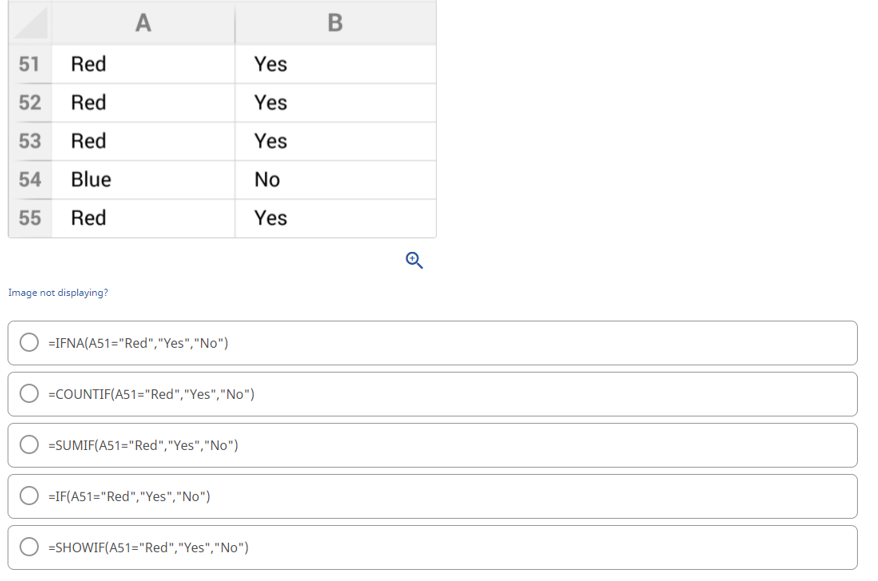
Question: Based on the values in Cell A51: A55, what formula can you copy and paste in to Cells B51: B55 to return the values shown?
Based on the values in Cell A51: A55, what formula can you copy and paste in to Cells B51: B55 to return the values shown?
If the formula in Cell D49 is copied to Cells E49:F49, what sequence of values would be generated in Cells D49:F49?
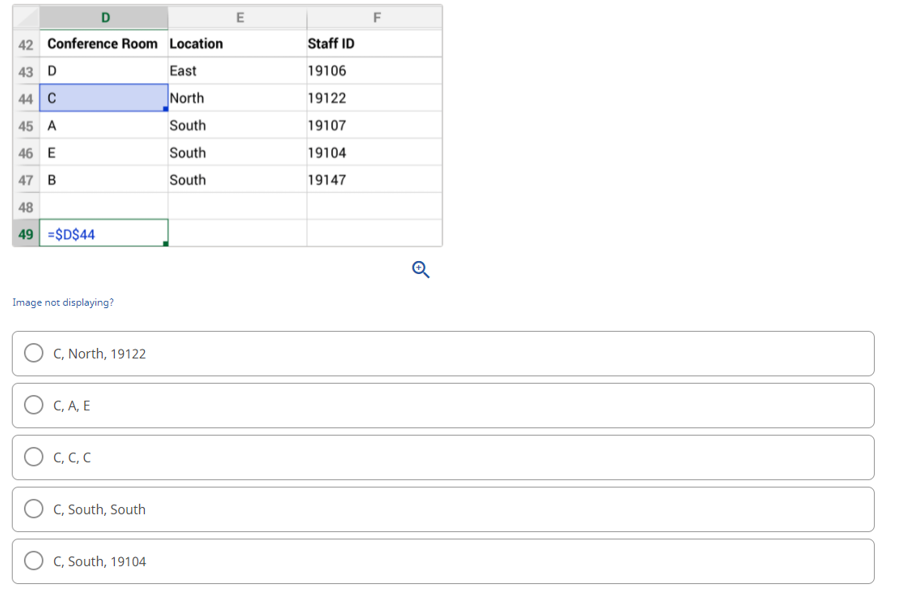
51 Red 52 Red 53 Red 54 Blue 55 Red Image not displaying? A =IFNA(A51= Red , Yes , No ) =COUNTIF(A51= Red , Yes , No ) =SUMIF(A51= Red , Yes , No ) =IF(A51= Red , Yes , No ) Yes Yes Yes No Yes =SHOWIF(A51= Red , Yes , No ) B Q D 42 Conference Room Location 43 D 44 C 45 A 46 E 47 B 48 49 =$D$44 Image not displaying? OC, North, 19122 OC,A,E 0 .. C, South, South C, South, 19104 East North South South South E Staff ID 19106 19122 19107 19104 19147 F Q
Step by Step Solution
3.44 Rating (157 Votes )
There are 3 Steps involved in it
Correct Option is IFA51RedYesNo Explanation ... View full answer

Get step-by-step solutions from verified subject matter experts
 Study Help