







Question: C#, C++ Add GUI Controls to a Windows Form Chatter Box | Select a Language The System.Windows.Forms namespace contains hundreds of built-in classes used to
C#, C++
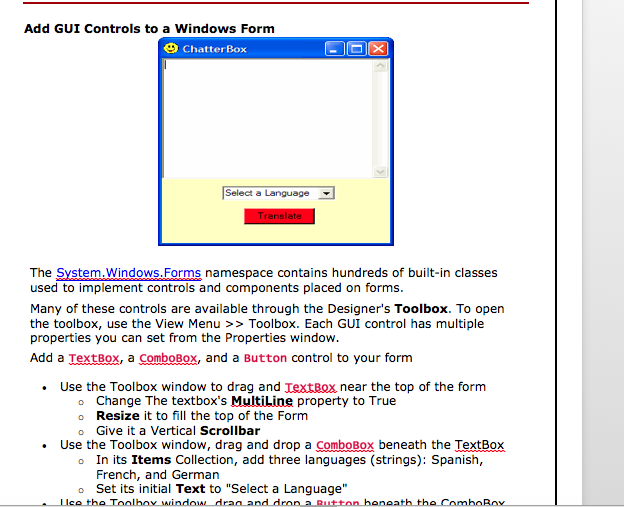
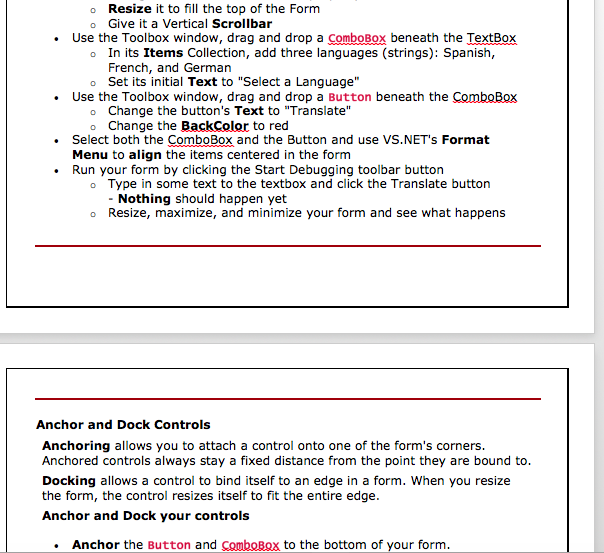
Add GUI Controls to a Windows Form Chatter Box | Select a Language The System.Windows.Forms namespace contains hundreds of built-in classes used to implement controls and components placed on forms. Many of these controls are available through the Designer's Toolbox. To open the toolbox, use the View Menu >>Toolbox. Each GUI control has multiple properties you can set from the Properties window. Add a TextBox, a ComboBox, and a Button control to your form Use the Toolbox window to drag and textBox near the top of the form . o Change The textbox's MultiLine property to True o Resize it to fill the top of the Form o Give it a Vertical Scrollbar Use the Toolbox window, drag and drop a ComboBox beneath the TextBox . o In its Items Collection, add three languages (strings): Spanish, French, and German Set its initial Text to "Select a Language o " Iico the Toolboy sindowdran and drona Button heneath the ComboBny Add GUI Controls to a Windows Form Chatter Box | Select a Language The System.Windows.Forms namespace contains hundreds of built-in classes used to implement controls and components placed on forms. Many of these controls are available through the Designer's Toolbox. To open the toolbox, use the View Menu >>Toolbox. Each GUI control has multiple properties you can set from the Properties window. Add a TextBox, a ComboBox, and a Button control to your form Use the Toolbox window to drag and textBox near the top of the form . o Change The textbox's MultiLine property to True o Resize it to fill the top of the Form o Give it a Vertical Scrollbar Use the Toolbox window, drag and drop a ComboBox beneath the TextBox . o In its Items Collection, add three languages (strings): Spanish, French, and German Set its initial Text to "Select a Language o " Iico the Toolboy sindowdran and drona Button heneath the ComboBny
Step by Step Solution
There are 3 Steps involved in it

Get step-by-step solutions from verified subject matter experts
 Study Help