







Question: c++, , please use functions This is how big the plane is 1 A B C D E F 2 A B C D E
c++,
This is how big the plane is
1 A B C D E F
2 A B C D E F
3 A B C D E F
4 A B C D E F
5 A B C D E F
6 A B C D E F
7 A B C D E F
8 A B C D E F
9 A B C D E F
10 A B C D E F
11 A B C D E F
12 A B C D E F
13 A B C D E F
14 A B C D E F
15 A B C D E F
16 A B C D E F
17 A B C D E F
18 A B C D E F
19 A B C D E F
20 A B C D E F
21 A B C D E F
22 A B C D E F
23 A B C D E F
24 A B C D E F
25 A B C D E F
26 A B C D E F
27 A B C D E F
28 A B C D E F
29 A B C D E F
30 A B C D E F
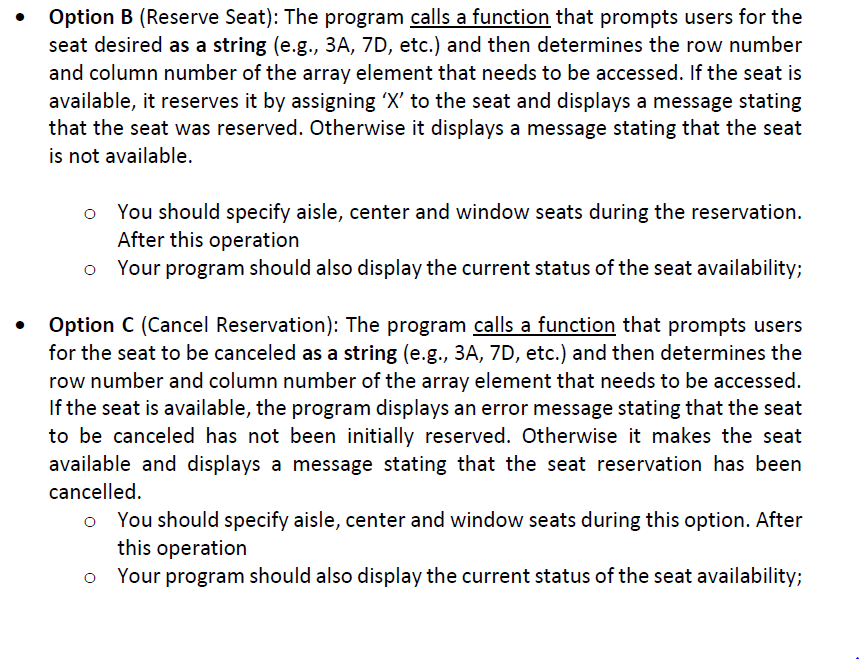
Option B (Reserve Seat): The program calls afunction that prompts users for the seat desired as a string (e.g., 3A, 7D, etc.) and then determines the row number and column number of the array element that needs to be accessed. If the seat is available, it reserves it by assigning 'X' to the seat and displays a message stating that the seat was reserved. Otherwise it displays a message stating that the seat is not available o You should specify aisle, center and window seats during the reservation. After this operation Your program should also display the current status of the seat availablitlyi o Option C (Cancel Reservation): The program calls a function that prompts users for the seat to be canceled as a string (e.g., 3A, 7D, etc.) and then determines the row number and column number of the array element that needs to be accessed. If the seat is available, the program displays an error message stating that the seat to be canceled has not been initially reserved. Otherwise it makes the seat available and displays a message stating that the seat reservation has been cancelled. o You should specify aisle, center and window seats during this option. After this operation o Your program should also display the current status of the seat availability
Step by Step Solution
There are 3 Steps involved in it

Get step-by-step solutions from verified subject matter experts
 Study Help