







Question: Can you please write me the Verilog code for this design module and the testbench code too for the FSM I created? I also need
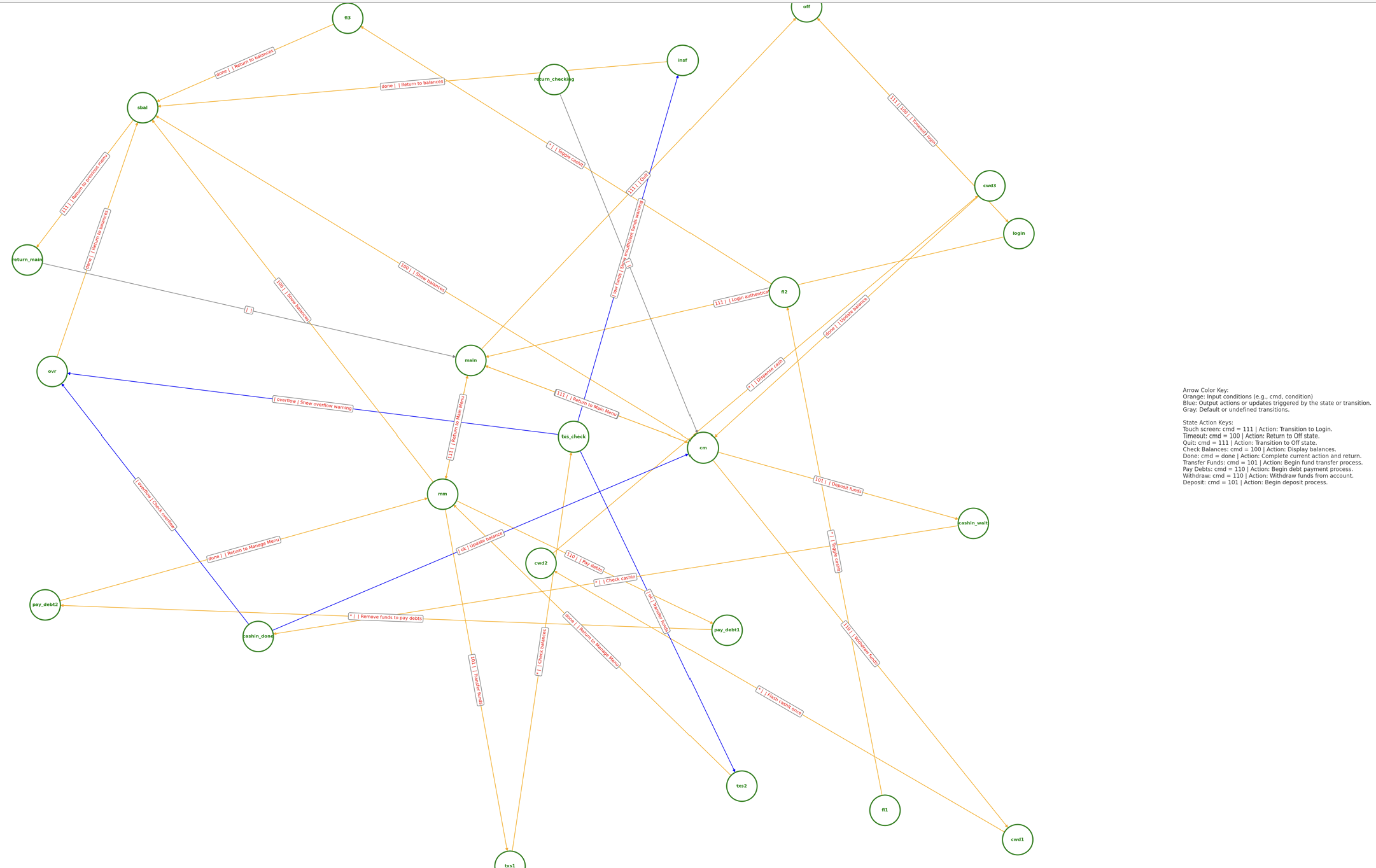
Can you please write me the Verilog code for this design module and the testbench code too for the FSM I created? I also need simulation images from Vivado. I have attached my FSM and pasted the questions: I need help with step and Thank you!
Step :
a In the designated section below, paste the final Verilog code you created for your S$ ATM Controller design module.
b In the designated section below, paste the final Verilog codes you created for your testbench.
c In the designated section below, paste all of the simulation images needed to verify the four required use cases. Your images should be properly scaled and cropped to show only the signals simulated over an appropriate time scale to verify each use case. You are welcome to submit multiple images for each use case, where each image is focused on a specific aspect you will reference in your description response part d
Please assign a name to each image egSim and define it in a line beneath the image like a figure caption so you can reference it within your descriptions. Feel free to add other explanatory details within each figure caption.
d In the designated area beneath each of your simulation images, record a thorough description of the simulation results that clearly indicates what should be observed in each simulation waveform in order to verify a given use case. Your description should be specific enough that someone reading your worksheet could view your waveform image and see how it demonstrates proper operation.
Be thorough. A full page in total describing simulation results is not too much!
Step :
Describe the S$ ATM use case you chose to simulate.
Click or tap here to enter text.
In the designated section below, paste the Verilog code you created for your chosen use case testbench. Please just show the initial statements and omit all the earlier code which will be the same as that youve already recorded
In the designated section below, paste all of the simulation images needed to verify your chosen use case. Refer to additional instructions from Step
In the designated area beneath each of your simulation images, record a thorough description of the simulation results. Refer to additional instructions from Step
Step :
In the designated section below, paste one or more instructor testbench simulation images. Refer to additional instructions from Step
In the designated area beneath each of your simulation images, record a thorough description of the simulation results. Refer to additional instructions from Step
Step by Step Solution
There are 3 Steps involved in it
1 Expert Approved Answer
Step: 1 Unlock

Question Has Been Solved by an Expert!
Get step-by-step solutions from verified subject matter experts
Step: 2 Unlock
Step: 3 Unlock
 Study Help